Monday, 31 January 2011

Intel Identifies Chipset Design Error, Implementing Solution

intel

As part of ongoing quality assurance, Intel Corporation has discovered a design issue in a recently released support chip, the Intel 6 Series, code-named Cougar Point, and has implemented a silicon fix.

In some cases, the Serial-ATA (SATA) ports within the chipsets may degrade over time, potentially impacting the performance or functionality of SATA-linked devices such as hard disk drives and DVD-drives. The chipset is utilized in PCs with Intel's latest Second Generation Intel Core processors, code-named Sandy Bridge. Intel has stopped shipment of the affected support chip from its factories. Intel has corrected the design issue, and has begun manufacturing a new version of the support chip which will resolve the issue. The Sandy Bridge microprocessor is unaffected and no other products are affected by this issue.

Get Sonic PDF Creator v2 worth $75 for FREE

sonic pdf creator facebook like

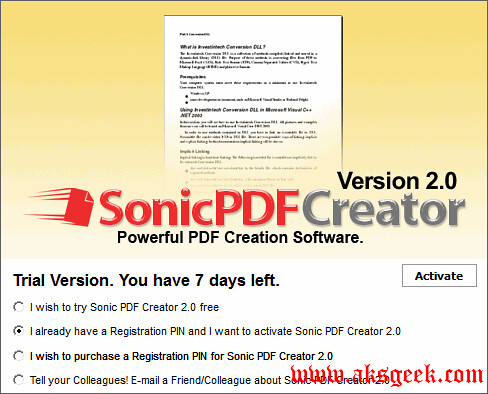
Here is your chance to get Sonic PDF Creator v2 which normally cost $75 for Free. Sonic PDF allows users to create professional-looking PDF documents every time.  By creating PDF documents, users can rest assured that information can be quickly disseminated and always viewed in their original format.

In addition to simple PDF creation, Sonic PDF also offers PDF document editing capabilities. Users of Sonic PDF can now delete or add pages to a PDF document, merge or split PDF documents, and stamp text, images or add watermarks to a PDF document.

Key Features:-

  • Print to PDF from any Windows program.
  • Add Security with 40 and 128 Bit Encryption.
  • Add Security with 40 and 128 Bit Encryption.
  • Format existing or newly created PDF Documents.
  • A PDF toolkit for customizing your PDF documents
  • Simple to Use Interface.

How to get Sonic PDF Creator v2 to FREE

1. Visit facebook page.

sonic pdf creator form

2. Click Like button (for this you need to login)

3. Fill up first name, last name and email. Make sure you enter valid email id.

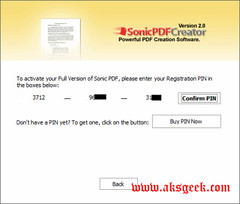
4. Check your inbox for 12 digit pin code.

sonic pdf creator 1

 sonic pdf creator pin

Download Sonic PDF Creator 2 (14MB)

Enjoy!


Avast Beta 6.0 now Available for Download

avast antivirus free

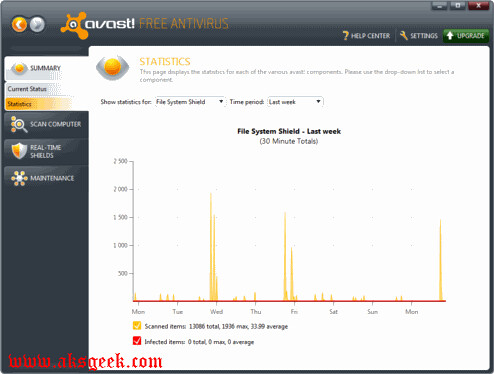
  Good news for avast lover’s , avast 6.0 Beta now available for download which includes new features like Auto Sandbox, WebRep, sidebar gadget for windows 7 etc.

What's new

  • AutoSandbox – suspicious programs will be optionally run sandboxed
  • avast! WebRep – browser plugin for website reputation rating; a combination of data from our virus lab and community voting
  • Script Shield now even in the Free AV
  • Site Blocking now even in the Free AV
  • SafeZone – a special virtualized area for sensitive transactions (e.g. secure online banking) (paid products only)
  • Restore factory settings command (Settings -> Troubleshooting)
  • Automatic actions in the boot-time scan
  • New compression method in the installer makes the setup packages about 20% smaller.
  • Script Shield now functional even with IE8/IE9 Protected Mode
  • Sidebar gadget
  • Improved stability/compatibility of the Behavior Shield
  • Improvements in the avast! sandbox

Issues:-

  • Help files not updated yet
  • Localizations incomplete yet
  • SafeZone not yet accessible (Pro AV / IS only)
  • WebRep only available for IE and Firefox (Chrome is coming soon)
  • Firewall: per-application packet rules not yet accessible
  • Firewall: uTorrent conflict not yet resolved

NOTE :- This version needs to be installed from scratch, i.e. updating from a previous version of avast won't work.

So guys, this is only for experienced user who want to try it  and for novice users  you guys just wait for the final release of Avast 6.0 and if you can’t wait and want to try this-- just for time pass and for enjoyment then you can go and download it (which i don’t recommend to the novice user).

Avast 6.0 Beta Free Antivirus | Pro Antivirus | Internet Security AV

Razer Packs Powerful Audio Punch With Portable Gaming Speakers

razer ferox

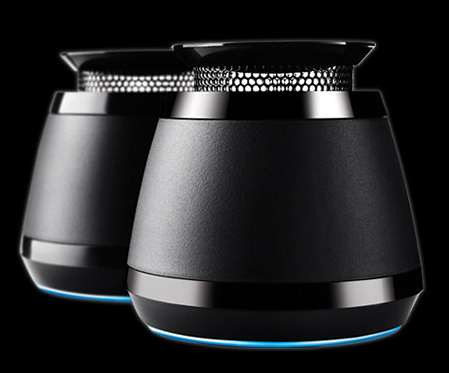
Razer announced the Razer Ferox – a cool, new ultraportable stereo speaker set that proves it’s not how big it is, it’s how awesome it sounds--Built to deliver 360 degrees of omni-directional sound.

The Razer Ferox delivers room-filling audio clarity with its 360 degree omni-directional acoustics, giving a much wider listening sweet spot than any ordinary front-facing speakers. No matter where you stand, sit, or backflip during a riotous shootout, audio from the Razer Ferox sounds just as immersive.

Featuring expandable resonance chambers that provide stronger bass and optimized digital amplifiers for a fuller sound experience, each chamber rises upon a single press to power up. You’ll have a hard time just keeping your hands off the nifty mechanism every time you switch the Razer Ferox on.

With 12 hours of rechargeable battery life and a convenient carrying case, the Razer Ferox is extremely versatile. These mobile speakers can be used for space-constrained gaming desktop setups, brought along to LAN parties for a convenient audio solution, or broadcasting your headbanging playlist whilst at the beach. Just plug it into any media player with a 3.5mm jack and you’ll realize that you’ll never want to leave home without your Razer Ferox, especially when phenomenal audio is just a plug and press away.

Razer Ferox Features:-

  • 360° omnidirectional sound for all round clarity
  • Expanded bass resonance chamber for powerful bass
  • Digital amplification for enhanced power efficiency
  • Compatible with any media player with a 3.5mm jack
  • 30mm drivers for exceptional audio quality
  • Rechargeable non-replaceable in-built batteries
  • Up to 12 hours of playback
  • Play and charge simultaneously
  • LED battery status indicator for easy monitoring
  • Seamless switch between On/Off-mode
  • Carrying pouch for maximum portability
  • Approximate size: 70 mm (length) x 70mm (width) x 53 - 64 mm (height)
  • Price: $59.99 | EU €59.99

For more information on the Razer Ferox, please visit www.razerzone.com/ferox.


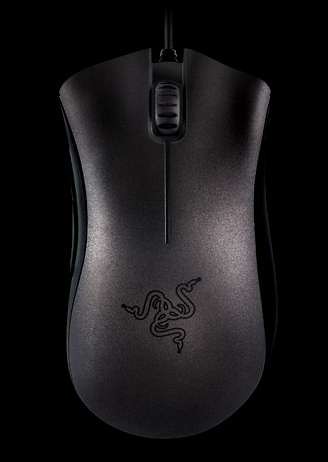
Razer Unleashed Special All-Black Version of the DeathAdder

razer-deathadder-black-edition

In 2006, the world of gaming was taken by storm when the Razer DeathAdder was unleashed.  Those who wielded it crushed their opponents with ease, and it became synonymous with gaming excellence.  Now, five years on, the DeathAdder is used by more professional gamers than any other gaming mouse, a testament to its prowess in securing them legendary status in the history of competitive gaming.  Razer released the Black Edition as a commemoration of this glorious collaboration between every single gamer and their never-failing, trusty DeathAdder.

Razer DeathAdder Black Edition Features

  • 3500dpi Razer Precision 3.5G infrared sensor
  • Ergonomic right-handed design
  • 1000Hz Ultrapolling / 1ms response
  • Five independently programmable Hyperesponse buttons
  • On-The-Fly Sensitivity adjustment
  • Always-On mode
  • Ultra-large non-slip buttons
  • 16-bit ultra-wide data path
  • 60–120 inches per second and 15g of acceleration
  • Zero-acoustic Ultraslick mouse feet
  • Gold-plated USB connector
  • Seven-Foot, lightweight, braided fiber cable
  • Approximate size: 128mm (length) x 70mm (width) x 42.5mm (height)

System Requirements

  • PC / Mac with USB port
  • Windows 7 / Windows Vista / Windows XP or Mac OS X (v10.4 and above)
  • Internet connection (for driver installation)
  • At least 35MB of hard disk space

Price: US $59.99 / EU €59.99

 Razer DeathAdder Black Edition

Sanho Announces 2nd Iteration Of HyperDrive iPad-compatible Hard Drive

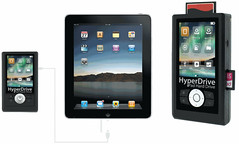
HyperDrive iPad Compatible

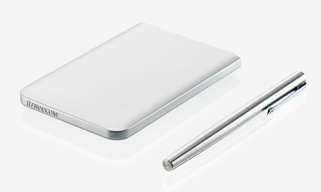
Sanho announced the second iteration of their popular HyperDrive Hard Drive for iPad, the only hard drive in the market that can connect directly to the iPad via the Apple Camera Connection Kit. This new version allows users to directly use their iPads to browse and transfer up to 1TB of video and photo content without the need for computers, additional apps or a jailbroken ipad.

Finished in a slim enclosure, the HyperDrive looks exactly like any portable USB hard drive except that it has 2 mini USB ports, one for connecting to the computer to function as a normal USB hard drive and the other to connect to the iPad via the Apple Camera Connection Kit.

Using the Apple Camera Connection Kit, the iPad is able to connect to SD cards and self-powered USB devices. However there is a size limitation of 32GB, making it impossible for larger USB hard drives to connect to the iPad. HyperDrive iPad Hard Drive overcomes this limit with its unique patent pending ability to turn individual file folders into virtual 32GB drives on the fly that is readable by the iPad. While the HyperDrive is bus powered when connected to the computer, it has an internal 1600mAh battery to power its connection to the iPad.

Users can first transfer their entire movie and photo library from their computer to the HyperDrive via USB. Once that is done, users will have up to 1TB of media accessible to the iPad anytime.

To transfer media from the HyperDrive to the iPad, users just need to connect the HyperDrive to the iPad via a USB cable and the Apple Camera Connection Kit. The HyperDrive hard drive folder contents will appear on the iPad screen and users can navigate the folders to search for videos and photos to download to the iPad.

Features

  • Connects to the iPad to transfer photos, movies and other media
  • Connect HyperDrive as a USB hard drive to the computer
  • Support multiple partitioned hard drive formats

The new HyperDrive Hard Drive for iPad ships in March 2011 and is available for pre-order now at the following manufacturer's suggested retail price (0GB: $99, 320GB:$199, 500GB:$249, 640GB:$299, 750GB:$349, 1TB: $399). It is available at http://www.hyperdrive.com/ipad


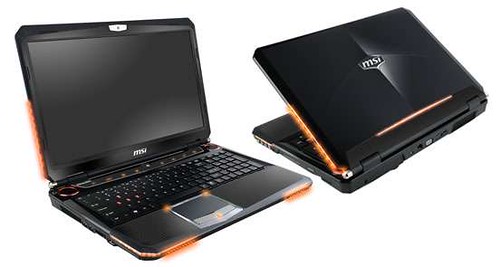
MSI releases GT680R Gaming notebook

MSI GT680R

MSI announced the North American availability of the GT680R, its first gaming notebook available to consumers with the new 2nd Generation Intel Core i7 Processor. With features focused on performance, sound and vision, the GT680R provides the perfect combination for people in need of the ultimate gaming and multimedia experience.

Features of GT680R-008US

  • Latest Intel Core i7-2630QM Processor
  • Genuine Windows 7 Home Premium 64bit
  • 15.6" Full HD Display (LED Backlight; 1920 x 1080)
  • NVIDIA GeForce GTX 460M discrete graphics card (DDR5 1.5GB VRAM)
  • 8GB (2GB x 4) DDR3 1066 MHz System Memory
  • 1TB (500GB x 2) 7200RPM hard drive
  • 802.11 b/g/ n Wireless LAN with Bluetooth
  • THX TruStudio PRO provides excellent surround sound effect
  • Dynaudio Premium Sound Speakers
  • Accelerated CPU performance with MSI TDE Technology
  • MSI Cooler Boost Technology
  • USB 3.0 for high speed data transfer
  • Built-in 720p HD webcam
  • HDMI (High-Definition Multimedia Interface) output
  • Cost $1649.99

Samsung Introduces LOVEFiLM Streaming to all Blu-ray Players

samsung blu-ray player

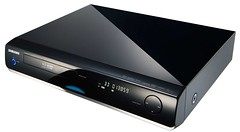
Samsung Electronics (UK) today announces the launch of the new LOVEFiLM application to all Samsung Blu-ray players.

The App, once activated with a LOVEFiLM subscription of £5.99 or above, will allow users to stream thousands of movies on their Blu-ray player via Samsung's Internet@TV service. The huge choice of films available ranges from Hollywood blockbusters, to the latest Cannes Film Festival nominees and even critically acclaimed documentaries.

Samsung customers can expect the arrival of even more exciting new Apps throughout 2011 following the UK's first ever Application Developer Day where developers were encouraged to create their own App to populate in the World's first TV App Store with rich, relevant content.

Thursday, 27 January 2011

Sony’s Next Generation Portable Entertainment System (codename: NGP)

PlayStation codename NGP

Sony Computer Entertainment Inc. (SCE) today announced its next generation portable entertainment system (codename: NGP), which delivers the ultimate portable entertainment experience. NGP will make its debut at the end of the year 2011.

NGP is designed to offer unparalleled interactive entertainment that is only possible on PlayStation. This new system offers a revolutionary combination of rich gaming and social connectivity within a real world context, made possible by leveraging SCE’s experience from both PSP (PlayStation Portable) and PlayStation3 (PS3) entertainment systems.

Deep and immersive gaming is at the core of PlayStation’s DNA, and NGP is the latest embodiment of this vision. By having both Wi-Fi and 3G network connectivity, together with various applications, NGP will enable infinite possibilities for users to “encounter”,  “connect”, “discover”,  “share” and “play” with friends wherever they are. Within the device are a range of features that provide a genuinely cutting-edge, next generation ultimate portable entertainment experience.

Stunning OLED and Revolutionary User Interface

NGP incorporates a beautiful multi-touch 5-inch organic light emitting display (OLED) as the front display. A high-performance CPU / GPU combined with OLED enables rich, visually striking graphics never seen before on a portable entertainment system, for both games and other digital entertainment content. The new system also incorporates a unique multi-touch pad on the rear, and together with the front touch display, NGP offers new game play allowing users to interact directly with games in three dimension-like motion, through “touch, grab, trace, push and pull” moves of the fingers.

Super Oval Design and Dual Analog Sticks

While succeeding the basic design philosophy of PSP, NGP adopts the Super Oval Design form factor, created to fit comfortably in users’ hands. For the first time, a portable entertainment system will feature two analog sticks, which enable a wider range of game genres to be brought into the portable experience.

LiveArea

Every game title for NGP will be provided with a space called “LiveArea” where users can share the fun and excitement with other players. Users will have access to the latest information of games provided from SCE and 3rd party developers and publishers through PlayStation Network. Additionally, NGP users will be able to view an “Activity” log that is constantly updated with accomplishments from users who are playing the same game, which in turn can trigger active real-time communication among users.

Near

SCE will also provide location-based services on NGP as part of the basic features utilizing PlayStation Network. The new application called “Near,” developed specifically for this service and the network, will be pre-installed in the system to let users find out what their friends in the vicinity are playing now or what they were playing recently. Users can meet their friends and new players virtually, regardless of what games they are playing, simply by sharing their game information across different dimensions of time and distance.

New Game Medium

NGP adopts a new game medium, a small flash memory based card, dedicated for NGP software titles. Taking advantage of the flash memory feature, this innovative card can store the full software titles plus add-on game content or the game save data directly on to the card. By adopting flash memory based card, SCE will be able to provide game cards with higher capacity in the future, allowing developers to store more game data to deliver rich and immersive games.

NGP will also come equipped with two cameras on its front and rear, as well as three motion sensors, gyroscope, accelerometer and electronic compass, all of which are designed to enable users to enjoy the world of entertainment that is linked with real life experiences.
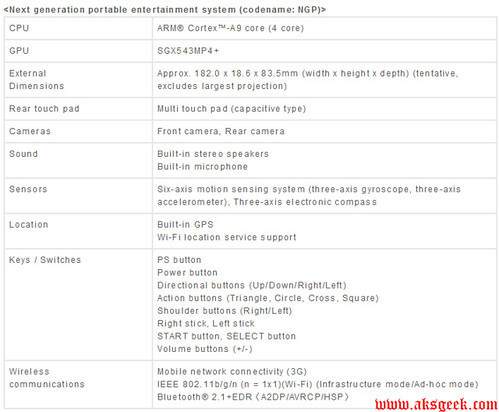
Sony's NGP Features


Sony Unveiled the PlayStation Suite delivering the PlayStation experience to Android

sony

Sony Computer Entertainment (SCE) today unveiled “PlayStation Suite” (PS Suite), delivering the PlayStation experience to Android  (2.3 required)based portable devices. Through this entirely new initiative, users will be able to enjoy PlayStation content on an open operating system for the first time in PlayStation history.

In the dramatically evolving and diversifying mobile market, the number of users who enjoy games casually on a variety of devices including mobile phones, smart-phones and tablet PCs, has been increasing significantly. By offering “PlayStation quality” content to this rapidly growing market, SCE will not only deliver the PlayStation experience to a wider base of users around the globe, but will also be able to offer game developers and publishers the potential to further expand their business opportunities to these devices.
In providing the PlayStation experience on Android based portable devices, SCE will commence a “PlayStation Certified” license program for hardware manufacturers. Through this program, SCE will offer necessary support, including development support as well as logo licensing, to ensure the delivery of PlayStation quality experience across various devices.

On the software front, SCE plans to provide PS Suite content within this calendar year, starting with original PlayStation games (PS one classics) that will allow users to enjoy “PlayStation quality” gameplay on their Android based portable devices. SCE also plans to open PlayStation Store where users will be able to download content in an easy to use environment, directly via the Android based portable devices. Moreover, SCE will provide a new game development environment in an effort to ensure new and compelling content is delivered on PS Suite, which will also offer opportunities for a wider base of developers and publishers to further expand their business on various portable devices.

Newly developed content for PS Suite can also be enjoyed on the next generation portable entertainment system (codename: NGP), which SCE announced today. Users who have never experienced PlayStation content can get a taste of the PlayStation experience through PS Suite and from there, they can enjoy the ultimate portable entertainment experience that is only possible on NGP.

SCE will vigorously enhance the entertainment world delivering the PlayStation experience to a wider base of users.


HSN Launches Sprint ID Pack

HSN

HSN, a leader in transactional innovation, announced the launch of HSN ID, a new way for consumers to access HSN’s special offers, live broadcast and more –at their convenience – right on their Sprint ID Android phone. This innovative new service allows HSN customers to watch, discover and shop for their favorite HSN brands, such as Wolfgang Puck, Twiggy London, Jonathan Adler, Mariah Carey and Lancome, anywhere they choose.

As part of the new Sprint ID technology, which offers consumers instant personalization with apps and other content tailored to their interests, Sprint customers can now watch and shop for HSN products in real time on the following Sprint ID-enabled devices: LG Optimus S, Sanyo Zio and Samsung Transform.

HSN ID, developed by Motricity, includes the following features available in a single download:

  • HSN’s Today’s Special: HSN’s best value of the day displayed with product information details and a direct link to purchase that item.
  • Live Video: Customers will never miss their favorite HSN brands and personalities with a 24-hour live video feed that includes a window displaying the product currently airing live on HSN.
  • Last 15 Aired: The three most recently aired items on display, with arrows to scroll through all 15 of the most recently aired items.
  • New Arrivals: A scrollable list of all the latest new discoveries from HSN’s portfolio of high-quality brands.
  • Social Media: Customers can stay connected with the latest HSN Facebook updates appearing on their Sprint-ID enabled device.

HSN ID users are still free to search more than 100,000 apps in Android Market and download additional apps to their phone to add even further personalization.

HSN ID is free to download. Users can download up to four additional ID packs, in addition to HSN ID, such as MTV Music ID, ESPN, Socially Connected, or Fashion and Beauty and easily switch back and forth depending on which apps they’d like to access at any given time.

For more information about HSN ID, visit www.sprint.com/hsn or visit www.sprint.com/sprintid for more about Sprint ID.

The LG Optimus S smartphone featuring the HSN ID pack is currently available at www.hsn.com for $149.95.

Thanks Amy.

Tuesday, 25 January 2011

Samsung Releases Free Photo Studio for WP7

Photogram-WP7

Samsung releases free Photo Studio for Windows Phone 7 which allow user to take pictures with effects such as LomoShot, Beauty Shot and PlusMe –you can also upload your pictures to social networking sites like flickr, Facebook.

Photo Studio is an all-in-one solution for taking, editing and sharing pictures though your WP7. Photo Studio allows the user to take pictures with effects such as LomoShot, Beautyshot and PlusMe. All pictures can modified with various photo effects. Users also can also easily upload their pictures to the most popular Social network services including Facebook and Flickr.

  • LomoShot: Users can vignette pictures in the style of softening or shading away the edges of the subject. There are four option modes: Normal, Gay, Warm and Cold
  • BeautyShot: Users can brighten and sharpen the portrait
  • PlusMe: Users can take two pictures separately and mix them together
  • Facebook, Flickr, Picasa, MySpace, Photobucket, Friendster support

Samsung Photo Studio

Via WPCentral

Google Launch Cloud Print for Mobile docs and Gmail

cloudprint

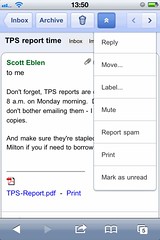
Google brings Cloud Print for mobile documents and Gmail for mobile (beta), which will be rolling out to users throughout the next few days.

Now you can print important document from your smartphone. Just open a document in Google Docs or an email in Gmail in your mobile browser and choose “Print” from the dropdown menu in the top right corner. You can also print certain kinds of email attachments (such as .pdf or .doc) by clicking the “Print” link that appears next to them.

you'll be able to use to print documents from most mobile devices that supports HTML5 -- those running Android 2.1+ or iOS 3+, for instance.

To get started, you’ll need to connect your printer to Google Cloud Print. This step requires a Windows PC for now, but Linux and Mac support are coming soon.

Google Mobile

Toshiba announces industry first 1.8 inch Hard Drives with LIF SATA connectors

Toshiba 1.8inch HDD

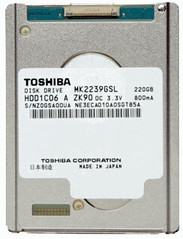
Toshiba announces the industry's first 1.8" drives with low-insertion force (LIF) SATA (Serial ATA) connectors, enabling a 10% smaller footprint compared to standard 1.8" drives using microSATA connectors.

Developed for use in multiple devices, including tablets, consumer electronics devices and external HDDs, the new MKxx39GSL series offers three models, at 160GB (MK1639GSL), 200GB (MK2039GSL) and 220GB (MK2239GSL) capacities.

The MK2239GSL features the largest capacity 1.8" single-platter HDD (5mmH) available. The MK2239GSL, MK2039GSL, and the MK1639GSL are designed for the most demanding mobile computing applications, surpassing 2.5" HDDs in terms of vibration robustness, low power consumption, and quiet operation. Samples will be available for customer qualification in February.

visit www.toshibastorage.com


O&O Defrag Free Edition available for Download

O&O

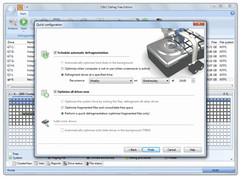
If you are looking for free defragmenter here is another option for you O&O Defrag Free Edition. I know you can’t believe it., free version from O&O software but its true.

O&O Defrag Free Edition merges fragments that were created while Windows was saving files. Merging them increases your computer’s performance considerably. On top of that, the “Optimize” defragmentation method consolidates free space on your hard disks so that new fragmentation can be kept to a minimum.

Intelligent zone filing makes it possible to move your files into various physical sectors on a hard disk. As a result, frequently-used files can be saved on the fastest sectors of the hard disk and this improves your computer’s performance even further.

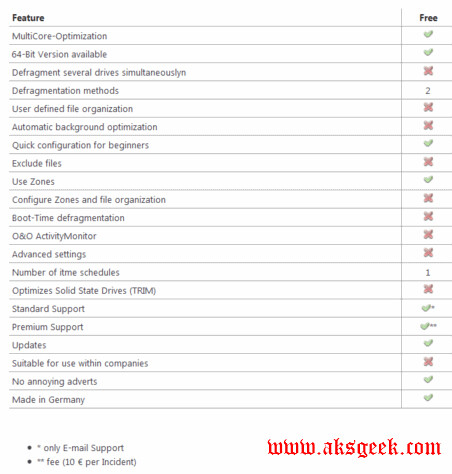
O&O defrag feature

Download O&O Defrag Free Edition 32 bit | 64 bit (17.17MB)


Wednesday, 19 January 2011

Microsoft Release OneNote app for iPhone, free for Limited Time

Microsoft OneNote

If you use an iPhone, now you can experience the organizing power of OneNote right there. Starting today, you can download Microsoft OneNote Mobile for iPhone from the iTunes App Store, and it's free for a limited time.

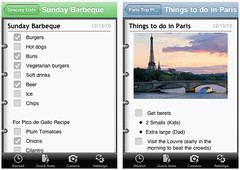
OneNote Mobile for the iPhone lets you capture and review notes and lists on your phone. Notes are automatically backed up and synced with free Windows Live SkyDrive online storage, so that you can access them from virtually anywhere - your PC, phone, and browser. Collecting thoughts and ideas on the go is what OneNote was made for.

Read A first look at Microsoft OneNote on the iPhone to see how to install, start, use, and sync the new app.


Mobile Payment Debut Nationally at Starbucks

Starbucks Mobile payment

Starbucks announced the launch of mobile payment in all U.S. company-operated stores, allowing customers to pay for in-store purchases with select smartphones. Building on the earlier introduction of Starbucks Card Mobile App for select BlackBerry smartphones, iPhone and iPod touch and a successful mobile payment test program, customers now have access to the largest mobile payment program in the U.S and the fastest way to pay at Starbucks. This national program now includes nearly 6,800 company-operated stores and more than 1,000 Starbucks in U.S. Target locations.

In addition to engaging a loyal base of several million cardholders with the offering, Starbucks anticipates mobile payment will be a draw for customers looking to experience the speed, ease and convenience of paying with their mobile phone. "Today, one in five Starbucks transactions is made using a Starbucks Card and mobile payment will extend the way our customers experience and use their Starbucks Card," said Brady Brewer, vice president Starbucks Card and Brand Loyalty. "With mobile payment, the Starbucks Card platform further elevates the customer experience by delivering convenience, rewarding loyalty and continuing to build an emotional connection with our customers."

To experience mobile payment at Starbucks, customers just need to download the free Starbucks Card Mobile App for select BlackBerry smartphones, iPhone or iPod touch mobile devices. More than one-third of U.S. Starbucks customers use smartphones, of which nearly three quarters use BlackBerry smartphone or iPhone mobile devices. In addition to the mobile payment capability, the app allows customers to manage their Starbucks Card account, check their card balance, reload their card with any major credit card (iPhone users can also use the PayPal feature), check their My Starbucks Rewards status and find a nearby Starbucks store with the store locator feature.

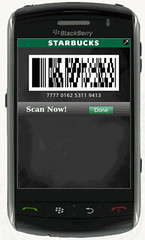
Customers can pay with their smartphone by holding their mobile device in front of a scanner on the countertop and scan the Starbucks Card Mobile App's on-screen barcode to make a purchase. Customers have successfully adopted this technology in test markets in Seattle, Northern California, New York and more than 1,000 Starbucks in U.S. Target stores.

Mobile payment is built on the Starbucks Card platform, which continues to experience significant customer adoption. Customers loaded more than $1.5 billion on Starbucks Cards in 2010, an increase of 21 percent over 2009, driven in part by the My Starbucks Rewards program which provides benefits to customers who pay with a registered Starbucks Card at participating stores. With the introduction of the quick and easy Starbucks Card Mobile App and the mobile payment feature, customer will find yet another reason to use their Starbucks Card for payment.

To download the Starbucks Card Mobile App and check out mobile payment, BlackBerry smartphone users can text the word "GO" to 70845 or visit http://www.starbucks.com/coffeehouse/mobile-apps/starbucks-card-mobile-bb from their device (Standard message and data rates apply.). It's available for a variety of BlackBerry smartphones including BlackBerry 8800 series; BlackBerry Bold series; BlackBerry Curve series; BlackBerry Storm; BlackBerry Storm2 and BlackBerry Tour.

iPhone and iPod touch users can download the app from the App Store at www.itunes.com/appstore/.

Visit www.starbucks.com/coffeehouse/mobile-apps for more information about the Starbucks Card Mobile app and payment system for select BlackBerry smartphones and Apple iPhone, iPod touch.

Monday, 17 January 2011

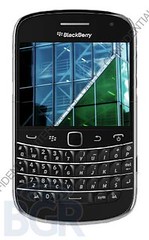
Specs leaked for RIM’s Upcoming Dakota

BlackBerry Dakota

Boy Genius Report (BGR) has unearthed a number of specifications regarding RIM’s upcoming BlackBerry Dakota smartphone, which looks not far removed from the existing BlackBerry Bold.

Leaked Specs

  • Quad-band GSM/GPRS/EDGE
  • Tri-band UMTS
  • 5 megapixel camera with HD video recording, flash, and image stabilization
  • 4GB of built in storage, 768MB of RAM
  • 2.8-inch VGA 640 x 480 capacitive screen
  • WiFi b,g,n on 2.4GHz and 5GHz frequencies
  • 3G mobile hotspot!
  • MicroUSB port
  • Bluetooth
  • NFC
  • Magnetometer
  • Accelerometer
  • Proximity sensor
  • 10.5mm thin
  • Launches with BlackBerry OS 6.1

BGR

Steve Jobs take medical leave from Apple

steve jobs

Apple's CEO Steve Jobs is taking a medical leave from work, his second in as many years, with Tim Cook filling his role during that time.

Apple CEO Steve Jobs today sent the following email to all Apple employees:

Team,

At my request, the board of directors has granted me a medical leave of absence so I can focus on my health. I will continue as CEO and be involved in major strategic decisions for the company.

I have asked Tim Cook to be responsible for all of Apple’s day to day operations. I have great confidence that Tim and the rest of the executive management team will do a terrific job executing the exciting plans we have in place for 2011.

I love Apple so much and hope to be back as soon as I can. In the meantime, my family and I would deeply appreciate respect for our privacy.

Steve

Extract Text from Image Document with i2OCR

i2OCR

i2OCR is a free online OCR service which lets you extract text from any image document like  TIF, JPEG, PNG, BMP, GIF, PBM, PGM, PPM. i2OCR supports multi-column document and 33 languages. The best part of this service is –--no email and registration required.

How to use this service?

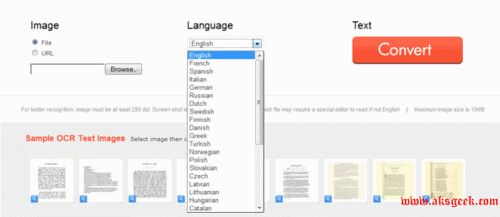
i2OCR-convert

1. You need image document from which you want to extract text. You can upload your File using browse button. If your file is on web then you need to select “URL” and copy paste the full URL of your image doc.

2. Select the language. It supports 33 Languages (English, French, Italian, Chinese, +more)

3. Click on TEXT button. You are done. Wait for few seconds then you’ll see your converted text on the left side and your image file on right side. You can  also download your converted text file.

Features:-

  • Extract Text from Document Image
  • Supports (TIF, JPEG, PNG, BMP, GIF, PBM, PGM, PPM)
  • 33 Languages (English, French, Italian, Chinese, +more)
  • Supports Multi-column Document
  • Unlimited Uploads
  • No Registration, No Email

Limits

  • Only 10MB upload is possible.
  • Uploaded, intermediate, and generated result files are automatically deleted.

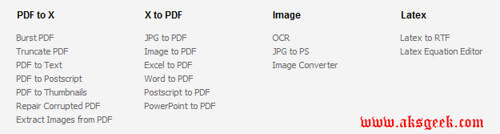
i2OCR is a service from Sciweavers and is one from many other services provided by Sciweavers (see the list  below or image).

Sciweaver Service

PDF to X

  • Burst PDF
  • Truncate PDF
  • PDF to Text
  • PDF to Postscript
  • PDF to Thumbnails
  • Repair Corrupted PDF
  • Extract Images from PDF

X to PDF

  • JPG to PDF
  • Image to PDF
  • Excel to PDF
  • Word to PDF
  • Postscript to PDF
  • PowerPoint to PDF

Image

  • OCR
  • JPG to PS
  • Image Converter

Latex

  • Latex to RTF
  • Latex Equation Editor

Are you impressed with the i2OCR or not? Or you like any other free online service from Sciweavers? Share with us.

Visit i2OCR


Sunday, 16 January 2011

Easily View and Organize images with RibbonVu Image Viewer

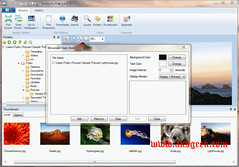
RibbonVu

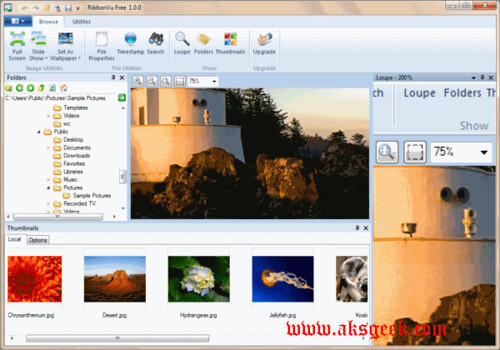
RibbonVu is a small handy, easy to use, powerful image management program designed to help you view and organize your pictures. it is not like any other image viewer it has capabilities to create slideshows,  timestamp your images or set them as wallpapers

Features:-

  • Intuitive ribbon interface (only available in Windows 7)
  • View images within zip files
  • Thumbnail interface
  • View the most popular formats available
  • View images at full screen
  • Set the wallpaper on your computer
  • Change file timestamps
  • Magnifying loupe RibbonVu-loupe
  • Image search
  • Print images

Requirements:

  • Microsoft .Net framework 3.5
  • 1024 x 768 or higher resolution with true color recommended
  • Multiple monitors supported

RibbonVu Freeware is a small and intuitive image viewer anyone can easily use this software with just one or two try. Although its missing the basic function---image rotation but still it is a very decent image viewer. or if you are interested in buying one then RibbonVu Pro is also available with more features.

You like RibbonVu Freeware or not? Share with us.  

Download RibbonVu (3.24 MB Freeware)

iPad 2, iPhone 5 and Apple TV 3 Hardware Specs leaked

Apple

Engadget got some concrete information from reliable sources about the next iPad, iPhone and, surprisingly, a third iteration of the company’s hobby - the Apple TV.

iPad 2 

iPad 2 will feature dual cameras, a “super high-resolution” display, an SD card slot (placed where it was believed iPad 2 had a larger speaker built-in), and a dual GSM/CDMA chip made by Qualcomm.

iPhone 5

iPhone 5 -- a completely redesigned handset running atop Apple's new A5 CPU (a Cortex A9-based, multi-core chip). This device, like the iPad 2, will feature a Qualcomm chipset that does triple duty as the CDMA / GSM / UMTS baseband processor.

Apple TV 3

Apple TV 3--the second generation of its redesigned Apple TV, which will include that new A5 processor. The CPU is said to be blazingly fast, cranking out 1080p video “like running water.”

Via Engadget

Saturday, 15 January 2011

HTC HD2 running Windows Phone 7

HTC HD2 running WP7

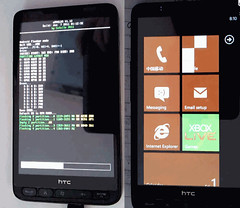
If you are a proud owner of the HD2 and don’t mind flashing ROMs then good news for you guys, Dark Force Steam (DFT) after five months of research and development team, and finally succeeded in HD2 run on straight brush WP7. At the end of the post there are must watch videos in which whole process is demonstrated from flashing to its actually running.

How Much it Works…

  • System starts quickly, after flashing the first boot needs about 20 seconds up to start settings.
  • Battery can be charged normally in WP7 OS. Testers reports that power consumption is normal.
  • Phone functions are working: call answer, dial without problems and good sound quality, speaker volume is very large, volume +,- keys works fine. During a call when you can adjust the volume.
  • SMS send and receive works without problems, display Chinese symbols right.
  • Import contacts from the SIM card works, the Chinese text displayed correctly, contact editing all normal. Setting ringtone working.
  • Camera works, all the features available, including the 720P video. (Photo-Flash sync is slightly buggy, better make photos without flash)
  • WiFi turn on, turn off, fast, and works for available networks properly, unable to make detailed settings (common WP7 system issue).
  • Bluetooth functional normally, but have not detailed settings (common WP7 system issue)
  • Program interface and system UI works correctly, features fully stocked.
  • The system date, time, normal, alarm clock works correctly.
  • Calendar have all functionality.
  • Internet Explorer all functions works, up to 6 pages possible. Multi-touch works.
  • Office - all functions are available.
  • The music and video player works.
  • Image management is normal. Picture view works, including multi-touch.
  • Lock screen interfaces works normally, show event reminders, wallpaper, and appear on screen quickly after power button press, everything OK.
  • Sync with the Zune works/normal.
  • USB function can be achieved (by modifying the registry on the PC side), you can read, write, everything works.
  • Normal gravity sensing, gravity sensing screen rotation, screen very smooth transition. Accelerometer works, autorotation works with beautiful effects.
  • Automatic screen brightness control, manual control is normal. Screen brightness control can be manually controlled. Automatic works fine too.
  • Theme set to normal. Ability to choose custom wallpaper works. Lock screen, unlock the normal, including password settings. 

Source:- DFT