Thursday, 31 March 2011

HP ePrint-enabled Printers First to Support Google Cloud Print

HP ePrint enabled

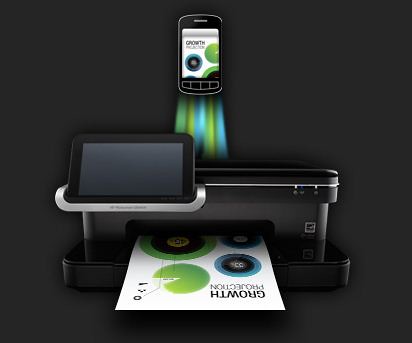
HP today announced that Google Cloud Print users can print directly to any HP ePrint-enabled printer from any Google Cloud Print supported app on any computer or smartphone.

HP's portfolio of web-connected and cloud-aware printers for home and business are the first to support Google Cloud Print out of the box.

The combination of Google Cloud Print and HP ePrint printers makes printing from any web, mobile or desktop app that supports Google Cloud Print more intuitive, accessible and useful by eliminating the need for a print driver or PC connection to the printer. Apps supported by Google Cloud print currently include Gmail for Mobile, Google Docs for Mobile and Chrome OS, and will expand to include third-party apps.

Users simply add the unique email address of their HP ePrint-enabled Photosmart, Officejet or LaserJet Pro to their Google account, which provides the ability to print easily and securely from Google apps to the selected HP printer.

Source: HP

Disable Location Aware Browsing in IE9, Firefox, Chrome and Opera

browsers

Currently all the browsers support location aware browsing or geo-location browsing which tells the website where you’re located. This features is useful in most of the cases to provide you the information which is relevant to you. But if you don’t want this or little conscious about your privacy then you can disable this on Internet Explorer 9 (IE9), Firefox 4 or previous version, Chrome and Opera 11.

How to Disable Geo-Location/Location Aware Browsing in

1. Internet Explorer 9 ?

IE9 Internet Options
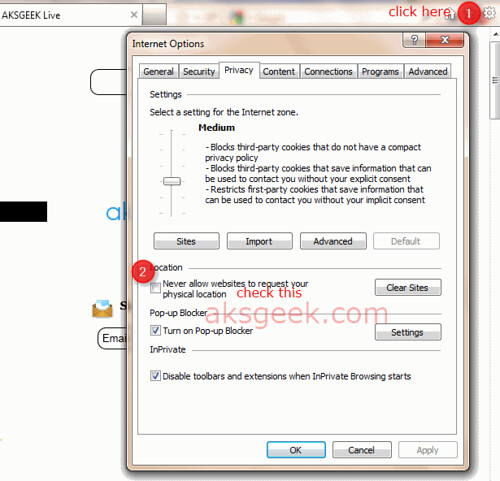
  • Open IE9 –> go to Internet Options –> Privacy Tab.
  • Check the box “Never Allow Website to request your physical location” and click Ok

OR 

Go to Control Panel –> Network and Sharing –> Internet Options –> Privacy tab and check the box next to "Never allow web sites to request your physical location" and click OK .

2. Firefox 4 or previous version?

Firefox geoenabled
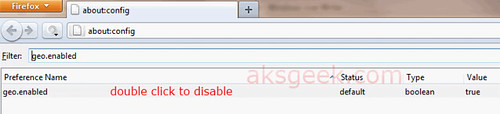
  • In Firefox address bar type about:config and hit enter.
  • Confirm the security warning and type geo.enabled in the filter field.
  • Double click on the geo.enabled to disable Location-Aware Browsing.

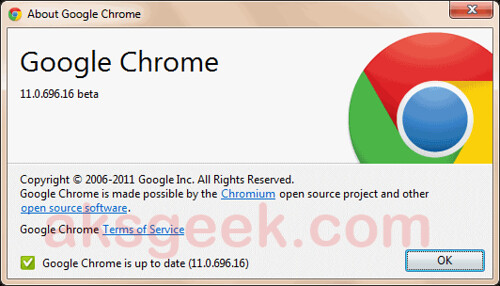
3.  Google Chrome 11?

Google Chrome-options
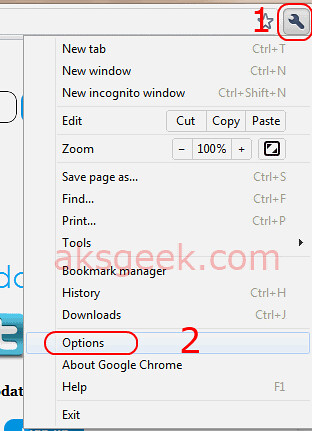
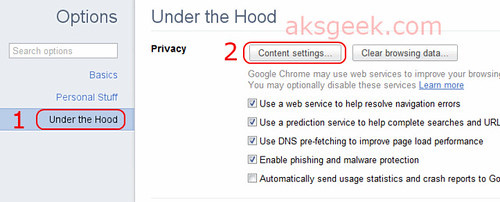
  • Click the Wrench icon and select Options. Google Chrome-under the hood
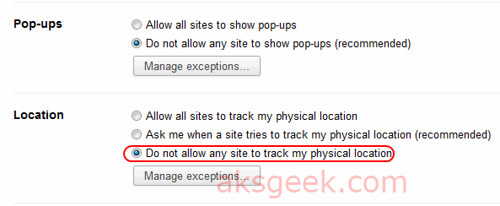
  • Now select the 'Under the hood tab' and click the button 'Content Settings' Google Chrome-Locations
  • In this window scroll down and see location –>  Now select 'Do not allow any site to locate my physical location' and  Close

(screenshots of chrome 11 beta)

4. Opera 11? 

Opera Advance tab
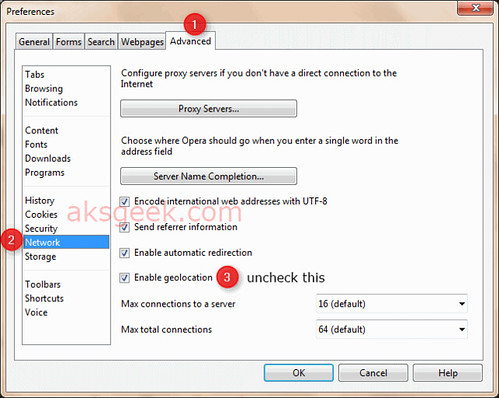
  • Go to Menu –> Settings-> preferences or you can click ctrl+F12
  • Now go to Advanced tab –> Network and uncheck ''Enable geolocation".

That’s it!

Enjoy!


Amazon Introducing Cloud Drive; Cloud Player for Android and Web

Amazon Cloud Drive and Player

Amazon announced the launch of Amazon Cloud DriveAmazon Cloud Player for Web and Amazon Cloud Player for Android . Together, these services enable customers to securely store music in the cloud and play it on any Android phone, Android tablet, Mac or PC, wherever they are. Customers can easily upload their music library to Amazon Cloud Drive and can save any new Amazon MP3 purchases directly to their Amazon Cloud Drive for free.

Store Music for Free

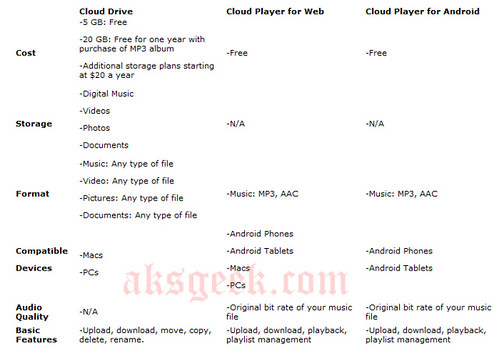
Customers automatically start with 5 GB of Cloud Drive storage to upload their digital music library, and those who purchase an Amazon MP3 album will be upgraded to 20 GB of Cloud Drive space. New Amazon MP3 purchases saved directly to Cloud Drive are stored for free and do not count against a customer's storage quota.

Adding Music to Cloud Drive

Amazon's easy uploading process makes it simple for customers to save their music library to their Cloud Drive. Files can be stored in AAC or MP3 formats and will be uploaded to Cloud Drive in the original bit rate. Customers can hand-pick particular songs, artists, albums or playlists to upload or simply upload their entire music library.

Cloud Player for Web

Customers who have a computer with a Web browser can listen to their music. Cloud Player for Web currently supports Internet Explorer, Firefox, Safari for Mac, and Chrome. Cloud Player for Web lets customers easily manage their music with download and streaming options. Customers don't need to worry about regularly updating software on their computer to enjoy music, and Amazon MP3 customers can continue to use iTunes and Windows Media Player to add their music to their iPods and MP3 players.

Cloud Player for Android

Cloud Player for Android is now bundled into the new version of the Amazon MP3 App; it includes the full Amazon MP3 Store and the mobile version of Cloud Player. Customers can use the app to play music stored on their Cloud Drive and music stored locally on their device. Features include the ability to search and browse by artist, album or song, create playlists and download music from Cloud Drive.

Secure Storage

Customers never need to worry about losing their music collection to a hard drive crash again. Files are securely stored on Amazon Simple Storage Service (Amazon S3) and each file is uploaded to Cloud Drive in its original bit rate. Customers can buy music anywhere and know that their MP3s are safely stored in Cloud Drive and accessible from any device.

Store More than Music

Cloud Drive allows customers to upload and store all kinds of digital files; music, photos, videos and documents can be stored securely and are available via web browser on any computer. In addition to the 5 GB of free storage, customers can purchase storage plans starting at $20 a year for 20 GB.

Amazon Cloud Drive for web and cloud player for android cost-features

Amazon Cloud Drive | Cloud Player For Web and Android

Google Introducing +1 button in Search Result

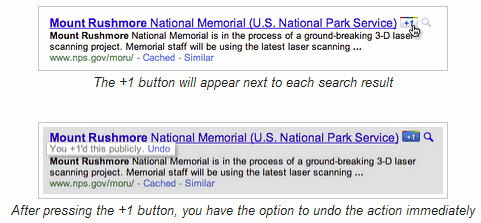
Google's +1button

Google introducing the +1 button, an easy way for Google users to recommend your content right from the search results pages.

According to Official Google Blog : The beauty of +1’s is their relevance—you get the right recommendations (because they come from people who matter to you), at the right time (when you are actually looking for information about that topic) and in the right format (your search results). For more information about +1, watch this video:

How do Google know which +1’s to show you?

Like social search, Google use many signals to identify the most useful recommendations, including things like the people you are already connected to through Google (your chat buddies and contacts, for example). Soon we also incorporate other signals, such as your connections on sites like Twitter, to ensure your recommendations are as relevant as possible.

How to Get Started?

To get started +1’ing the stuff you like, you’ll need to create a Google profile—or if you already have one, upgrade it. You can use your profile to see all of your +1’s in one place, and delete those you no longer want to recommend. To see +1’s in your Google search results you’ll need to be logged into your Google Account.

Google slowly rolling out +1’s, starting in English on Google.com. If you can’t wait to start seeing +1’s, we’ll soon let you opt-in to the launch by visiting our experimental search site. Initially, +1’s will appear alongside search results and ads, but in the weeks ahead they’ll appear in many more places (including other Google products and sites across the web).

Source: Google Blog


Wednesday, 30 March 2011

MetroPCS Introduces TapouT Special Edition Android Handset

metroPCS Tapout

MetroPCS in partnership with SA Studios Global, today introduced the Huawei Ascend Sanctioned by TapouT, a special-edition handset designed in conjunction with Mixed Martial Arts ("MMA") and lifestyle brand TapouT, an Authentic Brands Group company. The phone will be available exclusively at MetroPCS stores and online within the next few weeks.

The Huawei Ascend Sanctioned by TapouT comes with two interchangeable backs and is pre-loaded with a full content suite featuring TapouT static and live wallpapers, TapouT Virtual Training center videos and a new TapouT application exclusively available on the phone.

Finished in high gloss black with matte black casing, the Huawei Ascend Sanctioned by TapouT features the iconic TapouT logo emblazoned on the back of both covers, one in tonal black and the other in dark grey with the cage graphic frequently seen on TapouT merchandise. The handset is powered by Android 2.2 (Froyo), features a large 3.5 inch touchscreen and a 3.2 megapixel auto-focus camera and camcorder, and comes with a 2GB microSD memory card.

The Huawei Ascend Sanctioned by TapouT is available with MetroPCS' smartphone service plans at $50 and $60 a month, including all applicable taxes and regulatory fees. Both plans offer unlimited talk, text and Web services for about half the cost of other carriers' smartphone plans today, along with Metro USA(SM) nationwide coverage covering more than 90 percent of the U.S. population.

MetroPCS


Apple’s WWDC 2011 Kicks Off on June 6

Apple WWDC 2011

Apple announced that it will hold its annual Worldwide Developers Conference (WWDC) June 6 through June 10 at San Francisco’s Moscone West. At this year’s five-day conference Apple will unveil the future of iOS and Mac OS, including exciting demonstrations of the new kinds of apps that developers can build using Apple’s advanced frameworks and more than 100 technical sessions presented by Apple engineers.

Mobile developers will be able to explore the latest innovations and capabilities of iOS and learn how to greatly enhance the functionality, performance and design of their apps. Mac developers will see and learn how to develop world-class Mac OS X Lion applications using its latest technologies and capabilities. Developers can even bring their code to the labs and work with Apple engineers, applying development techniques and best-practices to enhance their apps.

Activities at Apple’s WWDC 2011 include:

  • more than 100 technical sessions presented by Apple engineers on a wide range of technology-specific topics for developing, deploying and integrating the latest iOS and Mac OS technologies;
  • over 1,000 Apple engineers providing developers with code-level assistance, insight into optimal development techniques, and guidance on how they can make the most of iOS and Mac OS technologies in their apps;
  • the opportunity to connect with thousands of fellow iPad, iPhone and Mac developers from around the world; and
  • Apple Design Awards which recognize iPad, iPhone and Mac apps that demonstrate technical excellence, innovation and outstanding design.

Apple


Tuesday, 29 March 2011

Acer Iconia Touchbook Dual-Screen Tablet Now Available for Pre-Sale in the U.S. and Canada

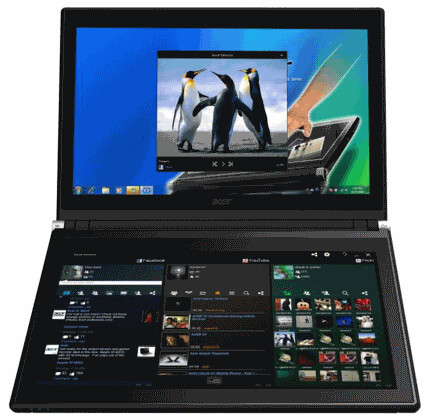
Acer Iconia 6120

Acer today announced that its much anticipated dual screen tablet, the Iconia-6120 Dual-Screen Touchbook is now available for pre-sale in North America. Providing a powerful, immersive touch experience like no other, it is the world's first and only tablet to offer two touch-enabled 14-inch high-definition widescreen LED backlit LCDs.

Iconia-6120 powered with a Core i5 CPU, 4GB of memory, integrated Intel HD graphics and a 64-bit copy of Windows 7 Home Premium. You'll also get USB 3.0 support, a 640GB hard drive, a 1.3 megapixel camera, 802.11b/g/n WiFi, an HDMI output, gigabit Ethernet and weighs 5.95 pounds

U.S. Configurations, Pricing and Availability

With an MSRP of $1,199.99, the Acer Iconia-6120 Touchbook is available for pre-sale now and will be available in April at leading retailers nationwide.

Canada Configurations, Pricing and Availability

With an MSRP of $1,199(CAD), the Acer Iconia-6120 Touchbook will be available in April through authorized Canadian resellers

Amazon

JBL OnBeat loudspeaker for iPad, iPhone and iPod devices

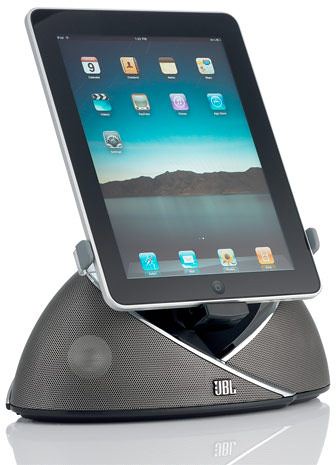
JBL OnBeat loudspeakers

HARMAN International Industries today announced the release of its new JBL OnBeat loudspeaker docking station, the first JBL dock to bring your next-generation entertainment experience to life, delivering realistic, dynamic sound with any iPad, iPhone or iPod device.

Bringing Netflix movie streaming, gaming, Skype conversations, YouTube clip watching and more to an entirely new level with HARMAN's signature sound quality, the JBL OnBeat dock features dual Phoenix full-range transducers with computer-optimized DSP equalization, creating a richly detailed soundstage. A universal connector that firmly docks an iPad, iPod or iPhone lets you rotate iPod and iPhone screens to portrait or landscape orientation for the best video display, and an infrared remote (IR) puts you in full control of system functions and music navigation from across the room.

Stream action-packed movies and intimate family photos and videos, and share the hottest content on the Web in your living room with family and friends through the addition of an optional composite cable that can send video content from the device directly to your TV.

The new JBL OnBeat also features a USB connection to sync and charge devices when connected to the iTunes music library (cable not included), and a 3.5mm stereo mini-jack auxiliary input that connects to virtually all portable media devices (cable not included). The dock has the dynamic JBL Weave design styling that is as sculptural as it is conversation-starting. Brackets to attach the iPod, iPhone and iPad to the dock are included in the package. The JBL OnBeat also serves as a charging station for your iPod or iPhone while it is docked.

The JBL OnBeat loudspeaker dock is available in April in black for $149.95.

For more information visit http://www.jbl.com/onbeat.

Firefox 4 Now Available for Android

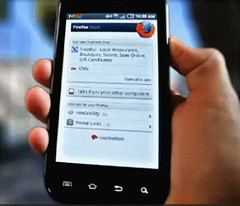
Firefox 4 for Android

Today, Mozilla release Firefox 4 for Android. Firefox delivers an intuitive interface, unparalleled customization and support for modern Web technologies. To make mobile browsing effortless and fun, Firefox provides seamless and secure access to personal data across desktop and mobile devices, including browsing history, bookmarks, open tabs, form data and passwords.

Firefox for mobile is offered in more than 10 languages.

Android Market | Download For Maemo

Via Mozilla Blog


Calling All Jr. Scientists!

googlesciencefair

Google introduced the first global online science competition: the Google Science Fair “Calling All Jr. Scientist!”. It’s open to students around the world who are between the ages of 13-18. All you need is access to a computer, the Internet and a web browser.

How to enter

  • If you don't already have one, create a Google Account. You will need a Google Account to complete the sign up form.
  • Complete the Google Science Fair sign up form. After you submit the form, you will see an important link on the confirmation page. This link will create the Google project submission site where you will post your science fair project details. Signed up but can’t find the link? Click here to create your Google project submission site.
  • Plan your science project, conduct your experiment, and write up your results.
  • Complete all of the sections of your Google project submission site (see sample project submission site).
  • Create either a two-minute video or 20-slide presentation giving an overview of your project and embed it on the Summary page of your project submission. A video or presentation is required to enter.
  • When your project site is done, make sure to submit it via this form by 4 April 2011.

Detailed instructions and tips for building your project submission can be found in the Resources section of this website.

Please note: Entries and supporting documentation must be submitted in English.

Source: Google

[This is a Sponsored post for Unruly Media] 

Technorati Tags: ,,,,

Monday, 28 March 2011

91 Books from Author Dame Catherine Cookson Now Available in the Kindle Store

Amazon Kindle Store

Amazon, today announced that 91 titles from Dame Catherine Cookson are now available as e-books for the first time, exclusively in the Kindle Store .

The collection of titles, including some which are out of print, represents the majority of the full-length novels from one of the UK's most-read novelists. These books, which are published by The Catherine Cookson Charitable Trust in conjunction with Peach Publishing, are available from $1.50-$5.99 and can be downloaded exclusively by Kindle and Kindle app customers.

Kindle Store

After Dark Knight Warner Bros offers Five Additional Movies for Rent Directly on Facebook

Inception facebook page

Warner Bros. announced it will expand its test offering of movies for rental through Warner Bros. Entertainment's Facebook Movie Pages. Starting today at 10:00 pm Pacific Time / 1:00 am Eastern Time, consumers will be able to rent five additional titles directly through each film's official Facebook Page using Facebook Credits. The films include "Harry Potter and the Sorcerer's Stone", "Harry Potter and the Chamber of Secrets", "Inception", "Life as We Know It" and "Yogi Bear".

To rent a film, consumers simply click on the "watch now" icon to apply their Facebook Credits, and within seconds they will begin enjoying the film. This offering is presently available only to consumers in the United States.

Fans will have full control over the film while watching it through their Facebook account for up to 48 hours from purchase. They can choose to watch it in full screen, pause the movie, and resume playing it when they log back into Facebook. Consumers will also have full Facebook functionality including the ability to post comments on the movie, interact with friends and update their status.

Inception


Software Update for AT&T Motorola ATRIX 4G 4.1.57 [Beta Tester]

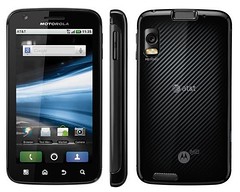
Motorola Atrix 4G

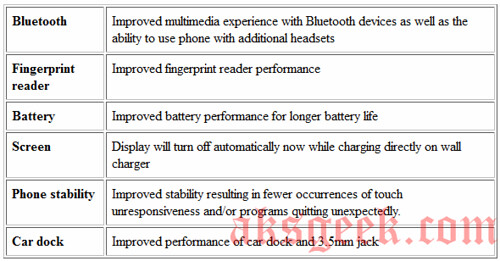
Motorola is preparing to deliver an imminent OTA update to its Atrix 4G, which will fix up battery performance, overall phone stability and improved car dock, headphone jack performance and fingerprint reader performance, but will regrettably leave the major drawback. If you have rooted your Atrix and you install this update then you’ll lose super user privileges.

Software Highlights

Atrix 4G 4.1.57 update features

XDA Developers Forum


Sunday, 27 March 2011

Cydia 1.1 is now Available for download

Cydia logo

Jay Freeman aka Saurik, the founder of Cydia has released an upgrade to Cydia version 1.1 for Jailbroken devices.

Cydia is a software application for iOS that allows a user to find and download software packages (including applications) for a jailbroken iPhone, iPod Touch or iPad.

Cydia is a graphical front end to APT and the dpkg package management system, so the packages available in Cydia are provided by a decentralized system of repositories that list these packages. Most of the software packages available through Cydia are free, and it also includes several hundred packages for sale through the Cydia Store with a commission setup similar to the App Store.

Cydia-saurik twitter msg

Features of Cydia 1.1 include:

  • the ability to run and operate Activator, libstatusbar, and SimulatedKeyEvents while Cydia is running
  • an overall speed improvement, including the “Loading Changes” dialog
  • “much less” memory usage
  • a more advanced search mechanism with a new relevancy algorithm
  • better management of broken repositories

In order to use Cydia, Apple device owners must perform what is known as a “jailbreak” of their software, using one of various hacking tools distributed for free by groups like the iPhone Dev Team, and Chronic Dev.

NOTE:-This article has a purely informational purpose and doesn't, in any way, suggest that you should hack your Apple device.

Source:- Twitter (Saurik)

Saturday, 26 March 2011

Create keyboard Shortcuts with WinHotKey

Window Hot Key Config

If you love using keyboard shortcuts for running apps, then here is a free tool which allows you to assign system-wide hot keys to perform tasks when you press a hot key combination-WinHotKey.

You can assign the following tasks for WinHotKey to perform:

  • Launch an application
  • Open a Document
  • Open a Folder
  • Automatically type some text
  • Control other windows on the screen

Hot key combinations with WinHotKey typically include the "Windows" key, a letter or number, and can also include any combination of "Alt", "Control", and "Shift".

For example: you could assign the hot key Win+C to open the Windows Calculator program. This means that if you press and hold the "Windows" key, then the letter "C", then release both of them, the Calculator program would be started.

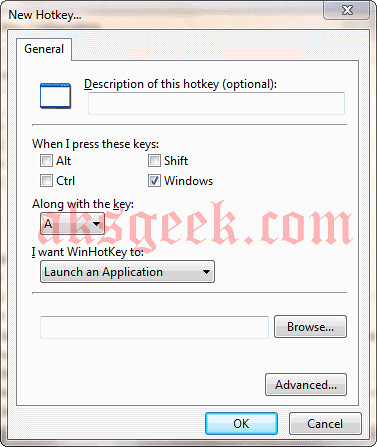
WinHotKey does not normally have a window on the desktop.  Instead, it runs in the system tray. To configure WinHotKey, double-click the icon in the system tray and the Configuration window will be displayed.

new hotkey

To add a new hot key, press the "New Key..." button.
To edit an existing hot key, select the key you want to edit and press the "Edit Key..." button.
Download WinHotKey (Windows, Freeware)

[Homepage]


Friday, 25 March 2011

Customize Internet Explorer 9 with TweakIE9

TweakIE9

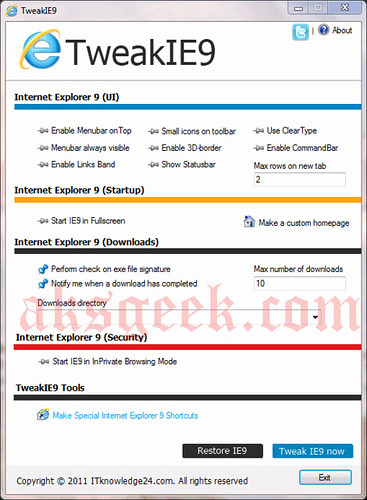
If you’re looking to customize Microsoft’s beauty of web- IE9 then here is a free tool available for you to download called TweakIE9

TweakIE9 is a small and comprehensive application that allows you to customize Windows Internet Explorer 9.  With TweakIE9 you can make special IE9 shortcuts, make a custom homepage with thumbnails of websites and so on. TweakIE9 has a restore button to undo the tweaked changes in IE9.

Share with us if you know any other free tool better than TweakIE9 for customizing IE9

Download TweakIE9 (1.2MB zip file)


Download Internet Explorer 9 Product Guide for Free

IE9 Product Guide

Now you know how IE9 unlocks the beauty of web.  Microsoft has released the Internet Explorer 9 Product Guide in PDF and XPS  format and is available to download for free.

This product guide outlines new features in Internet Explorer 9, highlights the top features, and provides additional information on features specific for end users, developers, and IT professionals.

Download

Internet Explorer 9 Product Guide (PDF) 27.9MB

Internet Explorer 9 Product Guide (XPS) 8.6MB