Showing posts sorted by date for query apple. Sort by relevance Show all posts

Sunday, 30 July 2023

Got a New Mac? Do These 10 Things to Set It Up Perfectly

System Settings-MacOS
So you just bought a brand new Mac and can't wait to dive into the world of the Apple ecosystem. Congratulations! Whether you're a long-time Apple user or a first-time Mac user, setting up your new device can improve your experience and productivity. In this article, we'll walk you through ten important steps to ensure your new Mac is ready to reach its full potential. Let's get started!

1. MacOS Updates:

Once you've set up your Mac, check for macOS updates. Click on System Settings, then select General, then select Software Update. Install any pending updates to ensure your Mac is running the latest version of macOS, which includes bug fixes and new features.

2. Adjust System Preferences:

Customize your Mac's settings to your liking. Go to System Settings and explore options like Touchpad, Mouse, Keyboard, Desktop & Dock etc. Customize these settings to fit your workflows to personalize your Mac experience.

3. Customize your Dock:

The Dock is the quick access bar at the bottom of the screen. Customize for easy access by adding the apps you use most. To add an application to the Dock, simply drag its icon from the Applications folder or click and hold the application icon in the Dock, then select Save to Dock. 

4. Install Must Have Apps:

Go to the App Store and download essential apps like web browsers, communication tools (like Slack or Microsoft Teams), productivity apps, and media players. Some popular applications you might consider are Google Chrome, Microsoft Office, VLC Media Player, and Evernote.

5. Configure Time Machine (Backup):

It's important to back up your Mac regularly to protect your data from the unexpected. Connect an external hard drive and set up Time Machine (Apple's built-in backup solution). Go to System Settings > General>Time Machine and select an external drive as the backup destination.

6. Configure iCloud:

Take advantage of Apple's cloud services by setting up iCloud. Go to System Settings > Apple ID> iCloud. Enable iCloud Drive to sync files across devices, iCloud Photos to back up and access your photos and videos, and iCloud Keychain to keep your passwords safe. 

7. Security and privacy settings:

Make sure your Mac is protected by setting the necessary security and privacy settings. Go to System Settings > "Privacy & Security" to configure features such as FileVault (disk encryption), firewall, and gateways (application security). You can also manage app permissions to access your camera, microphone, and other sensitive data. 

8. Add email and social media accounts:

Integrate your email and social media accounts into your mail and calendar applications. This will help you stay organized and up-to-date without constantly switching between different platforms.


9. Personalize your desktop and screensaver:

Make your Mac feel more like home by personalizing the desktop wallpaper and screensaver. Simply right-click on the desktop, choose "Change Wallpaper," and select an image of your choice. For screensavers, go to System Settings > Screensaver and choose from the available options or add your own folder of images.

10. Learn useful keyboard shortcuts:

Finally, learn some useful Mac keyboard shortcuts to improve your workflow. Learn basic keyboard shortcuts like Command+C (copy), Command+V (paste), Command+Z (undo), and application-specific shortcuts that can dramatically speed up tasks. 

By following these ten steps, you can ensure that your new Mac is perfectly set up and tailored to your needs. From software updates to personalizing your desktop, every step helps create a smoother, more enjoyable Mac experience. Embrace the world of MacOS and explore the possibilities offered by the Apple ecosystem. 



Monday, 7 January 2013

Monday, 5 November 2012

Apple Sells Three Million iPads in Three Days

new iPad

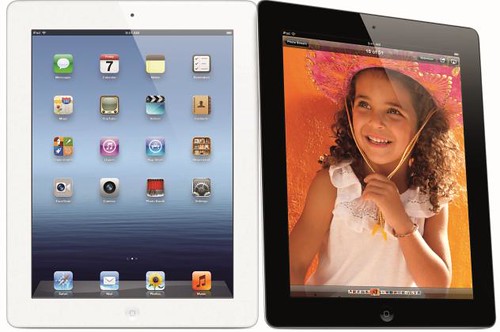
Apple today announced it has sold three million iPads in just three days since the launch of its new iPad mini and fourth generation iPad—double the previous first weekend milestone of 1.5 million Wi-Fi only models sold for the third generation iPad in March. The Wi-Fi + Cellular versions of both iPad mini and fourth generation iPad will ship in a few weeks in the US and in many more countries later this year.

The new iPad mini features a stunning 7.9-inch Multi-Touch display, FaceTime HD and iSight cameras, ultrafast wireless performance and an incredible 10 hours of battery life. The new fourth generation iPad features a gorgeous 9.7-inch Retina display, new Apple-designed A6X chip, FaceTime HD camera and ultrafast wireless performance.

Wednesday, 31 October 2012

iPhone 5 to be launched in India on November 2, Starting Rs 45500

iPhone 5 white

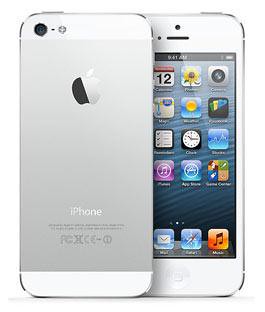
Redington announced that it will offer the Apple iPhone 5 at leading trade stores and retail outlets across India beginning on Friday, November 2nd. The iPhone 5 will be available for Rs 45,500 for the 16 GB variant, Rs 52,500 for 32 GB version while the 62GB version will cost Rs 59,500.

Online retailers like Saholic, and India's leading telecom operators like Airtel and Aircel are also taking pre-orders for the iPhone 5. Those interested can book their device before launch and it will take around 4-7 days for you to get your hands on the Thinnest, Lightest iPhone Ever.

The iPhone 5 features a 4-inch, 326ppi Retina display at 1136 x 640 pixels, 8-megapixel camera with 1080p HD recording, 720p front-facing camera, and runs on iOS 6. Know more about iPhone 5 here.

Tuesday, 30 October 2012

uRex Video Converter Platinum Free till November 6th

uRex Video Converter Platinum

uRexsoft on the festive season of Halloween giving away uRex Video Converter Platinum for Free which normally cost $39.95 till November 6th.

uRex Video Converter Platinum offers a powerful and professional video converting solution which can convert almost all the popular video formats on your PC to various formats like AVI, MP4, DivX, MPEG, H264, WMV, MKV, MOV, VOB, ASF, DV, 3GP, HD format, like HD VOB, HD MKV, HD TS, HD AVI, HD MPEG, HD MP4, HD ASF, HD WMV, HD MOV and audio MP3, WMA, WAV.  Also, it makes you to enjoy movie on your PSP, PS3, iPod, iPhone, iPhone 5, Apple TV, Xbox, Google phones, iPad, iPad2, the new iPad and other digital multimedia devices with ease.

  • Support all popular video & audio formats, even HD videos like AVI, TS, H.264/AVC, MKV
  • Convert to popular formats like AVI, MPEG, WMV, MP4, DivX, MOV, and FLV
  • Support almost all multimedia devices such as PS3, iPhone, iPhone 5, iPod, the new iPad, iPad/iPad2, Apple TV, Xbox, Wii, Google phones
  • Support NVIDIA CUDA & ATI Stream technology
  • Edit, split and merge video while converting.

How to Get uRex Video Converter Platinum for Free? urex-video-converter-pt-giveaway-for-halloween

1. Visit uRexsoft Halloween giveaway page and download the uRex Video Converter Platinum (or directly download from below link).

2. The above downloaded zip file contains the license code, so just use that license code for product activation.

Download uRex Video Converter Platinum

Monday, 24 September 2012

iPhone 5 First Weekend Sales Top Five Million

iPhone 5

Apple today announced that it has sold over five million of its new iPhone 5, just three days after its launch on September 21, and more than 100 million iOS devices have been updated with iOS 6, the world's most advanced mobile operating system. iPhone 5 is available in the US, Australia, Canada, France, Germany, Hong Kong, Japan, Singapore and the UK, and will be available in 22 more countries on September 28 and more than 100 countries by the end of the year.

iPhone 5 will be available on September 28 in Austria, Belgium, Czech Republic, Denmark, Estonia, Finland, Hungary, Ireland, Italy, Liechtenstein, Lithuania, Luxembourg, Netherlands, New Zealand, Norway, Poland, Portugal, Slovakia, Slovenia, Spain, Sweden and Switzerland.

Friday, 21 September 2012

Get uRex iPhone DVD Ripper for Free till October 10th

uRex iPhone DVD Ripper

As Apple launched its widely rumored iPhone 5 device, uRexsoft in no time upgrades its uRex iPhone DVD Ripper and giving away to all ifans for free till October 10th to watch DVD on iPhone 5.

uRex iPhone DVD Ripper is a professional windows DVD to the new iPhone 5 ripper that helps you rip DVD to the new iPhone 5 as well as iPhone 4S, iPhone 4 and 3GS.

Key Features :-

  • Convert DVD to iPhone 4S, iPhone 4, iPhone 5, iPhone 3G and iPhone 3GS.
  • Extract audios from DVD from DVD to iPhone 4S, iPhone 5, iPhone 4 and iPhone 3GS MP3, M4A and AAC
  • Trim video lengths, crop videos, Adjust brightness, contrast and other effects etc.
  • Capture DVD screenshots as JPG or BMP image.

How to get uRex iPhone DVD Ripper for free? iPhone DVD Ripper giveaway

1. Visit this page and download uRex iPhone DVD Ripper (or directly download from below link).

2. The above downloaded zip file contains the license code, so just use that license code for product activation.

Download uRex iPhone DVD Ripper

Wednesday, 19 September 2012

Apple Releases OS X Mountain Lion 10.8.2

OS X Mountain Lion 10.8.2

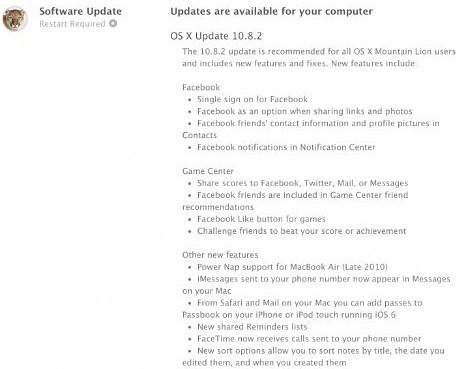
Apple has released OS X Mountain Lion 10.8.2 for download along with iOS 6.

This update includes new features and fixes:-

Facebook

  • Single sign on for Facebook
  • Adds Facebook as an option when sharing links and photos
  • See Facebook friends' contact information and profile pictures in Contacts
  • Facebook notifications now appear in Notification Center

Game Center

  • Share scores to Facebook, Twitter, Mail, or Messages
  • Facebook friends are included in Game Center friend recommendations
  • Added Facebook "Like" button for games
  • Challenge friends to beat your score or achievement

Other new features

  • Adds Power Nap support for MacBook Air (Late 2010)
  • iMessages sent to your phone number now appear in Messages on your Mac*
  • You can now add passes to Passbook (on your iPhone or iPod touch) from Safari and Mail on your Mac*
  • FaceTime can now receive calls sent to your phone number*
  • New shared Reminders lists
  • New sort options allow you to sort notes by title, the date you edited them, and when you created them
  • Dictation now supports additional languages: Mandarin, Cantonese, Spanish, Korean, Canadian English, Canadian French, and Italian
  • Dictionary app now includes a French definition dictionary
  • Sina Weibo profile photos can now be added to Contacts

* Requires iOS 6

General fixes

  • The OS X Mountain Lion v10.8.2 update also includes general operating system fixes that improve the stability, compatibility and security of your Mac, including the following fixes:
  • Adds an option to discard the changes in the original document when choosing Save As
  • Unsent drafts are now opened automatically when launching Mail
  • Receive Twitter notifications for mentions and replies from anyone
  • URLs are shortened when sending tweets from Notification Center
  • Notifications are disabled when AirPlay Mirroring is being used
  • Adds SSL support for Google searches from the Smart Search Field in Safari
  • Adds a new preference to have Safari launch with previously open webpages
  • Resolves an issue that may cause the "Enable Autodiscover" checkbox to always remain checked
  • Enables access to the Mac App Store when Parental Controls are enabled
  • Support for @icloud.com email addresses
  • Resolves a video issue with some VGA projectors when connected to certain Mac notebooks
  • Addresses an issue that may prevent Active Directory accounts from being locked out
  • Resolves an issue that may cause the policy banner to re-appear prior to logging in
  • Improvements to SMB
  • Addresses an issue with NIS users when auto-login is enabled
  • Addresses an issue in which the Keychain may not be accessible
  • Ability to pre-authenticate a FileVault protected system
  • Addresses an issue that may cause Xsan to not automatically start after migrating from Mac OS X Snow Leopard

Source:- Apple

Monday, 17 September 2012

iPhone 5 Pre-Orders Top Two Million in First 24 Hours

iPhone 5

Apple today announced pre-orders of its iPhone 5 topped two million in just 24 hours, more than double the previous record of one million held by iPhone 4S. Demand for iPhone 5 exceeds the initial supply and while the majority of pre-orders will be delivered to customers on September 21, many are scheduled to be delivered in October.

iPhone 5 will be available at 356 Apple retail stores in the US beginning at 8 a.m. local time on Friday, September 21. Every customer who buys an iPhone 5 at an Apple retail store will be offered free Personal Setup service, helping them customize their iPhone 5 by setting up email, showing them new apps from the App Store and more, so they'll be up and running with their new iPhone before they leave the store.

Thursday, 13 September 2012

iPhone 5 Officially Announced

iPhone 5
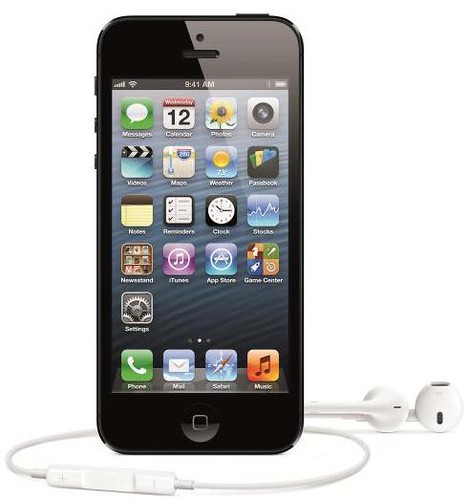
Apple today announced iPhone 5, the thinnest and lightest iPhone ever, completely redesigned to feature a stunning new 4-inch Retina display; an Apple-designed A6 chip for blazing fast performance; an 8 megapixel iSight camera and a new FaceTime HD front facing camera with 720p HD video recording and ultrafast wireless technology including LTE and DC-HSDPA. iPhone 5 comes with iOS 6, the world’s most advanced mobile operating system with over 200 new features including: the all new Maps app with Apple-designed cartography and turn-by-turn navigation; Facebook integration; Passbook organization; and even more Siri features and languages.

iPhone 5 is the thinnest smartphone in the world, with an all-new 7.6 mm anodized aluminum body that is 18 percent thinner and 20 percent lighter than iPhone 4S. Designed with an unprecedented level of precision, iPhone 5 combines an anodized aluminum body with diamond cut chamfered edges and glass inlays for a truly incredible fit and finish.
The new 4-inch Retina display on iPhone 5 delivers even more pixels than iPhone 4S, making the already incredible Retina display even better. By making the screen taller, not wider, iPhone 5 is just as easy to use with one hand so you can tap, type and scroll the same way you always have, while enjoying even more of your content including amazing apps optimized for the larger Retina display, widescreen HD video, a full five days of your Calendar and more of every web page.
iPhone 5 supports ultrafast wireless standards including LTE and DC-HSDPA, so you can browse, download and stream content even faster. To support the latest LTE technology, Apple has pioneered a unique single-radio LTE solution that provides blazing fast speeds while fitting perfectly into the new remarkably thin design. iPhone 5 features dual-band 802.11n Wi-Fi support for a wireless experience up to 150 Mbps.
The all-new A6 chip was designed by Apple to maximize performance and power efficiency to support all the incredible new features in iPhone 5, including the stunning new 4-inch Retina display—all while delivering even better battery life. With up to twice the CPU and graphics performance, almost everything you do on iPhone 5 is blazing fast for launching apps, loading web pages and downloading email attachments.
The 8 megapixel iSight camera is the most popular camera in the world and with iPhone 5, it’s even better. The new camera is completely redesigned with incredible optical performance, yet amazingly it’s 25 percent smaller than the camera in iPhone 4S. The new iSight camera in iPhone 5 features a sapphire crystal lens cover that is thinner and more durable than standard glass with the ability to provide crystal clear images. The new panorama feature lets you capture jaw-dropping panorama images of up to 28 megapixels by simply moving the camera across a scene in one smooth motion. New video features include improved stabilization, video face detection for up to 10 faces and the ability to take still photos as you record. A new FaceTime HD front facing camera makes FaceTime calls incredibly clear and can also be used for self portraits and recording 720p HD video. iPhone 5 also allows you to share photos with friends and family using iCloud’s Shared Photo Streams.
iPhone 5 features the new Lightning connector that is smaller, smarter and more durable than the previous connector. The all-digital Lightning connector features an adaptive interface that uses only the signals that each accessory requires, and it’s reversible so you can instantly connect to your accessories. The Lightning-to-30-pin Adapter is also available to connect iPhone 5 to legacy 30-pin accessories.
iPhone 5 introduces new enhanced audio features including a new beam-forming, directional microphone system for higher quality sound, while background noise fades away with new noise canceling technology. iPhone 5 now includes support for cellular wideband audio for crisper word clarity and more natural sounding speech. Wideband audio will be supported by over 20 carriers worldwide at launch. iPhone 5 comes with the new Apple EarPods featuring a breakthrough design for a more natural fit and increased durability, and an incredible acoustic quality typically reserved for higher-end earphones.
Pricing and Availability
iPhone 5 comes in either white and silver or black & slate, and will be available in the US for a suggested retail price of $199 (US) for the 16GB model and $299 (US) for the 32GB model and $399 (US) for the 64GB model. iPhone 5 will be available from the Apple Online Store, Apple’s retail stores, and through AT&T, Sprint, Verizon Wireless and select Apple Authorized Resellers.
iPhone 5 will be available in the US, Australia, Canada, France, Germany, Hong Kong, Japan, Singapore and the UK on Friday, September 21, and customers can pre-order their iPhone 5 beginning Friday, September 14. iPhone 4S will also be available for just $99 (US) and iPhone 4 will be available for free with a two-year contract. iOS 6 software will be available on Wednesday, September 19 as a free software update.
iPhone 5 will roll out worldwide to 22 more countries on September 28, including Austria, Belgium, Czech Republic, Denmark, Estonia, Finland, Hungary, Ireland, Italy, Liechtenstein, Lithuania, Luxembourg, Netherlands, New Zealand, Norway, Poland, Portugal, Slovakia, Slovenia, Spain, Sweden and Switzerland.


Apple intros new iPod touch and iPod nano

new iPod touch

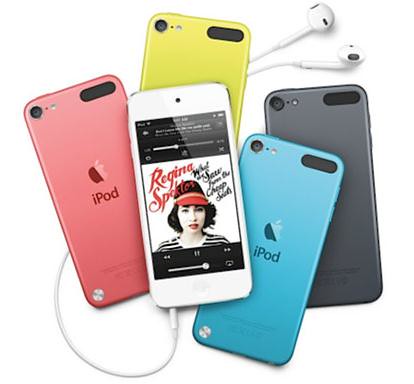
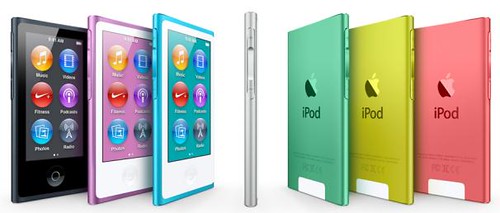
Apple today introduced all-new iPod touch and reinvented iPod nano. The new iPod touch is the thinnest iPod touch ever and features a brilliant 4-inch Retina display; a 5 megapixel iSight camera with 1080p HD video recording; Apple’s A5 chip; Siri, the intelligent assistant; and iOS 6. The new iPod touch comes in a gorgeous new ultra-thin and light anodized aluminum design, and for the first time ever, iPod touch comes in five vibrant colors. The new iPod nano is the thinnest iPod ever featuring a 2.5-inch Multi-Touch display; convenient navigation buttons; built-in Bluetooth for wireless listening; and the new iPod nano comes in seven gorgeous new colors.

iPod nano

Both iPod touch and iPod nano come with the new Lightning connector that is smaller, smarter and more durable than the previous connector. The all-digital Lightning connector features an adaptive interface that uses only the signals that each accessory requires, and it’s reversible so you can instantly connect to your accessories. The Lightning-to-30-pin Adapter is also available to connect iPod touch and iPod nano to legacy 30-pin accessories.

iPod touch and iPod nano also come with the new Apple EarPods featuring a breakthrough design for a more natural fit, increased durability and an incredible acoustic quality typically reserved for higher-end earphones.

Pricing and Availability

Pre-orders for the new iPod touch in pink, yellow, blue, white & silver, black & slate begin September 14 through the Apple Online Store (www.apple.com) for a suggested price of $299 (US) for the 32GB model and $399 for the 64GB model. The new iPod touch will be available in October through the Apple Online Store Apple’s retail stores and Apple Authorized Resellers. The fourth generation iPod touch is available in black and white for $199 (US) in a 16GB model and $249 (US) in a 32GB model.

iPod nano will be available in October in pink, yellow, blue, green, purple, silver and slate for a suggested price of $149 (US) in a 16GB model through the Apple Online Store (www.apple.com), Apple’s retail stores and Apple Authorized Resellers. iPod shuffle is available today in pink, yellow, blue, green, purple, silver and slate for a suggested price of $49 (US) in a 2GB model.

Apple Announces new iTunes

Apple new iTunes

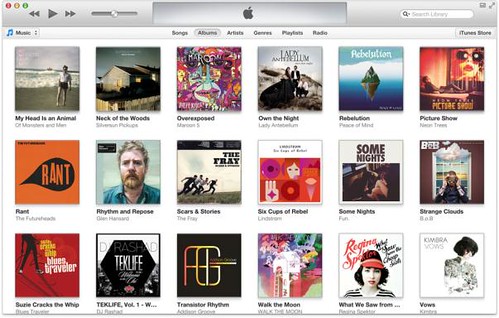
Apple today announced the new iTunes for Mac and PC featuring a completely redesigned player, seamless integration with iCloud, and a stunning new look for the world’s most popular online music, apps, TV and movie stores. The new iTunes is coming in October and will feature a dramatically simpler and cleaner interface that keeps your favorite iTunes content at the forefront. With iCloud integration, your music, movie and TV purchases made on any of your iOS devices or computers is conveniently displayed in your iTunes library on your Mac or PC, available anytime you want them.

The new iTunes will be available in October as a free download at www.itunes.com.

Friday, 7 September 2012

NVIDIA Quadro K5000 for Mac Pro Announced

NVIDIA QUADRO K5000

NVIDIA today announced the Kepler-powered Quadro K5000 GPU for Mac Pro systems.

NVIDIA Quadro K5000 for Mac is ideal for professional applications such as video editing, color correction, compositing, design visualization and GPU-accelerated ray-traced 3D rendering. In addition, the Quadro K5000 for Mac retains its full performance and features when using Apple Boot Camp and running Microsoft Windows-based professional PC applications.

Key features of the NVIDIA Quadro K5000 GPU for Mac include:

  • Cinema 4K display support (4096x2160 resolution), which enables content creators to process and view high resolution cinema content
  • A new display engine that can drive up to four displays simultaneously
  • 4 GB graphics memory that provides faster interactivity when using design and content creation applications
  • Based on NVIDIA Kepler architecture, which enables the Quadro K5000 GPU for Mac to run key content creation applications up to 2x faster at lower power than the Fermi-based Quadro 4000 for Mac
  • Support for up to two Quadro K5000 GPUs for Mac in a single Mac Pro
  • Support for OpenGL, OpenCL and NVIDIA CUDA

The NVIDIA Quadro K5000 for Mac is planned to be available later this year from select Apple resellers and system integrators, and from authorized distribution partners, including PNY Technologies in the Americas and Europe, ELSA in Japan and Leadtek in Asia Pacific. Estimated pricing starts at $2,249.

Thursday, 30 August 2012

WD introduces My Book VelociRaptor Duo

WD My Book Velociraptor Duo

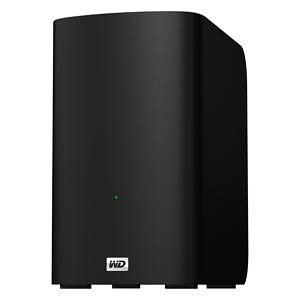
Western Digital (WD) today introduced its fastest My Book External HDD, My Book VelociRaptor Duo, supports Mac OS X.

My Book VelociRaptor Duo provides ultimate speed and performance with two 1 TB 10,000 RPM WD VelociRaptor drives along with two Thunderbolt ports. The 2 TB dual-drive storage system is ideal for editing high resolution video, 3D rendering, graphic design, and other demanding digital media applications. This boost in performance delivers solid state drive (SSD) -like data transfer rates of up to 400 MB/s for greater work-flow productivity. The dual-drive storage system offers RAID 0 for performance or RAID 1 for protection; and the twin Thunderbolt ports offer daisy-chaining multiple My Book VelociRaptor Duo drives and other high performance peripherals without impacting data transfer speeds or performance. The My Book VelociRaptor Duo also comes complete with a Thunderbolt cable in the box and is user-serviceable.

While RAID 0 maximizes the drive's speed and capacity, RAID 1 support allows users to create a second copy of their digital content on the drive for added protection, security and peace of mind. The drive also provides a JBOD (just a bunch of disks) option for users running a Windows operating system on a Mac.

Additional features found on the My Book VelociRaptor Duo dual-drive storage system include out-of-the-box compatibility with Apple Time Machine and HFS + Journaled for Mac computers; capability for multi-stream workflows; and a 3-year limited warranty.

The My Book VelociRaptor Duo dual-drive storage system is currently available at select U.S. retailers and online, starting at $899.99 MSRP USD.

Source:- Western Digital

Thursday, 23 August 2012

Apple post OS X 10.8.1 Update

OS X 10.8.1 update

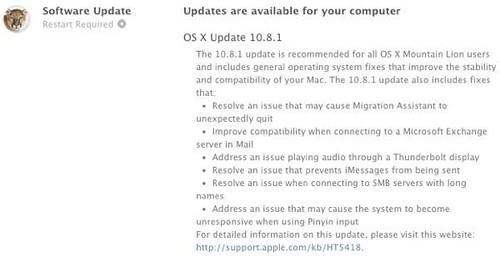
Apple has released OS X Mountain Lion 10.8.1 for public download. This update includes general operating system fixes that improve the stability and compatibility of your Mac, including fixes that:

  • Resolve an issue that may cause Migration Assistant to unexpectedly quit
  • Improve compatibility when connecting to a Microsoft Exchange server in Mail
  • Address an issue playing audio through a Thunderbolt display
  • Resolve an issue that could prevent iMessages from being sent
  • Address an issue that could cause the system to become unresponsive when using Pinyin input
  • Resolve an issue when connecting to SMB servers with long names
  • Address a issue that may prevent Safari from launching when using a Proxy Automatic Configuration (PAC) file
  • Improve 802.1X authentication with Active Directory credentials.

Source:- Apple

Tuesday, 7 August 2012

Tuesday, 31 July 2012

3 Million Mountain Lion Downloads in 4 days

OS X Mountain Lion

Apple announced that downloads of OS X Mountain Lion have exceeded three million in four days, making it the most successful OS X release in Apple’s history. With more than 200 innovative new features, Mountain Lion is the ninth major release of the world’s most advanced desktop operating system and is available through the Mac App Store as an upgrade to Lion or Snow Leopard users for $19.99 (US).

Thursday, 26 July 2012

Office for Mac 2011 ready for Mountain Lion

mountain lion office for mac 2011

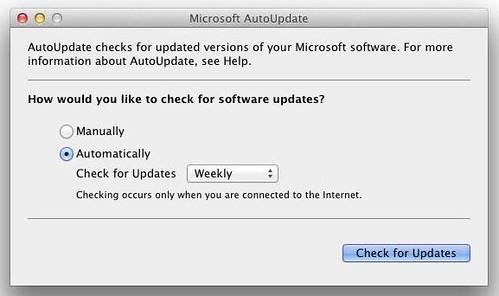
Microsoft announced that the Office for Mac 2011 (and Office 2008 for Mac) is ready for Apple's latest OS X Mountain Lion. But the only problem remaining is the inability to manually download and install future updates because of Mountain Lion's new feature called Gatekeeper.

Gatekeeper protect users by allowing you to choose to only download and install software from known developers but due to its architecture, updates will not run when you download and initiate them on your desktop.

To keep your Office for Mac updated, Microsoft recommends that you use Microsoft AutoUpdate.

Source:- Office for Mac

Wednesday, 25 July 2012

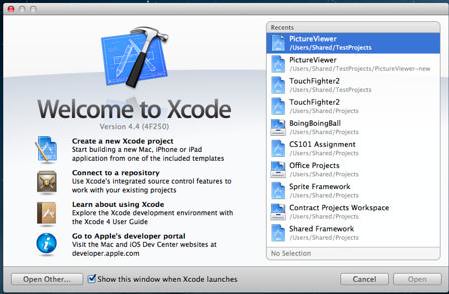
Apple releases Xcode 4.4

Xcode 4.4

Along side with OS X Mountain Lion, Apple today has released Xcode 4.4 in the Mac App Store with SDKs for OS X 10.8 Mountain Lion and support for the new MacBook Pro’s high-resolution Retina display.

Xcode provides everything developers need to create great applications for Mac, iPhone, and iPad. Xcode 4 has been streamlined to help you write better apps. It has unified user interface design, coding, testing, and debugging all within a single window. The Xcode IDE analyzes the details of your project to identify mistakes in both syntax and logic, it can even help fix your code for you.

What's New in Version 4.4

  • This update runs on both OS X Lion and OS X Mountain Lion.
  • Included in Xcode 4.4:
  • SDKs for OS X 10.8 Mountain Lion and iOS 5.1.
  • Enhanced for the MacBook Pro with Retina display.
  • Code completion persists your selections to give more accurate suggestions.
  • Objective-C @synthesize command is generated by default when using properties.
  • Objective-C adds literal syntax for numbers, arrays, dictionaries, and expressions when developing for OS X.
  • Apple LLVM compiler supports additional C++11 features, including lambdas.
  • Assistant editor tracks caller or callee for the current selection.
  • New localization workflow can share a single base .xib file for multiple locales on OS X.
  • Source control can commit individually selected changes.
  • ARC migration tool converts both retain/release and garbage collected code.
  • Fixes an issue where code completion could fail, requiring the user to delete derived data.
  • Additional bug fixes and stability improvements.

Source:- Download Xcode 4.4