Showing posts sorted by relevance for query Spotify. Sort by date Show all posts

Tuesday, 22 May 2012

Spotify is Available in Australia and New Zealand

Spotify-Logo

Good news for music fans in Australia and New Zealand, Spotify announced that it's streaming services is now available in Australia and New Zealand, offering  access to some 16 million tracks via PC, smartphone and iPad. Each country will also be getting its Spotify apps - Triple J app in Australia and NZ Top 40 app in New Zealand.

Spotify offers three great services, from absolutely free to paid subscriptions:

Spotify Free – the unsurpassed, totally free music service. Enjoy free, on-demand, buffer-free access to more than 16 million songs on your computer. No gimmicks. Just listen and love it, month after month after month. Manage your own music files through Spotify, and sync them with your mobile or iPod. With occasional advertising. All Spotify users enjoy unlimited free, ad-supported music.

Spotify Unlimited – all the special features of our free service but with uninterrupted, ad-free access to Spotify on your computer. All for only $7.49 a month in New Zealand and $6.99 in Australia.

Spotify Premium – the all-singing, all-dancing, top-of-the-range Spotify experience. Premium gives you access to all the music, all the time. Listen online or offline, on your computer, your mobile phone, tablet and a whole heap of other devices. Enjoy enhanced sound quality and access to exclusive content, competitions and special offers. Premium costs just $12.99 a month in New Zealand and $11.99 in Australia.

Thursday, 14 July 2011

Spotify lands in the US

Spotify

We all know its coming. Spotify, the largest and fastest growing music service of its kind, is available from today in the US. The streaming music service is currently in an invite-only beta phase, but you can sign up for an invitation or jump the queue right into the service's Unlimited ($5) or Premium ($10) monthly subscription tiers.

Spotify Free – the unsurpassed free music service. With an invite, enjoy on-demand, buffer-free access to over 15 million songs on your computer, great social features, manage your own music files through Spotify, and sync with your cellphone or iPod. Features occasional advertising.

Spotify Unlimited – all the special features of our free service but with uninterrupted, ad-free access to Spotify on your computer. All for only $4.99 a month.

Spotify Premium - the all-singing, all-dancing, top-of-the-range Spotify experience. Premium gives you access to all the music, all the time. Listen online or offline, on your computer, your cellphone and a whole heap of other devices. Enjoy enhanced sound quality and access to exclusive content, competitions and special offers. Premium costs just $9.99 a month (that's the equivalent of a few fancy coffees).

Source:- Spotify

Tuesday, 26 June 2012

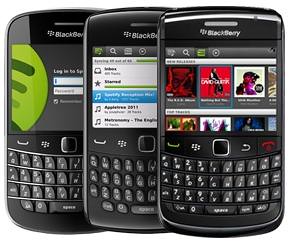
Spotify app now available on BlackBerry App World

Spotify BlackBerry App world

Spotify, the world’s leading music streaming service, is now available to download for free on BlackBerry App World.

Spotify provides users with free and instant access to a music catalogue of over 16 million tracks. With the Spotify for BlackBerry smartphones app, users are able to:

  • Search for any track or album and just hit play to listen
  • Build a library of playlists and share them with friends with one click
  • Integrate it with their favourite social media feeds to enable them to discover and share friends’ music with just one click

It will be available in 15 countries, including Australia, Austria, Belgium, Denmark, Finland, France, Germany, New Zealand, Norway, Spain, Sweden, Switzerland, the U.S., the U.K. and the Netherlands.

The app is compatible with a broad range of BlackBerry smartphones running the BlackBerry 5 Operating System (OS) and higher. ( compatible devices - 9780 Bold, 9700 Bold, 9300 Curve, 9000 Bold, 8520 Curve. Currently the app only supports phones running on GSM networks. CDMA-network phones and Torch 9800 are not currently compatible)

Download Spotify App from BlackBerry App World

Thursday, 22 December 2011

Spotify now Available for BlackBerry Smartphones

Spotify BlackBerry

Spotify expanding its access to additional mobile platform and the latest one to join Spotify family is BlackBerry. Today, Spotify announced that BlackBerry app is no longer a Preview release and is now available to any user with a compatible phone.

Compatible phones include Bold 9780, Bold 9700, Curve 9300, Bold 9000, Curve 8520. Currently the app only supports phones running on GSM networks. CDMA-network phones and the Torch 9800 are not compatible.

You can check out 48-hour free trial directly from the mobile app or sign up to our 30-day free trial to give it a spin.

Source:- Spotify


Tuesday, 8 November 2011

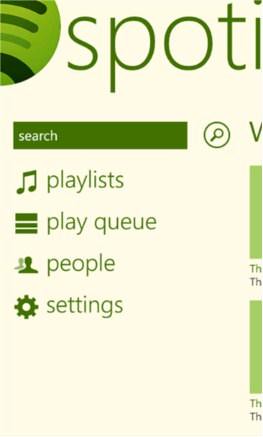
Spotify for Windows Phone now Available for Download

Spotify Windows Phone app

Good news for Windows Phone users, Spotify is now available for a wide range of Windows Phone 7 devices.

Features of Spotify-Windows Phone App

  • Search, browse & play our catalogue of millions of tracks
  • Explore & play your friends’ playlists, top artists and tracks
  • Stream over WiFi or 2.5/3G - all your existing playlists are available
  • Offline playlists - play your music without an internet connection
  • On-the-fly sync - every track you add to a playlist appears on mobile and computer
  • What’s New view
  • Receive music from friends via the inbox
  • Starred tracks - tag all your favourites into a special list

The app is free to download however it does require a Premium subscription to actually be able to use the app.

Download Spotify from Windows Marketplace


Tuesday, 12 June 2012

Spotify new Android App hits Google Play

Spotify new Android App

Spotify's new Android App is now available on Google Play, bringing complete redesign, full support for Android 4.0, Last.fm scrobbling, added social functionality and streaming at 320kps.

What's New

  • Totally new app with full support for Android 4.0
  • Top-to-bottom redesign
  • All-new slide-out navigation
  • Even more social - check out friends’ profile pages and playlists on the go
  • Artist imagery in high resolution
  • Related artist view - available for the first time on mobile
  • ‘Extreme’ sound quality setting for 320kbps listening
  • Play queue
  • Last.fm scrobbling
  • Crossfade/gapless playback settings
  • Widget – control Spotify from the home screen
  • Folder support

Source:- Google Play

Wednesday, 6 July 2011

Thursday, 10 February 2011

Sonos Introduces Sonos Controller for Android

Sonos android

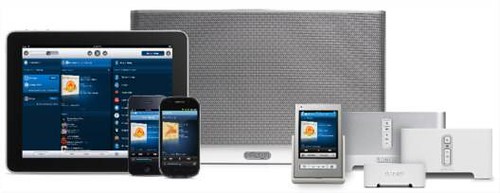
Sonos, the leading developer of wireless multi-room music systems for the home, today introduced the Sonos Controller for Android, a free app that transforms most Android smartphones into a wireless music controller for the award-winning Sonos Multi-Room Music System. The Sonos Controller for Android, available in late March as a free download from Android Market, will make its public debut next week at Mobile World Congress in Barcelona.

With the award-winning Sonos S5 in any room and an Android phone in hand, music lovers will enjoy an unmatched wireless music experience in the home. You’ll be able to access and play all the music on earth—from the Internet and your personal music library—throughout the home, wirelessly.  Use the free Sonos Controller for Android app to control all your music and rooms, all from the palm of your hand.  And, Sonos Controller for Android features Sonos’ latest innovation in the home music experience – music voice search - allowing users to find any artist, album or track by simply speaking into the phone.

To get started enjoying music in any or every room of the home, all you need is a Sonos ZonePlayer and a Sonos Controller such as the free Sonos Controller for Android.  The most popular Sonos ZonePlayer is the Sonos S5, an all-in-one wireless music system you can plug in anywhere.  Now you can play any track you like, anytime you like, in any room you like.  Wirelessly play the same song in every room of the house – perfectly synchronized. Or, mix it up and play different songs in different rooms.

When it comes to controlling Sonos, you simply reach into your pocket for your Android smartphone. With Sonos Controller for Android, you can search for songs and stations by typing or speaking, choose the music and control the volume in as many rooms as you like.  And because your Android phone is controlling the music, and not the source of it, when a text comes in or you need to make a phone call, the music doesn’t stop.

Sonos connects directly to the Internet so you can access a world of music without ever turning on your computer.  Search and play more than 100,000 Internet radio stations, shows and podcasts — from around the world.  Play songs, playlists and radio from the most popular music services like Deezer, iheartradio, Last.fm, Napster, Pandora, Rdio, Rhapsody, SiriusXM Internet Radio, Spotify, Wolfgang’s Vault, and more.  And of course, Sonos can play your entire digital music library (such as iTunes) stored on a computer or Network Attached storage drive.

The Sonos Controller for Android is designed to work on any Android smartphone running Android 2.1 or later with a screen size of HVGA 320 x 480, WVGA 480 x 800 or WVGA 480 x 854.  Sonos Controller for Android joins the family of Sonos Controllers which includes free apps for iPhone and iPad, a dedicated touchscreen controller, the Sonos Controller 200, and free software for your Mac or PC, included with every ZonePlayer. All controllers work together seamlessly.

visit www.sonos.com/android.