Showing posts sorted by relevance for query Update. Sort by date Show all posts

Saturday, 20 August 2011

Apple releases OS X Lion 10.7.2 update, iCloud Beta 8 and Safari 5.1.1 for Developers

OS X Lion

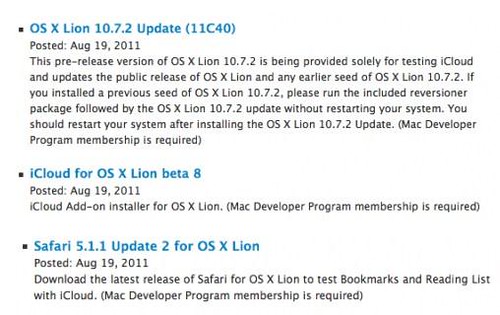
Apple has released Mac OS X Lion 10.7.2 Update (11C40), iCloud for OS X Lion beta 8, and Safari 5.1.1 Update 2 for developers.

Apple’s Mac OS X Lion 10.7.2 update comes after the recent 10.7.1 update which brought significant fixes, ranging from Wi-Fi to outputting video.

This pre-release version of OS X Lion 10.7.2 is being provided solely for testing iCloud and updates the public release of OS X Lion and any earlier seed of OS X Lion 10.7.2. If you installed a previous seed of OS X Lion 10.7.2, please run the included reversioner package followed by the OS X Lion 10.7.2 update without restarting your system. You should restart your system after installing the OS X Lion 10.7.2 Update.

Apple OS X Lion updates

iCloud, first introduced in June at WWDC, is a new cloud-based service from Apple. To enable iCloud on Mac OS X, user need to install iCloud for OS X Lion Beta 8.

Lastly, Apple also released the Safari 5.1.1 Update 2 for OS X Lion. This update is for developers to test Bookmarks and Reading List with iCloud.

Source:- Apple

Wednesday, 17 October 2012

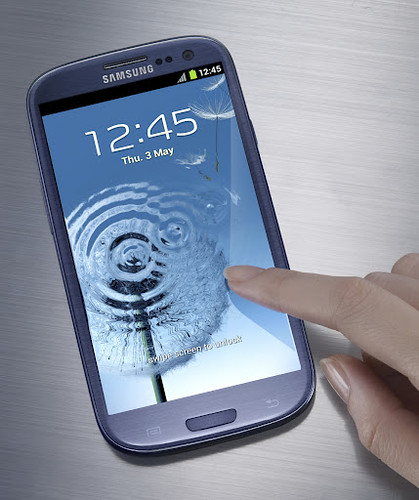
Samsung Galaxy S III to get Jelly Bean Update in coming months

Samsung Galaxy S III Android 4.1 update

Samsung today announced that the Jelly Bean Android 4.1 update will be made available to all Samsung Galaxy S III in the U.S. in the coming months.

The update will be made available both over the air and as a download via Kies, Samsung’s content sync and software update solution. The specific timing and update method will be announced by each carrier partner, AT&T, Sprint, T-Mobile, Verizon Wireless and U.S. Cellular.

Samsung refined and enhanced the Galaxy S III experience by adding new capabilities to the camera, video and user interface, including:

  • Camera Enhancements:
    • New live camera and camcorder filters offer a range of new ways to spark your creativity. Warm vintage, cold vintage, black and white, sepia, color highlights (blue, green, red/yellow), and many more are selectable from the main camera screen.
    • Pause and resume while recording video allows users to string together multiple captured video clips from a party, birthday or sporting event into a single file with no post editing required.
    • Low light photo mode takes advantage of Galaxy S III’s best-in-class High Dynamic Range (HDR) capabilities and offers an optimized mode for low light and indoor photos.
  • Pop Up Play Update: Users can now easily resize or pause the Pop Up Play picture-in-picture video window, taking full advantage of the Galaxy S III’s powerful processor and large 4.8-inch screen.
  • Easy Mode: Easy Mode is a simplified user experience option for first-time smartphone owners, providing large home screen widgets that focus on the device essentials. The Easy widgets include both 4x2 and 4x4 arrangements of favorite contacts, favorite apps, favorite settings, clock and alarm.
  • Blocking Mode: Galaxy S III owners can disable incoming calls, notifications, alarms and LED indicators for a designated period of time.
  • Improved Usability: Users now have multiple keyboard options with the addition of the Swype keyboard.

Android 4.1 Jelly Bean offers users a smoother, faster and more fluid experience with expanded feature functionality, including:

  • Google Now: Google Now gives users the right information at the right time, like how much traffic to expect before leaving work, when the next train is scheduled to arrive at the subway station or the score of a favorite team’s current game – conveniently delivered as notifications. Additionally, Google Now provides powerful voice assistant functionality across a range of domains, including weather, maps, navigation, search, image search, flight status and more. Google Now can conveniently be launched from the lock screen shortcut or by a long press on the menu button from any screen.
  • Rich Notifications: Notifications can now expand and shrink with a pinch to show the right amount of information a user needs. Notifications have been enhanced so action can be taken without having to launch the app first – like sharing a screenshot directly from the notification.
  • Automatic Widget Adjustment: Customizing the home screen is easier than ever before. Users can simply place a new icon or widget on the screen, and existing icons will move out of the way to make space. When widgets are too big, they automatically resize to fit on the screen.

In addition to the operating system update, Samsung and ESPN worked together to integrate AllShare technology into ESPN’s popular ScoreCenter application. This means Galaxy S III owners will now be able to wirelessly push on-demand ESPN global sports coverage and highlights from the ESPN ScoreCenter app to their Samsung SMART TV. When on the same Wi-Fi network as a Samsung SMART TV, a sharing icon will appear within the ScoreCenter video player which allows users to seamlessly push what they are watching to the TV. The ScoreCenter app with AllShare integration is available today for download through S Suggest on all U.S. Galaxy S III devices.

With the Jelly Bean update, the Galaxy S III will also add support for some exciting new accessory experiences.

  • AllShare Cast Wireless Hub: The AllShare Cast Wireless Hub accessory allows users to wirelessly mirror their phone screen to any HDTV or HDMI display. Whether it’s sharing pictures, browsing the Web, playing games, streaming music, watching videos or projecting business presentations, users can control the action on the big screen wirelessly from their smartphone. AllShare Cast Wireless Hub even supports licensed content playback of premium TV and movies.
  • NFC One Touch Pairing Support: Galaxy S III can now pair with supporting NFC Bluetooth accessories in a single touch. The Samsung Galaxy HM3300 Bluetooth headset will be the first Samsung portfolio accessory to support this functionality (available in the near future), allowing users to pair their headset by touching it to the back of their device.

Wednesday, 4 May 2011

Microsoft details Fresh issues with Samsung Focus and Omnia 7 NoDo update

Samsung Omnia 7

Yesterday, Microsoft confirmed that a small number of Samsung Focus owners on AT&T are not receiving the company’s Windows Phone NoDo update. Microsoft also revealed that they are currently tracking two issues hat could temporarily prevent some Windows Phone 7 owners from receiving updates.

On Windows Blog , Eric Hautala, GM, Customer Experience Engineering said "we recently halted delivery of updates to Samsung Omnia 7s after learning of a technical issue that required a new update software package. The new package is nearly ready, and we’re eager to resume updates to this model. Once I have a start date, I’ll let you know."

"We’ve also been looking into reports from a small number of Samsung Focus owners on AT&T who haven’t received an update notification. " said Hautala.

On Samsung Focus, Hautala has this to say:

To accommodate high demand for the Focus last year, two separate sources of flash memory components were required during manufacturing. Focus models are identical in all other ways.

Most Focus owners are receiving our updates. But some customers with handsets containing the alternative memory component aren’t. We’re now working closely with Samsung and AT&T to test and deliver an update for this group. As soon as I have more specifics, I’ll let you know.

Microsoft also confirmed the "7392" update. "This week we also begin distributing a small new update that adds no new features to your phone. Its sole purpose is to fix nine fraudulent third-party digital certificates.  Once installed, you’ll see “OS version: 7.0.7392.0” when you tap Settings>About>More Info on your phone.  You can read more about 7392 on our Update History page" said Hautala.

Source:- Windows Phone Blog

Monday, 23 August 2010

Motorola Droid X-Android 2.2 Froyo Update Leaked

Motorola Droid X

  Good news for Motorola Droid X user. The Motorola Droid X Android 2.2 update has leaked out from what My Droid World report and now available for download and those who want to know why we update it then here it is:-

   Android 2.2 is much faster than Android 2.1 and almost 2 to five times faster than 2.1. There are tons of other features that will be accompanied in android 2.2 update apart from flash 10.1, native internet tethering, and application manager.

  If you are kind of  interested in downloading and updating then here is complete step by step guidelines to manually update Android 2.2 Froyo on Droid X.

Step 1:
  This is a leaked ota upgrade in the update.zip format. This is not a ROM or a port. This will upgrade both your baseband and your system. You will not need to wipe date.

  1. The only way this update will work for you is if your phone is back to stock (you MUST be rooted already if you want to be rooted after the upgrade).
  2. If you have themed your phone you need to convert it back to stock
  3. If you have removed bloatware you must put it all back.

Step 2
Do you want to be rooted?

  1. If no skip to next step.
  2. If yes and already rooted skip to next step.
  3. If not go here and follow these direction. -----> how to root

STOP: YOU MUST VERIFY THAT YOUR SU IS LOCATED IN THE XBIN NOT THE BIN

I suggest using Root Explorer as it is the easiest was to do it: Get it in the MarketPlace

open rootexplorer

navigate to the /system/bin folder and hold down the su file, then select move
navigate to the /system/xbin folder and press the menu button (4 squares)

select edit and then paste

Step 3

So have you gotten back to stock:

If Yes proceed to step 3,

if No then proceed below.

If you don't know which files you need or which ones to put back, you can use the sbf to put your phone back in a stock state. You can go here to get details of how to return to stock via sbf file. ------> Droid SBF

After you return your phone to its stock state go to step 3.

Step 4

Now we need to download froyo for the Droid

Link One - Download Now

Link Two - Download Now

Mirror One - Download Now

Mirror Two - Download Now

Mirror Three - Download Now

Place the file you have downloaded on the root of your sdcard.

Step 5
Reboot your phone in recovery mode:

  1. Hold down the home button and the power button.
  2. When the triangle with the android appears press the search button (far right button)
  3. Select apply sdcard:update.zip
  4. sit back and wait (5 - 10 minutes)
  5. restart your device.

Your phone will now be running 2.2.6 (Froyo Rooted)

Enjoy!

[ Via  MyDroidWorld ]

Saturday, 24 March 2012

No Windows Phone 8107 Update for AT&T Users

AT&T Windows Phone 8107 update

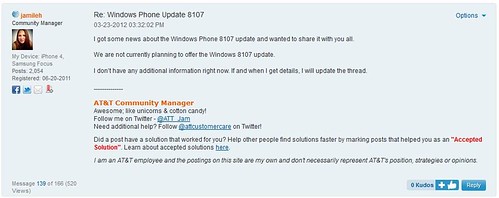
AT&T is in no mood to release Windows Phone 8107 software update as one of the AT&T community manager confirmed on community forum by saying

I got some news about the Windows Phone 8107 update and wanted to share it with you all.

We are not currently planning to offer the Windows 8107 update.

I don’t have any additional information right now. If and when I get details, I will update the thread.

It comes as surprise that AT&T won’t push 8107 update which fixes various issues, including the most famous "keyboard bug". Keep an eye on community as wireless carrier will provide some additional information on that matter in near future may be they will change their mind.

Source:- AT&T Windows Phone Community

Windows Phone update history


Monday, 30 May 2011

ASUS Eee Pad Transformer Android 3.1 Update Leaked

ASUS EeePadTransformer

Good news for Eee Pad Transformer owner’s very soon your device running Android 3.1, as official Android 3.1 for ASUS Eee Pad Transformer got leaked.  Although ASUS' official Android 3.1 update should be coming soon enough, but if you want to try this leaked update you can try it at your own risk.

How to Flash

  1. Extract EP101_SDUPDATE.zip from the below .tar file
  2. Place it on your SD card
  3. Make sure the Transformer is plugged in or has at least a 50% battery charge.
  4. Power off
  5. Press the volume down key and power key at the same time and continue to depress both until you notice a ROM Boot screen that advises you to press the volume up key within 5 seconds to start the ROM update process.
  6. Press the volume up key and the unit will update and reboot. It should take about 3~5 minutes
  7. After a reboot, a user notification should arrive in five minutes or so that the docking station has a firmware update available to version 0209. Please follow the instructions and update the docking station and then complete another reboot. The 0209 firmware offers improved typing speeds, mouse tracking and USB compatibility.

Download Android 3.1 Update for Eee Pad Transformer (~220MB)

Source:- Android Central Forum


Monday, 1 August 2011

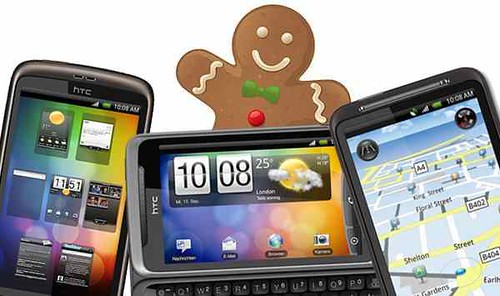
Gingerbread update for HTC Desire now Available but for expert users only

HTC Desire Gingerbread

HTC has just issued an Android 2.3 (Gingerbread) update for HTC Desire users but it’s not everyone As such HTC says " This update is only recommended for expert users who want to experience Android 2.3 and understand the limitations which apply to this update to the HTC Desire.  Due to memory constraints several applications have been removed from this update and we are only offering the ROM upgrade utility (RUU) for you to download. 

Please note that flashing this ROM will erase your previous customizations, including any messages, emails, contacts, and other personal information.  We suggest you take advantage of your Google account and other backup solutions available on the Android Market to ensure you do not lose your personal data.  Your SD Card will not be erased or modified. "

The major changes in this update include:

  • All customizations, including operator applications, will be removed
  • All wallpapers, except the default wallpaper, will be removed and placed online on the HTC Developer website
  • Several HTC applications will be removed and placed online on the HTC Developer website
  • The official Facebook application will be removed and is downloadable on the Android Market.

Note: This ROM update is for development only and not for general public use.  Upgrades to non-authorized phones may result in loss of functionality.  In addition certain functions may no longer be usable after re-flashing the ROM, including but not limited to MMS and SMS and HTC also disclaims liability for any unusable functions.  HTC disclaims liability for the loss and/or leakage of any personal data resulting from the re-flashing of the ROM.

The following regional variants are not compatible with this upgrade: Germany (Telekom Deutschland), North America, South Korea and Japan.

Download HTC Desire Android 2.3 update

Source:- HTC (Facebook)

Thursday, 3 March 2011

Microsoft resumes WP7 update for Samsung Handsets

Samsung Windows Phone 7

Microsoft is planning to resume rolling out the February update to Samsung phones. Last week, Microsoft pushed a small update to the Windows Phone 7; 90 percent of people who’ve received an update notification have installed the new software patch successfully whereas some had problems. Now, Microsoft has solved the problem and resumed the update. Here is the announcement from Microsoft.

Starting today, we plan to resume rolling out the February update to Samsung phones. Meanwhile, we’re continuing to dispatch the update to other Windows Phone models. As has been the case, the software patch is being sent out on a rolling schedule. You’ll see a message on your phone when it’s available.

During the past week the engineering team has pinpointed and fixed problems that were preventing a small percentage of Windows Phones from installing the February software patch.  We apologize again for the delay and continue looking for ways to improve the update process.

Windows Phone Blog

Wednesday, 2 May 2012

Download update for OS X 10.8 Mountain Lion Developer Preview 3

Download OS X 10.8 update

Apple has released an update for OS X Mountain Lion Developer Preview 3. Build 12A193i is available for free download via Software Update for those who already have Mountain Lion Developer Preview 3 installed.

OS X Mountain Lion introduces great features inspired by iPad, re–imagined for the Mac. With the Developer Preview, you can explore Game Center, Notification Center, Documents in the Cloud, new sharing capabilities, advanced security features, and much more.

Get the update from the Mac App Store.
If you already have Mountain Lion Developer Preview 3 installed, choose Software Update from the Apple menu to download the update from the Mac App Store. Download Xcode 4.4 Developer Preview 4 from the Mac Dev Center to continue building apps for Mountain Lion Developer Preview 3 Update.

Don't have Mountain Lion Developer Preview 3?
If you haven't already installed Mountain Lion Developer Preview 3, get your redemption code from the Mac Dev Center. You can redeem this code to download Mountain Lion from the Mac App Store.

Source: Apple

Saturday, 19 February 2011

Samsung Epic- Android 2.2 available beginning 22 February

Samsung Epic 4G update version EB13

New Samsung Epic 4G MR EB13 will upgrade the Epic 4G to Android 2.2/Froyo, many updates including Flash Player 10.1, Bluetooth dialing, allows app installs to external storage.

Android 2.2/Froyo will be pushed to Sprint Samsung Epic 4G customers beginning Feb. 21. All users should have access to Android 2.2 by Feb. 25.

This software update (version EB13) will include:

  • Upgrade of the Google OS from Éclair to Froyo (2.2.1)
  • Ability to install applications to external storage
  • Improved Bluetooth device support
  • Bluetooth Voice Dialing
  • Flash Player 10.1
  • GPS Enhancements
  • Improved OS performance

UPDATE PROCESS: The software update will be delivered as a wireless download (over-the-air, or OTA) in waves starting on February 21. All Samsung Epic 4G owners should have access to the download by the end of the week (Feb. 25).

Once your Epic is in the queue and eligible to download the update, a message will be pushed to your device saying that a software update is available. If you are not yet in the queue and you attempt to check for a software update manually, you will receive a message saying “no upgrade is available”.  This simply means your device isn’t in the current wave of updates.

All customers should have access to the update by the end of the week (Feb. 25).

Sprint Community

Saturday, 4 December 2010

AVG Fix for Win 7 64 Bit Customers Now Released

AVG Logo

  AVG released fix for Windows 7 64 Bit customer. AVG has identified a potential conflict between one of our recent updates (3292) and a significant number of systems running on the Windows 7 64 bit platform.AVG regrets any inconvenience this is causing our customers and we are working quickly to resolve this issue. AVG has pulled down the update and will release a program to make the fix automatically shortly.

In the interim, AVG encourages our Windows 7 64bit customers to do the following:

  • As the definitions update file was removed from the update servers, users who are running Windows 7 and have not downloaded and installed this update [3292] are ok.
  • Users who have downloaded the update and not yet rebooted their system at the prompt are advised to visit update.avg.com/softw/10/update/fixcorex3.exe, run the .exe file, and reboot your computer to have the issue fixed automatically.
  • Users who have downloaded the update and applied the system restart should follow the instructions provided on our website: forums.avg.com/ww-en/avg-free-forum?sec=thread&act=show&id=132999#post_132999 or www.avg.com/faq?num=4079

If the above mentioned steps did not resolve the issue, please use one of the following contacts:

  • Home and Free products:24/7 support +1-877-367-9933
  • Business products: 9:30am-6:30pm EST +1-828-459-5436 or skype: avg-nc
  • You can also email us at updateissuehelp@avg.com.

PRESS RELEASE

Friday, 20 January 2012

Sprint’s HTC EVO 4G, Design 4G and Samsung Epic 4G getting Software Updates

Sprint HTC Evo 4G,Evo Design 4G, Samsung Epic 4G software update

Sprint is rolling out OTA software updates for the HTC EVO 4G, HTC EVO Design 4G, and Samsung Epic 4G. Read the change log for each devices after the break.

HTC EVO 4G Software Update - 4.67.651.3

  • Security Update
  • Updated Peep client ( to align with Twitter)
  • Battery life improvements

HTC EVO Design 4G Software Update - 2.12.651.5

  • Security Update
  • Updated Peep client (to align with Twitter)
  • Updated Sprint Zone client
  • Battery life improvements
  • 3LM Enterprise Tool Access (no user interface changes)

Samsung Epic 4G Software Update - EL30

  • Security update
  • Speaker feedback fix
  • The QIK and Asphalt 5 applications are no longer preloaded.  When opening the applications using the application icon, you will be redirected to the Android market to download and install the full application. 

Source:- Sprint (1), (2), (3)   Via:- Android Police

Friday, 12 August 2011

Android 3.1 OTA update for G- Slate rolling out

G-Slate Android 3.1 OTA update

If you’re waiting for G-Slate’s Android 3.1 update then your wait is over. The OTA update is rolling out now. The update will be delivered in a staggered fashion to all G-Slate user’s. A notice will appear on your tablet when the update is available for you to install.

Android 3.1 allows customers to enjoy the tablet experience even more by adding user interface enhancements and features, including:

  • Google Videos - A new Videos app has been added that allows you to buy and rent movies.
  • Recent apps list expanded - The recent apps list has been expanded to show all apps recently used. After opening the apps list, touch one of the apps to access it.
  • Home screen resizable widgets - Widgets built-in to Android 3.0 (Calendar, Email, Gmail, etc.) can now be resized vertically or horizontally on any one of the five home screens.
  • USB accessory support - Customers can now attach a keyboard, pointing device, or gamepad to the G-Slate for use with typing, gaming, etc.

In addition to the enhancements, this software update is expected to improve the following:

  • Force close issues in the Google Talk and Music applications
  • Improved browser and widget responsiveness

Source:- T-Mobile

Thursday, 26 July 2012

2012 Xbox LIVE Update Public Beta Now Available

Xbox Logo

Microsoft today announced that the 2012 Xbox LIVE update public beta now available which includes select dashboard features including: Internet Explorer for Xbox; Personalized dashboard recommendations and Enhanced category search and discovery features. Xbox LIVE subscribers who want the latest updates on their consoles can sign-up for public beta update (you can find the link at the end of this post) by agreeing to a non-disclosure agreement for confidentiality reasons.

If you’re selected as a tester, an update will be pushed to your console once the public beta kicks off. The update will contain select dashboard features, including:

  • Internet Explorer for Xbox
  • Personalized dashboard recommendations
  • Enhanced category search and discovery features

Note: A console in the program is expected to remain fully compatible with standard retail consoles not in the program.

Signup for 2012 Xbox LIVE Update Beta

Source:- Major Nelson

Thursday, 12 July 2012

Sprint rolling out Android 4.0 ICS for Epic 4G Touch

Sprint Epic 4G Touch Galaxy SII ICS update

Sprint officially announced that starting today they will roll out OTA (over-the-air) Android 4.0 Ice Cream Sandwich update for Samsung Galaxy S II Epic 4G Touch.

Samsung Galaxy S II, Epic 4G Touch will receive the Android 4.0, Ice Cream Sandwich, update through an over-the-air maintenance release starting today. The over-the-air update will begin rolling out to users today, and all users should receive the update in the next month.

Samsung Epic 4G Touch Software Update - Ice Cream Sandwich (Android 4.0.4) - FF18

Enhancements/Fixes:

  • Android 4.0.4, Ice Cream Sandwich
  • Google Security Patches
  • Email Enhancements

Important Notes:

  • Software version is: S:D710.10S.FF18
  • Released in stages to devices

Source:- Sprint Community

Tuesday, 10 April 2012

AT&T Samsung Infuse 4G Android 2.3.6 Gingerbread update rolling out again

Samsung Infuse 4G SGH-i997

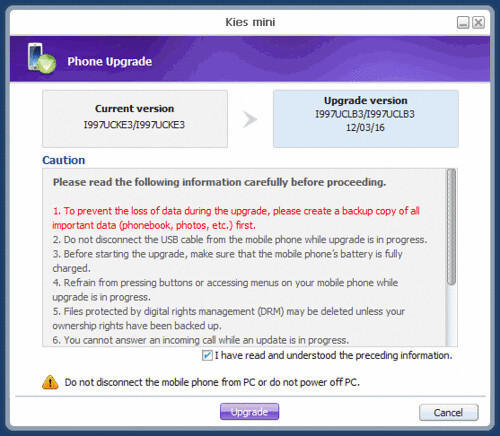
A couple of months ago, AT&T and Samsung rolled out Android 2.3.6 Gingerbread update for Samsung Infuse 4G but it was put on hold by the carrier due to "an issue". Now, AT&T and Samsung once again started rolling out the Gingerbread update for the Infuse 4G i997 devices, bumping the software version up to I997UCLB3.

The update is now available for download via Samsung Kies software desktop. Keep in mind that the AT&T mentions that this Gingerbread update for Samsung Infuse 4G will hard-reset the smartphone, so everything stored will be wiped. However, this hasn't been confirmed by users who have already upgraded their smartphones.

On a safer side, we recommend Samsung Infuse 4G owners to back up their sensitive data stored on the smartphone.

This update bring the following changes:-

  • Improved Copy and Paste functionality
  • Redesigned Multi Touch Software Keyboard
  • Download manager for long running HTTP downloads
  • Improved power management and application control
  • Notification Shade: “Flight Mode” added (“Silent” removed)
  • New Fonts options added include Choco Cooky, Cool Jazz, Rosemary
  • Keyboard Changes: Android Keyboard with Wider Spaced keys and Quick Keys at the top
  • New Widgets: The name of the content provider will be listed on the widget list along with the widget name. Previously only the widget name was provided.
  • New Widget: Traffic (Android) added to list of available widgets
  • Menu Changes/New Apps: Downloads and Google Books added new, Promotional pre-load of Angry Birds removed.

Source:- AT&T, Samsung 

Via

Wednesday, 17 August 2011

Apple releases Mac OS X Lion 10.7.1 and Mac OS X Lion Server 10.7.1

Mac OS X Server Update

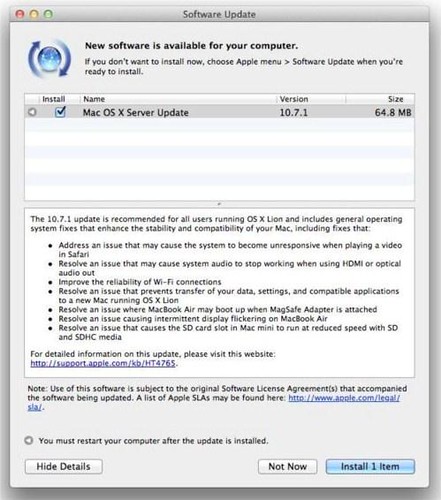
Apple has released Mac OS X Lion 10.7.1 and Mac OS X Lion Server 10.7.1. Lion update. 10.7.1 doesn't boast any new features, but it does solve a few major issues--read more after the cut.

Mac OS X Lion 10.7.1 update includes:

  • Address an issue that may cause the system to become unresponsive when playing a video in Safari
  • Resolve an issue that may cause system audio to stop working when using HDMI or optical audio out
  • Improve the reliability of Wi-Fi connections
  • Resolve an issue that prevents transfer of your data, settings, and compatible applications to a new Mac running OS X Lion

Mac OS X Lion Server 10.7.1 update includes:

  • Address an issue that may cause the system to become unresponsive when playing a video in Safari
  • Resolve an issue that may cause system audio to stop working when using HDMI or optical audio out
  • Improve the reliability of Wi-Fi connections
  • Resolve an issue that prevents transfer of your data, settings, and compatible applications to a new Mac running OS X Lion
  • Resolve an issue where MacBook Air may boot up when MagSafe Adapter is attached
  • Resolve an issue causing intermittent display flickering on MacBook Air
  • Resolve an issue that causes the SD card slot in Mac mini to run at reduced speed with SD and SDHC media

You can download the update by selecting Software Update from the Apple menu at the top left of your screen.

Source:- Apple(1), (2)

Wednesday, 7 December 2011

Honeycomb update rolling out for Logitech Revue? (update: it’s official)

Revue

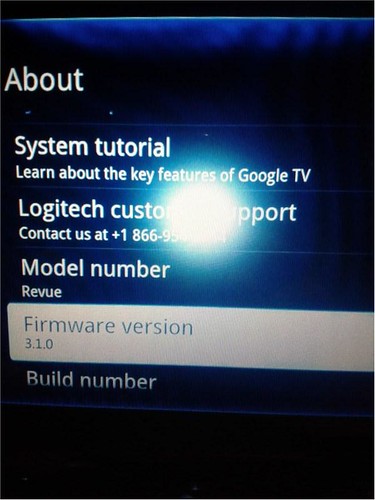
Looks like Logitech Revue owners finally getting Android 3.1 Honeycomb update as few lucky Revue owners already have it but nothing official from Logitech. We’ll keep you updated once its official.

Are you lucky the one who got Honeycomb update?

#Update: Logitech has officially announced that Android 3.1 Honeycomb update for Revue coming this week.

Source:- Engadget, Logitech Blog

Monday, 21 March 2011

Samsung Epic 4G and Samsung Galaxy Tab Now Sprint ID-Enabled

Samsung Galaxy Tab-Sprint

Sprint today announced that its award-winning Samsung Epic 4G and Samsung Galaxy Tab will be Sprint ID-enabled, beginning March 21, allowing customers who own these devices to download a complete mobile experience, called an "ID pack" – including apps, widgets, ringtones, wallpapers, shortcuts and more – tailored to their specific interests, business needs or favorite brands in a single download.

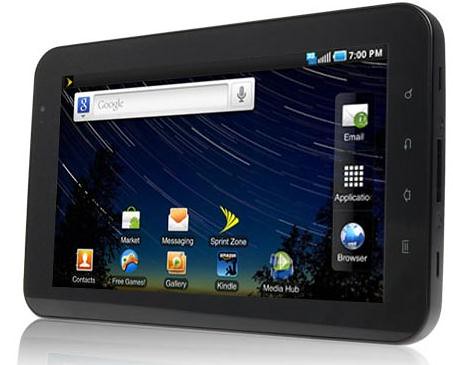
All existing Samsung Epic 4G and Samsung Galaxy Tab owners will be prompted this week to accept the over-the-air software update in their device's notification tab. Once the update is installed, the user can find the Sprint ID icon in their Applications Menu and begin experiencing Sprint ID. All users should have access to this new software update by March 24. The software update for Samsung Epic 4G will also include the Android 2.2 (Froyo) operating system update. This update will add numerous capabilities, including Adobe Flash Player 10.1, Bluetooth dialing and allows app installation to external storage.

Customers who purchase a new Samsung Epic 4G or Samsung Galaxy Tab can access Sprint ID from their Applications Menu when they turn it on for the first time. Customers can learn more about how to use Sprint ID on their device by visiting www.sprint.com/epicsupport or www.sprint.com/galaxytabsupport.


Thursday, 11 August 2011

PS3 firmware update v3.70 now available

PS3 firmware update v3.70

PS3 firmware update v3.70 gone live. This update will enable automatic syncing of Trophies to a player's online profile for PlayStation Plus subscribers. The firmware also packs a few additional features for non-paid users:-

  • adding a recommendation funtion that enables you to share your recommendations for PlayStation Store items, such as games and videos, with PlayStation Network friends
  • adding a new category on the XMB called TV/Video Services. This category will include video applications such as Netflix, Hulu PLUS, and VUDU.

Two updates Blu-ray 3D movies on PS3:

  • 3D support will now be available when accessing Java-based special features on Blu-Ray
  • DTS-HD MA, DTS-HD HR decoding/bit stream output (or lossless audio) will be supported while playing Blu-ray 3D movies.
  • 3D digital photos in MPO format can now be viewed in 3D on the XMB and in the Photo Gallery app.

Also, there is a minor PSP system software update (v. 6.60) available for download.

Download PS3 Firmware update v3.70

Source:- PlayStation Blog