Showing posts sorted by relevance for query iPod. Sort by date Show all posts

Thursday, 2 September 2010

Apple Unveils World’s Smallest iPod for $49

iPod Shuffle

Apple on its Live Event on 1 Sept 2010 announced a brand new, re-designed iPod shuffle. The button is back, and this model's got up to a 15 hour battery life, is available in five colors, and cost you $49.

Full press release :-

Apple iPod Shuffle

Apple® today announced the new redesigned iPod shuffle® which features both clickable “ring” buttons and Apple’s innovative VoiceOver technology, enabling users to easily navigate their music and playlists without ever looking at their iPod shuffle. The new wearable iPod shuffle has an all-aluminum enclosure with a built-in clip and comes in five brilliant colors—silver, blue, green, orange and pink. With nearly 50 percent more battery life, the new iPod shuffle features over 15 hours of music playback on a single battery charge* and offers 2GB of storage for just $49.

“We’re making the iPod shuffle even better by combining clickable buttons and VoiceOver technology, so users can find and enjoy their music without ever looking at their iPod shuffle,” said Steve Jobs, Apple’s CEO. “With its all-aluminum enclosure and built-in clip the new iPod shuffle is a great workout companion, and at just $49 it's a great entry-level iPod that almost everyone can afford.”

World's Smallest iPod

iPod shuffle is based on Apple’s incredibly popular shuffle feature, which randomly selects songs from a user’s music library. The clickable buttons make the new iPod shuffle even easier to use. Press the center button to play and pause, press the outer buttons to skip forward and back or adjust the volume up and down. 

The new VoiceOver button on top of iPod shuffle allows users to hear the name of the currently playing song and to switch between songs, playlists or Genius Mixes. VoiceOver speaks 25 different languages and even alerts users when their battery needs charging.

The new iPod shuffle now supports Genius Mixes, the popular iTunes® feature that automatically creates mixes from songs in a user’s music library that go great together. Genius Mixes provide the perfect way to rediscover music users already have, but may not have listened to recently. 

iPod® is the world’s most popular family of digital music players with over a quarter billion sold. Apple’s new holiday lineup includes a brand new iPod shuffle for just $49; the remarkable new iPod nano® with Multi-Touch™ starting at $149; the incredible new iPod touch with Retina™ display, Apple’s A4 chip, FaceTime®, HD video recording and Game Center starting at just $229; and iPod classic® in a 160GB model for $249.

Pricing & Availability

The fourth generation iPod shuffle will be available next week for a suggested price of $49 (US) for a 2GB model in silver, blue, green, orange and pink through the Apple Store® (www.apple.com), Apple’s retail stores and Apple Authorized Resellers. iPod shuffle comes with Apple Earphones and the iPod shuffle USB cable. iPod shuffle requires a Mac® with a USB 2.0 port, Mac OS® X v10.5.8 or later and iTunes 10 or later; or a Windows PC with a USB 2.0 port and Windows 7, Windows Vista, Windows XP Home or Professional (Service Pack 3) or later.


Apple


Thursday, 13 September 2012

Apple intros new iPod touch and iPod nano

new iPod touch

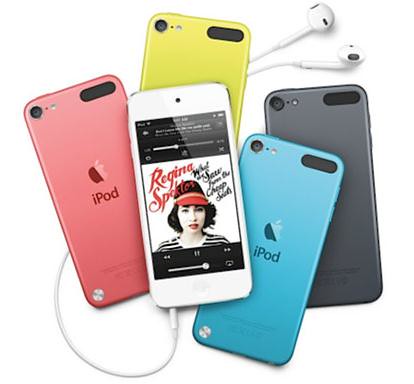
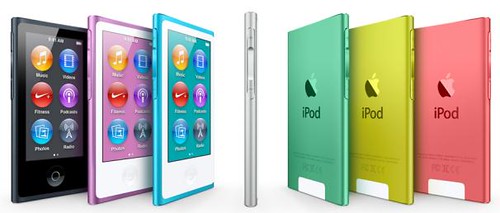
Apple today introduced all-new iPod touch and reinvented iPod nano. The new iPod touch is the thinnest iPod touch ever and features a brilliant 4-inch Retina display; a 5 megapixel iSight camera with 1080p HD video recording; Apple’s A5 chip; Siri, the intelligent assistant; and iOS 6. The new iPod touch comes in a gorgeous new ultra-thin and light anodized aluminum design, and for the first time ever, iPod touch comes in five vibrant colors. The new iPod nano is the thinnest iPod ever featuring a 2.5-inch Multi-Touch display; convenient navigation buttons; built-in Bluetooth for wireless listening; and the new iPod nano comes in seven gorgeous new colors.

iPod nano

Both iPod touch and iPod nano come with the new Lightning connector that is smaller, smarter and more durable than the previous connector. The all-digital Lightning connector features an adaptive interface that uses only the signals that each accessory requires, and it’s reversible so you can instantly connect to your accessories. The Lightning-to-30-pin Adapter is also available to connect iPod touch and iPod nano to legacy 30-pin accessories.

iPod touch and iPod nano also come with the new Apple EarPods featuring a breakthrough design for a more natural fit, increased durability and an incredible acoustic quality typically reserved for higher-end earphones.

Pricing and Availability

Pre-orders for the new iPod touch in pink, yellow, blue, white & silver, black & slate begin September 14 through the Apple Online Store (www.apple.com) for a suggested price of $299 (US) for the 32GB model and $399 for the 64GB model. The new iPod touch will be available in October through the Apple Online Store Apple’s retail stores and Apple Authorized Resellers. The fourth generation iPod touch is available in black and white for $199 (US) in a 16GB model and $249 (US) in a 32GB model.

iPod nano will be available in October in pink, yellow, blue, green, purple, silver and slate for a suggested price of $149 (US) in a 16GB model through the Apple Online Store (www.apple.com), Apple’s retail stores and Apple Authorized Resellers. iPod shuffle is available today in pink, yellow, blue, green, purple, silver and slate for a suggested price of $49 (US) in a 2GB model.

Thursday, 2 September 2010

Apple Reinvents iPod Nano with Multi-Touch Interface

New iPod Nano with Multi-Touch

  Apple unveiled a completely redesigned iPod nano featuring Apple’s Multi-Touch interface that lets users navigate their music collection by simply tapping or swiping a finger on the display. Nearly half the size and weight of the previous generation, the new iPod nano features a polished aluminum and glass enclosure with a built-in clip, making it instantly wearable. The new iPod nano features Genius Mixes, the ability to create and edit playlists, a built-in FM radio with live pause and up to 24 hours of music playback on a single battery charge.

iPod nano redesigned

   The new iPod nano with Apple’s Multi-Touch interface allows users to access their songs, artists, albums and playlists with a tap or swipe of their finger on the display. Holding down a finger returns the user to the Home screen, and users can easily use two fingers to rotate the screen if it is clipped onto their clothing upside down. Users can also customize their Home screen by simply dragging icons from other screens onto the Home screen.

iPod nano also features Shake to Shuffle, giving music lovers the ability to shake their iPod nano to shuffle to a new song in their music library. With its built-in FM radio, iPod nano lets you listen to your favorite radio stations, and live pause lets you pause and resume playing your favorite FM radio shows without missing a beat.

The new iPod nano will be available next week for a suggested price of $149 (US) for the 8GB model and $179 (US) for the 16GB model. Both models are available in silver, graphite, blue, green, orange and pink through the Apple Store.

Apple


Sunday, 13 November 2011

Apple launches iPad Nano (1st gen) Replacement Program

iPad Nano replacement

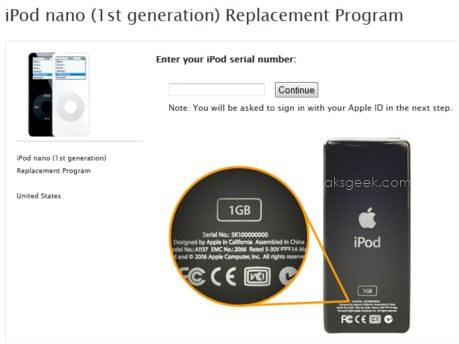
Apple has launched a replacement program for the first generation iPod nano, after the company has found that some early iPod nanos' pose a safety risk because of the aging batteries that power them.

Apple has determined that, in very rare cases, the battery in the iPod nano (1st generation) may overheat and pose a safety risk. Affected iPod nanos were sold between September 2005 and December 2006.

This issue has been traced to a single battery supplier that produced batteries with a manufacturing defect. While the possibility of an incident is rare, the likelihood increases as the battery ages.

Apple recommends that you stop using your iPod nano (1st gen) and follow the process noted below to order a replacement unit, free of charge.

Note: This battery issue is specific to the iPod nano (1st gen) and does not affect any other iPod.

How to Identify an iPod nano (1st gen):

It has a black or white plastic front and a silver metal back - later iPod nano models have a metal front and back.

Click here order a replacement unit via the web


Thursday, 2 September 2010

New iPod Touch : Retina Display, FaceTime, HD Video Recording

Apple's New iPod Touch

  Apple today announced the new iPod touch, packed with incredible new features including Apple’s stunning Retina display, FaceTime video calling, HD video recording, Apple’s A4 chip, 3-axis gyro, iOS 4.1 and Game Center—all combined in the thinnest and lightest iPod touch ever. The new iPod touch features up to 40 hours of music playback and seven hours of video playback on a single battery charge.

“We’ve put our most advanced technology inside the new iPod touch,” said Steve Jobs, Apple’s CEO. “Whether you’re listening to music, playing games, making FaceTime video calls, browsing the web, capturing HD video or watching TV shows and movies, the new iPod touch with its Retina display, A4 chip and 3-axis gyro is more fun than ever.”

The new iPod touch will be available next week for a suggested price of $229 (US) for the 8GB model, $299 (US) for the 32GB model and $399 (US) for the 64GB model through the Apple Store

[Press Release]

Apple Announces iTunes 10 with Ping

iTunes 10 with Ping

   With the announcement of all those new iPods, Apple announced iTunes 10 with Ping (music-oriented social network). With iTunes Ping you can follow your favorite artists and friends to discover what music they’re talking about, listening to and downloading, you can  post your thoughts and opinions, your favorite albums and songs, the music you’ve downloaded from iTunes. Ping Social Music Discovery now available to 160 million iTunes users in 23 countries.

Full Press Release:-

September 1, 2010—Apple® introduced iTunes® 10 with Ping, a new music-oriented social network for following your favorite artists and friends to discover what music they’re talking about, listening to and downloading. iTunes Ping lets you post your thoughts and opinions, your favorite albums and songs, the music you’ve downloaded from iTunes, plus view concert listings and tell your friends which concerts you plan to attend. iTunes 10 also features HD TV show rentals* for just 99 cents an episode and AirPlay wireless music playback.

“iTunes is the number one music community in the world, with over 160 million iTunes users in 23 countries, and now we’re adding social networking with Ping,” said Steve Jobs, Apple’s CEO. “With Ping you can follow your favorite artists and friends and join a worldwide conversation with music’s most passionate fans.”

Ping lets you follow your favorite artists to see what they’re up to, check out photos and videos they’ve posted, see their tour dates and read comments about other artists and albums they’re listening to. You can also create a profile on iTunes to let your friends know who you’re following, what you’re listening to and which concerts you’re going to. There’s no better way to discover new music than to find out what your friends are listening to, and Ping’s Recent Activity feed shows you their posts about artists, albums, songs and concerts, plus a consolidated Top 10 list of the songs and albums your friends and the artists you follow are downloading from iTunes. In addition to using Ping on your desktop computer, you can take it with you on your iPhone® or iPod touch®,** so you’re always plugged into your personal music scene.

With iTunes 10, you can rent your favorite HD TV shows commercial free from ABC, ABC Family, Fox, Disney Channel and BBC America and watch them at home or on the go for just 99 cents an episode. Thousands of episodes are available, many the day after broadcast, to watch on your Mac® or PC, iPhone, iPod touch and the all-new Apple TV®, and you have 30 days from the moment you rent an episode to start watching it, and 48 hours after that to finish it.

iTunes 10 also features AirPlay wireless music playback to listen to your music on remote speakers using Apple’s AirPort Express® base station. In addition, AirPlay now works without AirPort Express, using speakers, receivers and stereo systems from companies including Bowers & Wilkins, JBL, Denon and iHome, so you can enjoy your entire iTunes music library wirelessly from any room in the house with no extra gear required.   

iTunes 10 is available immediately as a free download at www.itunes.com. 

The iTunes Store® has a catalog of over 14 million songs, over 65,000 TV episodes and over 10,000 movies including over 3,000 in stunning high definition video. With Apple’s legendary ease of use, pioneering features such as iTunes Movie Rentals, integrated podcasting support, the ability to turn previously purchased tracks into complete albums at a reduced price, and seamless integration with iPod®, iPad™ and iPhone, the iTunes Store is the best way for Mac and PC users to legally discover, purchase and download music and video online.

*HD TV show rentals require iOS 4.1, which is a free software update available via iTunes 10 or later for iPhone and iPod touch users. iOS 4.1 works with iPhone 3G, iPhone 3GS, iPhone 4, and second, third and fourth generation iPod touch. 99 cent HD TV rentals only available in the US.

**Ping for iPhone and iPod touch requires iOS 4 or later, which is a free software update available via iTunes 9.2 or later for iPhone and iPod touch users. iOS 4 works with iPhone 3G, iPhone 3GS, iPhone 4, and second, third and fourth generation iPod touch

.

Apple


Tuesday, 31 May 2011

Apple iWork Now Available For iPhone & iPod touch Users

Keynote

Apple today announced that its groundbreaking iWork productivity apps, Keynote, Pages and Numbers, are now available for iPhone and iPod touch, as well as iPad. Created for the Mac and then completely redesigned for iOS and Apple’s revolutionary Multi-Touch interface, Keynote, Pages and Numbers allow you to create and share stunning presentations, beautifully formatted documents and powerful spreadsheets on the go. iWork apps are available on the App Store for $9.99 each to new users and as a free update for existing iWork for iPad customers.

Keynote, Pages and Numbers import and export documents from iWork for Mac and Microsoft Office; print wirelessly using AirPrint; and include beautiful Apple-designed themes and templates. All iWork apps now include improved document management with thumbnail images that let you find your files quickly, organize them and group them into folders using intuitive gestures. From the Tools button in the toolbar, you can easily share any presentation, document or spreadsheet without leaving the app.

Keynote makes it easy to create impressive presentations, complete with animated charts and transitions. You can play your presentation in Full Screen view on the stunning, high-resolution Retina display or connect to a projector or HDTV for a large audience. Available separately, the Keynote Remote app allows your iPhone or iPod touch to control a Keynote presentation on any iOS device or Mac.

Pages is the most beautiful word processor ever designed for a mobile device and has everything you need to create amazing documents. Pages takes full advantage of the high-resolution Retina display on iPhone 4 and iPod touch so you can see all the detail and richness of your documents. To make working with text easy on iPhone and iPod touch, Smart Zoom automatically zooms in to follow the cursor while you’re editing and zooms back out when you’re done.

Numbers uses Multi-Touch gestures and an intelligent keyboard to help you create compelling, great-looking spreadsheets with over 250 easy-to-use functions, flexible tables and eye-catching charts. Just like Pages, Numbers takes advantage of the high-resolution Retina display and Smart Zoom to make working with text and cells on iPhone 4 or iPod touch easy.

Pricing & Availability

Keynote, Pages and Numbers are universal apps that run on iPad and iPad 2, iPhone 3GS and iPhone 4, and iPod touch (3rd & 4th generation). Keynote, Pages and Numbers are available from the App Store for $9.99 (US) each for new users, or as a free update for existing iWork for iPad customers. Keynote Remote is sold separately via the App Store for 99 cents (US).

Source:-Keynote, Page, Numbers

Thursday, 3 March 2011

Apple introduces iOS 4.3

iOS 4.3

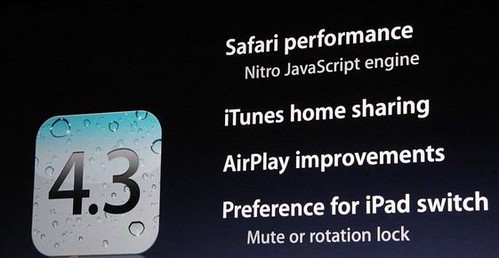
Apple introduced iOS 4.3, the latest version of the world’s most advanced mobile operating system. New features in iOS 4.3 include faster Safari mobile browsing performance with the Nitro JavaScript engine; iTunes Home Sharing; enhancements to AirPlay; the choice of using the iPad side switch to either lock the screen rotation or mute the audio; and the Personal Hotspot feature for sharing an iPhone 4 cellular data connection over Wi-Fi.

The Safari mobile browsing experience gets even better with iOS 4.3. The Nitro JavaScript engine that Apple pioneered on the desktop is now built into WebKit, the technology at the heart of Safari, and more than doubles the performance of JavaScript execution using just-in-time compilation. With the Nitro JavaScript engine, Safari provides an even better mobile browser experience working faster to support the interactivity of complex sites you visit on a daily basis.

New iTunes Home Sharing allows iOS 4.3 users to play music, movies and TV shows on an iPad, iPhone or iPod touch from their iTunes library on a Mac or PC over a local Wi-Fi network. With a simple tap you can enjoy all the media in your iTunes library wherever you are in your home. You can stream a movie from your Mac in one room to your iPad in another or stream an iTunes mix to your iPod touch from the office to the kitchen. With Home Sharing on your iPad, iPhone or iPod touch you’ve got your entire iTunes library in your hands wherever you are in your home.

iOS 4.3 includes enhancements to AirPlay, the breakthrough wireless technology that allows users to stream music, photos and video to Apple TV. With iOS 4.3 you can stream additional content including video from third party apps and web sites, videos from the Photos app and previews from the iTunes app to your TV. AirPlay also allows you to bring photos to life on the TV screen by using one of the stunning new slideshow transitions, or shoot a video on your iPad 2, iPhone or iPod touch and stream it directly from the Photos app to Apple TV.

The new Personal Hotspot feature in iOS 4.3 lets you bring Wi-Fi with you anywhere you go, by allowing you to share an iPhone 4 cellular data connection with up to five devices in a combination of up to three Wi-Fi, three Bluetooth and one USB device. Joining a Personal Hotspot is easy and once the feature is enabled a status bar displays how many devices are currently connected. Every connection is password protected and when not in use Personal Hotspot turns itself off to save battery life.

iOS 4.3 will be available to iPad, iPhone and iPod touch users as a free software update on Friday, March 11. iOS 4.3 is compatible with iPad, iPad 2, iPhone 3GS, iPhone 4 (GSM model), plus third and fourth generation iPod touch.

For more information please visit www.apple.com.


Tuesday, 29 March 2011

JBL OnBeat loudspeaker for iPad, iPhone and iPod devices

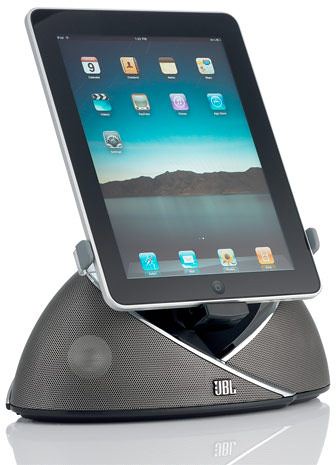
JBL OnBeat loudspeakers

HARMAN International Industries today announced the release of its new JBL OnBeat loudspeaker docking station, the first JBL dock to bring your next-generation entertainment experience to life, delivering realistic, dynamic sound with any iPad, iPhone or iPod device.

Bringing Netflix movie streaming, gaming, Skype conversations, YouTube clip watching and more to an entirely new level with HARMAN's signature sound quality, the JBL OnBeat dock features dual Phoenix full-range transducers with computer-optimized DSP equalization, creating a richly detailed soundstage. A universal connector that firmly docks an iPad, iPod or iPhone lets you rotate iPod and iPhone screens to portrait or landscape orientation for the best video display, and an infrared remote (IR) puts you in full control of system functions and music navigation from across the room.

Stream action-packed movies and intimate family photos and videos, and share the hottest content on the Web in your living room with family and friends through the addition of an optional composite cable that can send video content from the device directly to your TV.

The new JBL OnBeat also features a USB connection to sync and charge devices when connected to the iTunes music library (cable not included), and a 3.5mm stereo mini-jack auxiliary input that connects to virtually all portable media devices (cable not included). The dock has the dynamic JBL Weave design styling that is as sculptural as it is conversation-starting. Brackets to attach the iPod, iPhone and iPad to the dock are included in the package. The JBL OnBeat also serves as a charging station for your iPod or iPhone while it is docked.

The JBL OnBeat loudspeaker dock is available in April in black for $149.95.

For more information visit http://www.jbl.com/onbeat.

Friday, 24 August 2012

Philips Launches a new range of Home Theatre Systems, GoGEAR MP3/MP4 players, Docking Speakers and Headphones

Philips

Philips expanded its Lifestyle Entertainment portfolio with the launch of a range of state-of-the-art entertainment solutions – Home Theatre Systems, GoGear MP3/MP4 players, Docking Speakers and Headphones – designed to deliver a superior entertainment experience.

Home Theatre Systems:

The new Philips Home Theatre Systems are designed to disperse powerful sound evenly around the room to bring cinema right into your home. With a customized user interface and better bass and thump to match, this new range promises a truly blockbuster home entertainment experience.

  • Customized on-screen display: Adjusted User Interface naming to fit cultural differences
  • Customized sound settings: More Bass for a better movie and sports experience
  • Customized subwoofers: 23% bigger subwoofer for better thump

HTS2511 and HTS2512: These compact speakers with Dolby Digital surround sound are designed to pump up your home entertainment experience. Their 300W RMS power delivers great sound for your movies and music which can be played from almost any source, be it a DVD, VCD, CD or a USB device. HTS2511 and HTS2512

The HTS2511 and HTS2512 are priced at INR 9890.

HTS3533, HTS3532SL and HTS3532BL: These powerful compact speakers are designed to upgrade your home entertainment experience with exposed speakers drivers offering powerful surround sound and DVD video upscaling to 1080p via HDMI for near-HD images. It also comes with an EasyLink feature to control all HDMI CEC devices via a single remote. HTS3533, HTS3532SL and HTS3532BL

The HTS3533, HTS3532 (SL and BL) are priced at INR 12890 and INR 10890 respectively.

HTS6543 and HTS6553: These classy compact speakers allow you to bring the power of cinema to your home and drive your home entertainment experience even further. Their 3D angled speakers disperse sound evenly around the room for an enhanced sound experience. These can be played using any source - DVD, VCD, CD and USB devices and HDMI for high definition movies – and include an EasyLink feature to control all HDMI CEC devices via a single remote. HTS6543 and HTS6553
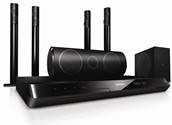
The HTS6543 and HTS6553 are priced at INR 20990 and INR 23990 respectively.

GoGEAR:

Philips GoGEAR MP3/MP4 players come bundled with innovative features to ensure a superior on-the-go entertainment experience:

  • Fullsound: To bring your MP3 music to life
  • SafeSound: For maximum music enjoyment without hearing damage
  • Surround for movies: To put you in the middle of the action
  • Philips Songbird: To discover, play and sync your music
  • LikeMusic: For playlists of songs that sound great together

GoGEAR SoundDot MP3 Player: SoundDot is a small, colourful and fashion-like accessory. It’s a simple device which is comfortable to wear especially for everyday activities like walking, exercising, or even cleaning the house. It comes with a built-in clip for convenient and hands-free use and Fastcharge - a quick 6-minute charge for 60 minutes of play to get you going while on the move. GoGEAR SoundDot MP3 Player

The GoGEAR SoundDot is priced at INR 1599.

GoGEAR SA060 MP4 Player: SA060 offers the superior sound experience and makes you enjoy all the multimedia you can pack in. With SA060, you get the FLAC & APE lossless codec support for precise sound quality, 3.2” HVGA color display for superb video enjoyment, Touch-screen control for smooth and intuitive navigation, Kinetic scrolling for quick and intuitive library browsing, Text reader to view text files and a 4/8GB internal memory to stuff in all that you need to enhance and share your multimedia experience. GoGEAR SA060 MP4 Player
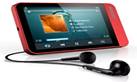
The GoGear SA 060 (4GB) is priced at INR 5999.

Docking Speakers:

Whether you're looking for a sleek wireless speaker packed with features or just a simple way to listen to your iPod or iPhone music out loud, the new range of Philips docking speakers is all you need.

DS9800W: The stylish Philips DS9800W comes equipped with AirPlay which enables you to stream songs directly from iPod Touch, iPhone, iPad and also iTunes. Its SoundSphere technology gives you a chance to experience the natural, deeper and wider sound impression. DS9800W

The DS9800W is priced at INR 65990.

AS111 – Android Docking: Now you can gear up to get great sound as this speaker plays and charges your Android powered phone and auto-synchronizes its clock with your device. It comes packaged with Songbird so you can sync music between your phone and PC, and a free app for even more functions. AS111 – Android Docking
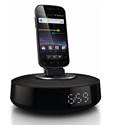
The AS111 is priced at INR 5999.

AJ3270D: This docking station helps you enjoy the pleasure of starting your day right - with favorite music from your iPod/iPhone. This compact clock plays and charges the latest iPod/iPhone models, even with protective cases on. If you prefer, you can even wake up to the radio or a buzzer. AJ3270D
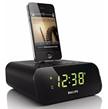
The AJ3270D is priced at INR 3999.

AJ7030D: Be prepared to rise and shine to favorite tunes from your iPod/iPhone or FM with the dashing Philips Clock radio that will brighten up your room - and mornings. Its smart dock lets you charge your devices without the need to remove its protective casing and comes with a dual alarm to wake you and your partner at different times.

The AJ7030D is priced at INR 6490.

DS1150: The compact Philips DS1150 docking speaker delivers full and rich sound and automatically synchronizes with your iPhone/ iPod's clock settings. You can also enjoy an adjustable night light and the convenience of charging a second mobile device.

The DS1150 is priced at INR 5999.

Headphones:

Philips O’Neil: The all new range of Philips O’Neil headphones is the toughest set of headphones in the market, designed to suit different consumer neePhilips O’Neilds.

Bend: Philips O’Neil Bend provides powerful sound with Dynamic 30mm drivers delivering deep and dynamic bass. The flexible headband provides enhanced durability. The cable stress relief prevents breakage, and the tough tangle-free Bendcable with reinforced connectors provides enhanced strength.
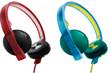
SHO 4200 is priced at INR 3499 & SHO 4205 with mic is priced at INR 3999.

Stretch: Philips O’Neil Stretch comes powered with 40mm drivers, dynamic bass, universal mic, cable stretch relief to prevent breakage and tough- tangle free cable & reinforced connectors. It also offers deluxe noise isolating super soft ear cushions.

SHO 9560 is priced at INR 4499 and SHO 9565 is priced at INR 4999.

All the products in the new range will be available at all leading retail stores across India starting August, 2012.

[Press Release]

Wednesday, 10 November 2010

ZTE PEEL Brings Sprint's 3G Network Reliability to Apple iPod Touch

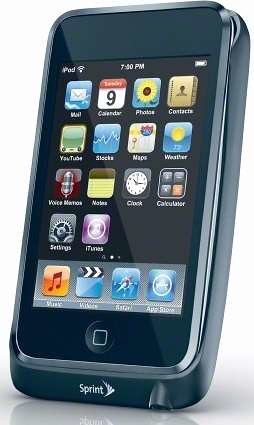
ZTE PEEL- Sprint

Beginning on Nov. 14, Sprint customers can attach ZTE PEEL to their Apple iPod touch and connect to Sprint's 3G network.

ZTE PEEL is a unique device that cradles the second- and third-generation iPod touch with a case-like form factor. With universal Wi-Fi compatibility and support for up to two Wi-Fi enabled devices, iPod touch users will have a virtually anywhere, anytime Internet connection that removes the reliance on a Wi-Fi hotspot for a data connection.Customers simply slide their iPod touch (touch-screen face out) into ZTE PEEL, press down on both sides until it clicks into place, and then press the power button located on the back of ZTE PEEL to connect to Sprint's 3G network.

ZTE PEEL will be available beginning Sunday, Nov. 14, through Sprint retail stores and direct ship sales channels, including Web sales (www.sprint.com) and Telesales (1-800-SPRINT1) for $79.99 (taxes excluded). The ZTE PEEL $29.99 monthly service plan from Sprint allows up to 1GB of 3G data on the Sprint network (taxes and surcharges excluded) with no annual contract required.

Key features of ZTE PEEL include advanced security through WEP, an internal antenna and compatibility with Windows 7, Windows Vista, Windows XP, Macintosh OS 10.5, 10.6. No software installation is required for use.

With the Sprint Free Guarantee, customers can take advantage of ZTE PEEL for 30 days. If not completely satisfied, customers may return the device within 30 days to get reimbursed for the device purchase and activation fee, get the restocking fees waived, and receive a full refund for the monthly service plan charges.

Monday, 28 May 2012

Giveaway - Get Wondershare Video Converter Platinum for Free

Wondershare Platinum

Courtesy of Wondershare, We’re giving away 10 licenses of Wondershare Video Converter Platinum to our readers for free which normally cost $39.95.

Wondershare Video Converter Platinum_02

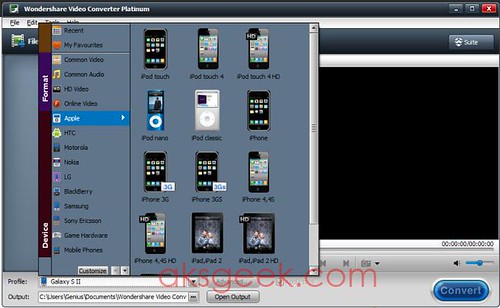
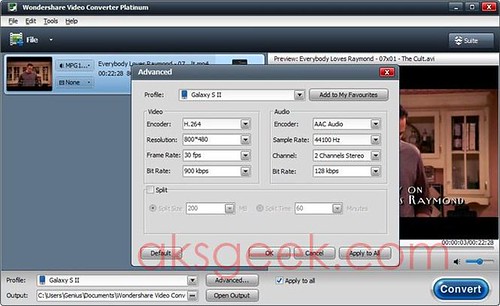
Wondershare Video Converter Platinum is an easy to use video converter which allows you to convert your favorite videos to various popular formats like iPod, iPhone, Apple TV, Zune, PSP, Pocket PC, Creative Zen, Archos and so on.

Just click the Add File button or use drag and drop interface to add more than one file for the conversion, choose your favorite format or device and hit convert button. You can also take snapshots, crop, apply effects, add watermark and subtitles to the videos. Wondershare Video Converter Platinum_convert

Supported Input Formats

  • Video Formats - AVI, MP4, DA, MPG, MPEG, NUT, H.264, NSV, VOB, MOV, FLV, MKV, TS/M2TS/TP/TRP (AVCHD H.264, VC-1, MPEG-2 HD), DV, RM, RMVB, WMV, AS, 3GP, 3G2
  • Audio Formats - WAV, APE, FLAC, M4A, WMA, AAC, AC3, MKA, OGG, AIFF, RA, RAM, MP3, MPA

Supported Output Formats

  • Video Formats - WMV, VOB, MPG, MOV, MP4, AVI, ASF, DV, 3GPP, 3GP, 3G2, FLV, MKV, M4V, SWF, DivX, WebM
  • Audio Formats - WAV, APE, FLAC, M4A, WMA, AAC, AC3, MKA, OGG, AIFF, RA, RAM, MP3, MPA
  • Image Formats - BMP, JPEG

Devices

  • Apple devices - iPad (new iPad included), iPhone, iPhone 4S/4, iPhone 3GS, iPod touch, iPod classic, iPod nano, Apple TV 3, Apple TV etc.
  • Game hardware - PSP, PS3, Xbox, Xbox 360, Wii, NDS
  • Mobile phones - Android, Blackberry, Windows Phone 7, Nokia, HTC, Motorola, Samsung, Sony Ericsson, LG, etc.
  • General MP4 players - Zune, Archos, Creative Zen, iRiver, Walkman, etc.

How to get Wondershare Video Converter Platinum for free?

Just do the task mentioned below. a Rafflecopter giveaway

(Make sure java script is enabled in your browser)

Contest Start Date: May 28th, 2012

Contest End Date: June 10th, 2012

Winner will be announced before or after June 13th, 2012.

Until then you can download and try Wondershare Video Converter Platinum trial.

P.S:- Winners email address will be send to Wondershare to generate registration code.

Wednesday, 15 September 2010

Apple’s AirPrint Wireless Printing for iPad, iPhone & iPod touch Coming to Users in November

Press Release


Apple AirPrint Wireless Printing - iOS 4.2 Beta

  Apple today announced that it is releasing a beta version of its AirPrint wireless printing for iPad, iPhone and iPod touch to members of Apple’s iOS developer program today, and that AirPrint will be included in the free iOS 4.2 software update in November.

  AirPrint automatically finds printers on local networks and can print text, photos and graphics to them wirelessly over Wi-Fi without the need to install drivers or download software. HP’s existing and upcoming ePrint enabled printers will be the first to support printing direct from iOS devices.

  “AirPrint is Apple’s powerful new printing architecture that matches the simplicity of iOS—no set up, no configuration, no printer drivers and no software to download,” said Philip Schiller, Apple’s senior vice president of Worldwide Product Marketing. “iPad, iPhone and iPod touch users can simply tap to print their documents or photos wirelessly to an HP ePrint printer or to a printer shared on a Mac or PC.”

  “We’re pleased to work with Apple to bring Apple’s AirPrint to our fall lineup of ePrint printers in time for the holiday shopping season,” said Vyomesh Joshi, HP executive vice president, Imaging and Printing Group. “Making it easy for our customers to print anytime, anywhere, is a key priority for HP. iPad, iPhone and iPod touch customers are going to love how easy it is to print using our new range of ePrint printers, creating high-quality printed pages in an instant.”

  AirPrint is designed to support a wide range of printers from entry level inkjet printers to office laser printers. Additionally, iOS 4.2 devices can print to printers shared through a Mac or a PC. iOS 4.2 compatible HP printers this fall include the HP Photosmart, Officejet, Officejet Pro and LaserJet Pro series ePrint enabled printers.

Thursday, 10 November 2011

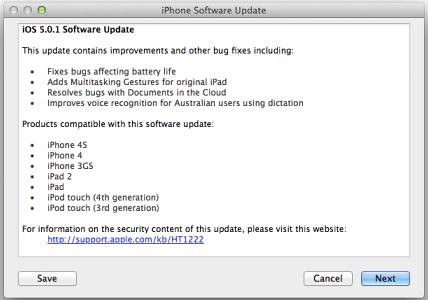
Apple releases iOS 5.0.1 for iPhone, iPad and iPod Touch

Apple releases iOS 5.0.1

Apple has released iOS 5.0.1 for the iPhone, iPad, and iPod touch.

This update contains improvements and other bug fixes including:

  • Fixes bugs affecting battery life
  • Adds Multitasking Gestures for original iPad
  • Resolves bugs with Documents in the Cloud
  • Improves voice recognition for Australian users using dictation

Products compatible with this software update:

  • iPhone 4S
  • iPhone 4
  • iPhone 3GS
  • iPad 2
  • iPad
  • iPod touch (4th generation)
  • iPod touch (3rd generation)

Thursday, 8 March 2012

Apple Brings 1080p High Definition to New Apple TV

Apple

Apple today announced the new Apple TV featuring 1080p programming including iTunes movies and TV shows, Netflix, Vimeo, photos and more in HD. With iTunes in the Cloud, customers can purchase and play their favourite movies and TV shows from the iTunes Store and watch them instantly on their HD TV. The new Apple TV features a simpler, refined user interface making it easier than ever to access your purchased movies, TV shows and music with iTunes Match right from iCloud. With AirPlay, users can stream or mirror their favourite content from their iPad or iPhone 4S to Apple TV.

Apple TV users can choose from an incredible selection of programming including over 15,000 movies and over 90,000 TV episodes on the iTunes Store. Apple TV also offers great content from Netflix's streaming catalogue, live sports from MLB, NBA and NHL as well as Internet content from Vimeo, YouTube and Flickr.

With iCloud, you can buy movies and TV shows on Apple TV and watch them on your iPhone, iPad, iPod touch, Mac or PC. iCloud also stores photos and pushes them wirelessly to all your devices including your HD TV via Apple TV. iCloud provides an incredibly easy way to get instant access to all of your content, no matter which device is being used.

iPhone, iPad and iPod touch users can use AirPlay to stream music, photos and videos from their devices directly to their HD TV with Apple TV. iPhone 4S or iPad users can use AirPlay Mirroring to show the screen of their device right on their HD TV, allowing them to stream web pages, spreadsheets or even games.

Apple TV makes it easy to enjoy iTunes video, music and photo libraries from your computer right on your HD TV-and with iCloud you can instantly enjoy content that was purchased on your iPhone, iPad or iPod touch as well. iTunes Match customers can now play their entire music library from iCloud-even songs they've imported from CDs. Users can also control Apple TV with their iPhone, iPad or iPod touch using the Remote app, available as a free download on the App Store (www.itunes.com/appstore).

Pricing and Availability

Apple TV will be available on Friday, March 16 for a suggested retail price of £99 including VAT, through the Apple online store, Apple's retail stores and Apple Authorised Resellers. Apple TV requires iTunes 10.5 or later. Apple TV requires an 802.11g/n Wi-Fi network or Ethernet network, a broadband Internet connection and a HD TV capable of 1080p or 720p and an HDMI cable that is sold separately. iTunes movie and TV show availability varies by country. Second generation Apple TV users can install the new Apple TV user interface via a free software update, available today. Third generation Apple TV hardware is required to play 1080p video.


Wednesday, 19 January 2011

Mobile Payment Debut Nationally at Starbucks

Starbucks Mobile payment

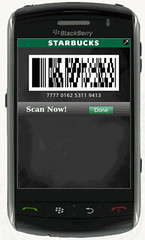
Starbucks announced the launch of mobile payment in all U.S. company-operated stores, allowing customers to pay for in-store purchases with select smartphones. Building on the earlier introduction of Starbucks Card Mobile App for select BlackBerry smartphones, iPhone and iPod touch and a successful mobile payment test program, customers now have access to the largest mobile payment program in the U.S and the fastest way to pay at Starbucks. This national program now includes nearly 6,800 company-operated stores and more than 1,000 Starbucks in U.S. Target locations.

In addition to engaging a loyal base of several million cardholders with the offering, Starbucks anticipates mobile payment will be a draw for customers looking to experience the speed, ease and convenience of paying with their mobile phone. "Today, one in five Starbucks transactions is made using a Starbucks Card and mobile payment will extend the way our customers experience and use their Starbucks Card," said Brady Brewer, vice president Starbucks Card and Brand Loyalty. "With mobile payment, the Starbucks Card platform further elevates the customer experience by delivering convenience, rewarding loyalty and continuing to build an emotional connection with our customers."

To experience mobile payment at Starbucks, customers just need to download the free Starbucks Card Mobile App for select BlackBerry smartphones, iPhone or iPod touch mobile devices. More than one-third of U.S. Starbucks customers use smartphones, of which nearly three quarters use BlackBerry smartphone or iPhone mobile devices. In addition to the mobile payment capability, the app allows customers to manage their Starbucks Card account, check their card balance, reload their card with any major credit card (iPhone users can also use the PayPal feature), check their My Starbucks Rewards status and find a nearby Starbucks store with the store locator feature.

Customers can pay with their smartphone by holding their mobile device in front of a scanner on the countertop and scan the Starbucks Card Mobile App's on-screen barcode to make a purchase. Customers have successfully adopted this technology in test markets in Seattle, Northern California, New York and more than 1,000 Starbucks in U.S. Target stores.

Mobile payment is built on the Starbucks Card platform, which continues to experience significant customer adoption. Customers loaded more than $1.5 billion on Starbucks Cards in 2010, an increase of 21 percent over 2009, driven in part by the My Starbucks Rewards program which provides benefits to customers who pay with a registered Starbucks Card at participating stores. With the introduction of the quick and easy Starbucks Card Mobile App and the mobile payment feature, customer will find yet another reason to use their Starbucks Card for payment.

To download the Starbucks Card Mobile App and check out mobile payment, BlackBerry smartphone users can text the word "GO" to 70845 or visit http://www.starbucks.com/coffeehouse/mobile-apps/starbucks-card-mobile-bb from their device (Standard message and data rates apply.). It's available for a variety of BlackBerry smartphones including BlackBerry 8800 series; BlackBerry Bold series; BlackBerry Curve series; BlackBerry Storm; BlackBerry Storm2 and BlackBerry Tour.

iPhone and iPod touch users can download the app from the App Store at www.itunes.com/appstore/.

Visit www.starbucks.com/coffeehouse/mobile-apps for more information about the Starbucks Card Mobile app and payment system for select BlackBerry smartphones and Apple iPhone, iPod touch.

Wednesday, 28 December 2011

Untethered 5.0.1 Jailbreak for Non-A5 Devices Now Available

non-A5 devices pwned

Pod2g's has released untethered iOS 5.0.1 jailbreak for the iPhone 4, iPhone 3GS, iPod Touch 3G, iPod Touch 4G, and iPad 1.

According to Dev-Team, this exploit has been incorporated into redsn0w 0.9.10, the Pwnage Tool and Chronic Devteam's Cydia package.

Here are the basic steps for how to get it:

  • The untether is for iOS 5.0.1 on iPhone3GS, iPhone4, iPhone4-CDMA, iPad1, iPod touch 3G, iPod touch 4G
  • If you have one of those devices and are not on 5.0.1 yet, update now!  The SHSH window is still open for 5.0.1  If you unlock via ultrasn0w or gevey, make sure you only get to 5.0.1 via a custom IPSW!  See the guides at places like iClarified.com if you don’t know how.  Once you’re at 5.0.1, use the latest redsn0w 0.9.10 to both jailbreak and untether.
  • If you’re already at 5.0.1 with a tethered jailbreak, you have two choices: either run redsn0w 0.9.10 over your current jailbreak (deselect “Install Cydia” if you do that), or install the Cydia package prepared by the chronic devteam.  The patches are the same regardless of which you choose.
  • Some of you are using a hybrid 5.0/5.0.1 configuration.  If so, do not attempt to install this untether over that setup!  You will most likely get into a reboot cycle.  Do a sync and fresh restore to 5.0.1 then install the jailbreak + untether.

Source:- Dev-Team

Tuesday, 7 June 2011

Apple announces iCloud

Apple iCloud

Apple today introduced iCloud, a breakthrough set of free new cloud services that work seamlessly with applications on your iPhone, iPad, iPod touch, Mac or PC to automatically and wirelessly store your content in iCloud and automatically and wirelessly push it to all your devices. When anything changes on one of your devices, all of your devices are wirelessly updated almost instantly.

The free iCloud services include:

  • The former MobileMe services—Contacts, Calendar and Mail—all completely re-architected and rewritten to work seamlessly with iCloud. Users can share calendars with friends and family, and the ad-free push Mail account is hosted at me.com. Your inbox and mailboxes are kept up-to-date across all your iOS devices and computers.
  • The App Store and iBookstore? now download purchased iOS apps and books to all your devices, not just the device they were purchased on. In addition, the App Store and iBookstore now let you see your purchase history, and simply tapping the iCloud icon will download any apps and books to any iOS device (up to 10 devices) at no additional cost.
  • iCloud Backup automatically and securely backs up your iOS devices to iCloud daily over Wi-Fi when you charge your iPhone, iPad or iPod touch. Backed up content includes purchased music, apps and books, Camera Roll (photos and videos), device settings and app data. If you replace your iOS device, just enter your Apple ID and password during setup and iCloud restores your new device.
  • iCloud Storage seamlessly stores all documents created using iCloud Storage APIs, and automatically pushes them to all your devices. When you change a document on any device, iCloud automatically pushes the changes to all your devices. Apple’s Pages, Numbers and Keynote apps already take advantage of iCloud Storage. Users get up to 5GB of free storage for their mail, documents and backup—which is more amazing since the storage for music, apps and books purchased from Apple, and the storage required by Photo Stream doesn’t count towards this 5GB total. Users will be able to buy even more storage, with details announced when iCloud ships this fall.
  • iCloud’s innovative Photo Stream service automatically uploads the photos you take or import on any of your devices and wirelessly pushes them to all your devices and computers. So you can use your iPhone to take a dozen photos of your friends during the afternoon baseball game, and they will be ready to share with the entire group on your iPad (or even Apple TV) when you return home. Photo Stream is built into the photo apps on all iOS devices, iPhoto on Macs, and saved to the Pictures folder on a PC. To save space, the last 1,000 photos are stored on each device so they can be viewed or moved to an album to save forever. Macs and PCs will store all photos from the Photo Stream, since they have more storage. iCloud will store each photo in the cloud for 30 days, which is plenty of time to connect your devices to iCloud and automatically download the latest photos from Photo Stream via Wi-Fi.
  • iTunes in the Cloud lets you download your previously purchased iTunes music to all your iOS devices at no additional cost, and new music purchases can be downloaded automatically to all your devices. In addition, music not purchased from iTunes can gain the same benefits by using iTunes Match, a service that replaces your music with a 256 kbps AAC DRM-free version if we can match it to the over 18 million songs in the iTunes Store, it makes the matched music available in minutes (instead of weeks to upload your entire music library), and uploads only the small percentage of unmatched music. iTunes Match will be available this fall for a $24.99 annual fee. Apple today is releasing a free beta version of iTunes in the Cloud, without iTunes Match, for iPhone, iPad and iPod touch users running iOS 4.3. iTunes in the Cloud will support all iPhones that iOS 5 supports this fall.

Apple is ready to ramp iCloud in its three data centers, including the third recently completed in Maiden, NC. Apple has invested over $500 million in its Maiden data center to support the expected customer demand for the free iCloud services.


The iCloud beta and Cloud Storage APIs are available immediately to iOS and Mac Developer Program members at developer.apple.com. iCloud will be available this fall concurrent with iOS 5.

Users can sign up for iCloud for free on an iPhone, iPad or iPod touch running iOS 5 or a Mac running Mac OS X Lion with a valid Apple ID. iCloud includes 5GB of free cloud storage for Mail, Document Storage and Backup. Purchased music, apps, books and Photo Stream do not count against the storage limit.

iTunes Match will be available for $24.99 per year (US only).

iTunes in the Cloud is available today in the US and requires iTunes 10.3 and iOS 4.3.3. Automatic download of apps and books is available today. Using iCloud with a PC requires Windows Vista or Windows 7; Outlook 2010 or 2007 is recommended for accessing contacts and calendars.

Thursday, 6 October 2011

Apple to Launch iCloud on October 12th

iCloud

Apple announced that iCloud, a breakthrough set of free cloud services, including iTunes in the Cloud, Photo Stream and Documents in the Cloud, that work seamlessly with your iPhone, iPad, iPod touch, Mac or PC to automatically and wirelessly store your content in iCloud and push it to all your devices, will be available on October 12. iCloud stores your music, photos, apps, contacts, calendars, documents and more, keeping them up to date across all your devices. When content changes on one device, all your other devices are updated automatically and wirelessly.

iCloud will be available on October 12 as a free download to iPhone, iPad or iPod touch users running iOS 5 or a Mac running OS X Lion with a valid Apple ID. iCloud includes 5GB of free cloud storage for Mail, Document Storage and Backup. Purchased music, TV shows, apps, books and Photo Stream do not count against the storage limit. iTunes Match will be available starting in the US later this month for $24.99 a year. Using iCloud with a PC requires Windows Vista or Windows 7; Outlook 2010 or 2007 is recommended for accessing contacts and calendars. Additional iCloud storage upgrades are available to purchase starting at $20 a year for 10GB, $40 a year for 20GB and $100 a year for 50GB.

iOS 5 will be available as a free software update for iPhone 4S, iPhone 4, iPhone 3GS, iPad 2, iPad and iPod touch (third and fourth generation) customers, allowing them to experience the amazing new features.


Thursday, 8 March 2012

Apple brings iPhoto for iPad and updates for iMovie, Garageband and iWork

iPhoto

Apple today introduced iPhoto for iPad and iPhone and major updates to iMovie and GarageBand, completing its suite of iLife apps for iOS. iPhoto includes breakthrough Multi-Touch features so you can use simple gestures to sort through hundreds of photos and find your best shots, enhance and retouch your images using fingertip brushes and share stunning photo journals with iCloud. iMovie now gives you the ability to create amazing Hollywood-style trailers as you record HD video on your iPad and iPhone. GarageBand introduces Jam Session, an innovative and fun feature that allows a group of friends to wirelessly connect their iOS devices to play instruments and record live music together. 

Apple today also updated its iWork for iOS apps to take advantage of the stunning Retina display of iPad and to offer 3D charts so you can create and view impressive 3D bar, line, area and pie charts. Pages now includes support for landscape orientation on iPhone and iPod touch, and Keynote gains new builds and transitions including Iris, Shimmer, Wipe, Flame, Swing and Fade Through Color.

Pricing and Availability

iPhoto, iMovie 1.3 and GarageBand 1.2 are available today for $4.99 (US) each from the App Store. Keynote 1.6, Pages 1.6 and Numbers 1.6 are available today for $9.99 (US) each from the App Store. Updates are available for free to existing customers.

iPhoto is a universal app that runs on iPad 2 or later and iPhone 4 or later.

iMovie is a universal app that runs on iPad 2 or later, iPhone 4 or later and iPod touch (4th generation). GarageBand, Pages, Keynote and Numbers are universal apps that run on iPad (all models), iPhone 3GS or later, and iPod touch (3rd generation) or later. Some features require an iCloud account.