Showing posts sorted by relevance for query touchpad. Sort by date Show all posts

Thursday, 9 June 2011

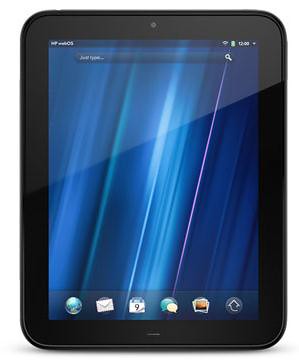
HP TouchPad coming to US on July 1st

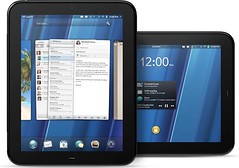
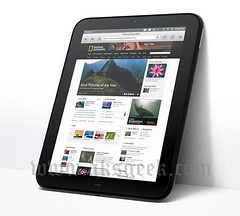
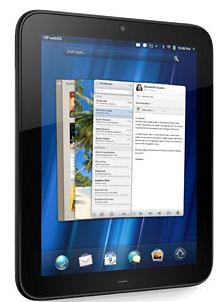
HP TouchPad

HP today announced that the Wi-Fi version of HP TouchPad will be available in the United States on July 1.

HP's first webOS tablet will be available in the United Kingdom, Ireland, France and Germany a few days later and in Canada in mid-July, with availability scheduled to follow later this year in Italy and Spain, as well as in Australia, Hong Kong, New Zealand and Singapore.

HP TouchPad will be available from U.S. retailers, commercial resellers and direct from HP with the option of either 16 GB or 32 GB of internal storagefor $499.99 and $599.99, respectively.

Preorders in North America and Europe will begin June 19.

Optional accessories for HP TouchPad include the HP Touchstone Charging Dock, the HP TouchPad Wireless Keyboard and the HP TouchPad Case (sold separately).

HP also announced it will be partnering with AT&T to introduce a connected version of HP TouchPad later this summer.

U.S. retailers and commercial resellers for HP TouchPad will include Best Buy, Staples, Office Depot, Walmart, Sam's Club, OfficeMax, Amazon.com, Fry's, Microcenter, other leading local and regional retailers, and HP's online stores.

Specific pricing and availability for HP TouchPad in Canada, France, Germany, Ireland and the United Kingdom will be announced regionally.

Details for Australia, Hong Kong, Italy, New Zealand, Singapore and Spain will be announced at a later date.

Source:- HP


Thursday, 10 February 2011

HP TouchPad brings webOS to the Big Screen

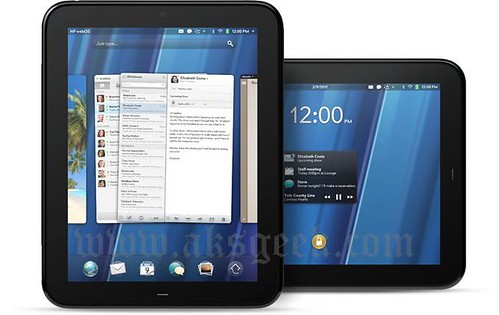
HP webOS full

HP today enlarged the HP webOS world with the first webOS slate ­– the HP TouchPad – the breakthrough webOS user interface fully realized in the tablet experience.

With its vibrant 9.7-inch diagonal flush capacitive multitouch display, virtual keyboard, instant-on access, support for Adobe Flash Player 10.1 beta in the browser and access to thousands of webOS applications, TouchPad works the way you do and is designed not just for fun but for mobile productivity. It’s ideal for anyone who wants the benefits of the amazing webOS platform on a much bigger scale.

HP webOS

HP TouchPad Features and Specs

  • HP webOS
  • High-speed connectivity
  • Qualcomm Snapdragon dual-CPU APQ8060 1.2-GHz processor
  • 9.7-inch diagonal XGA capacitive, multitouch screen with a vibrant, 18-bit color, 1,024 x 768 resolution display
  • The option of either 16 GB or 32 GB of internal storage
  • High-performance browser with full access to the web, including support for Adobe Flash Player 10.1 beta for access to rich, Flash-based web content
  • Wireless connectivity:
    • Wi-Fi 802.11b/g/n with WPA, WPA2, WEP, 802.1X authentication
    • A-GPS (3G only)
    • Bluetooth wireless technology 2.1 + EDR with A2DP stereo Bluetooth support
  • Multimedia options, including music, photos, video recording and playback, and a 3.5 mm headset/headphone/microphone jack
    • Internal stereo speakers and Beats Audio
    • Front-facing 1.3-megapixel webcam for live video calling
  • Email, including EAS (for access to corporate Microsoft Exchange servers) and personal email support (Google Gmail push, Yahoo!, POP3, IMAP)
  • Robust messaging support
  • Light sensor, accelerometer, compass (magnetometer) and gyroscope
  • Rechargeable 6,300 mAh (typical) battery
  • Micro-USB (Charging and PC Connect) with USB 2.0 Hi-Speed
  • Built-in HP Touchstone technology for easy charging (HP Touchstone for TouchPad sold separately) and HP touch-to-share to share web addresses between TouchPad and compatible webOS phones
  • Dimensions: 190 mm x 242 mm x 13.7 mm (7.48 inches x 9.53 inches x .54 inches)
  • Weight: approximately 740 g (1.6 pounds)


More information about HP TouchPad is available at www.palm.com/TouchPad.

Thursday, 23 June 2011

HP announces webOS Pivot for HP Touchpad

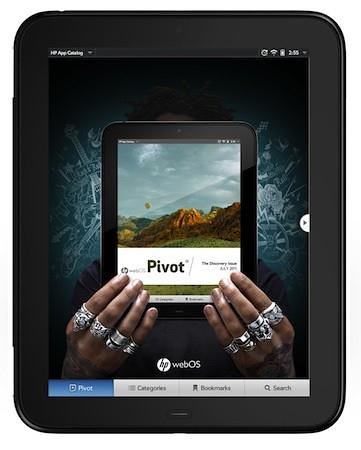
HP pivot

HP, today announced HP webOS Pivot, providing users an entertaining and informative editorial resource for discovering webOS 3.0 applications for the HP TouchPad, which launches July 1.

Designed to complement the HP webOS App Catalog, Pivot will showcase a broad range of applications – and the developers who create them – by providing customers the freedom to explore based on their interests and lifestyles. It's just one of the new ways HP is enhancing the webOS Developer Program and investing further in the success of the growing ecosystem.

Consisting of original content by journalists and photographers affiliated with leading publications, Pivot will include visually driven editorial pieces, columns from notable guest writers sharing their perspectives on digital culture, feature stories focused on applications around specific topics, and in-depth reviews – all accompanied by vibrant photos and illustrations on HP TouchPad's brilliant screen. Content will be catered to the specific interests and requirements of a given region, appealing to a wide range of international customers.

Pivot will publish initially for English, French, German and Spanish languages and will be updated over the air directly to all HP TouchPad customers.

The Wi-Fi version of HP TouchPad will be available in stores and online in the United States on July 1 with the option of either 16 GB or 32 GB of internal storage for $499.99 and $599.99, respectively.

HP TouchPad will be available in the United Kingdom, Ireland, France and Germany on July 2 and in Canada on July 15, with availability scheduled to follow later this year in Australia, Hong Kong, Italy, New Zealand, Singapore and Spain.

Complete details about the updated developer programs will be available on the HP webOS Developer Portal beginning July 1.

Source:- HP

Wednesday, 12 January 2011

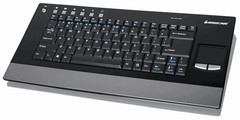
Iogear Debut Multi-link Bluetooth keyboard with Touchpad

iogear bluetooth keyboard GKM611B

IOGEAR's Multi-link Bluetooth Keyboard with Touchpad (GKM611B) can wirelessly switch between six Bluetooth enabled devices, providing convenient management of HTPCs, gaming consoles, smart phones and more.

Continuing their pursuit of connectivity through convergence, IOGEAR today introduced the Multi-Link Bluetooth Keyboard with Touchpad (GKM611B) for wireless management of up to six Bluetooth enabled devices. Data input for social media, gaming or even board rooms has reached a new level.

Entertainment, productivity and communication blend more seamlessly with a single data input device. Bluetooth 2.0 technology in the GKM611B provides a 30-foot radius of operability allowing the IOGEARTM Multi-Link Keyboard to go from couch to kitchen table or conference room to office, switching between different devices with ease.

Once a user switches to the desired Bluetooth-enabled device, custom hotkeys provide even greater convenience with push-button access and management of: My TV, videos, pictures, music, Internet browser, volume control and more. An Integrated touch pad with left and right mouse buttons adds additional flexibility since users are not required to keep a separate mouse in tow when switching between devices.

Complementing the functionality is an ultra-slim and low profile design that allows users to type with style and comfort from any angle in the room. Ergonomically designed for many different laps and surfaces, the GKM611B also features a slip resistant base, two AA batteries and weighs only 1.90 lbs for painless toting.

"Wireless keyboards are appealing because users aren't tethered to a machine while operating," states Bill Nguyen, senior marketing manager for IOGEAR. "Our new multi-link Bluetooth keyboard offers this same comfort for six separate devices, providing freedom to move around or stay seated while staying connected."

IOGEAR's Multi-Link Bluetooth Keyboard with Touchpad will be shipping late in Q1, 2011.

MSRP of the GKM611B is $79.95.

Monday, 1 August 2011

HP rolls out WebOS update for Touchpad

HP TouchPad WebOS OTA update

If you’re a HP TouchPad owner, waiting for the WebOS update then your wait is almost over. HP, today is rolling out WebOS update for TouchPad as HP's head of developer relations Richard Kerris tweeted that "It's in the pipeline… starting to roll out this morning." Let us know when you see the update own your tablet.

Tuesday, 12 July 2011

HP TouchPad 4G coming to AT&T

HP TouchPad 4G

HP today announced that the HP TouchPad 4G will be available exclusively in the United States on AT&T network. The TouchPad 4G will have a faster 1.5-GHz processor, 32GB of storage, integrated GPS and HSPA+ / WiFi. There is no details on pricing or release, with the carrier simply affirming that it'll be on sale prior to the "back to school" season.

Source:- HP Palm

Saturday, 16 July 2011

Thursday, 30 June 2011

HP TouchPad coming to UK on July 15th starting £399

HP TouchPad

The wait is nearly over! An on-sale date of July 15th has been confirmed for the HP TouchPad powered by webOS. Available from HP.com as well as a range of popular high-street retailers including PC World, Curry's, Amazon, Argos, Comet, & Carphone Warehouse, the HP TouchPad WiFi version will retail at £399 for the 16GB and £479 for the 32GB

Source:- HP 16GB, 32GB

Thursday, 10 February 2011

Amazon Announces Free "Buy Once, Read Everywhere" Kindle App for webOS TouchPad

Amazon

Amazon.com announced that it will launch a free Kindle app for webOS tailored for the new HP TouchPad. Like all Kindle apps, Kindle for webOS will let customers "Buy Once, Read Everywhere" – on Kindle, Kindle 3G, Kindle DX, iPad, iPod touch, iPhone, PC, Mac, BlackBerry, Windows Phone 7, Android-based devices, and this summer, the HP TouchPad. Amazon's Whispersync technology syncs your place across devices, so you can pick up where you left off and never lose your place.

For more information about the free Kindle apps, go to www.amazon.com/kindleapps.

Tuesday, 8 March 2011

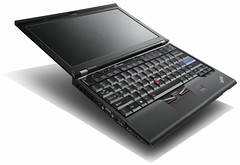
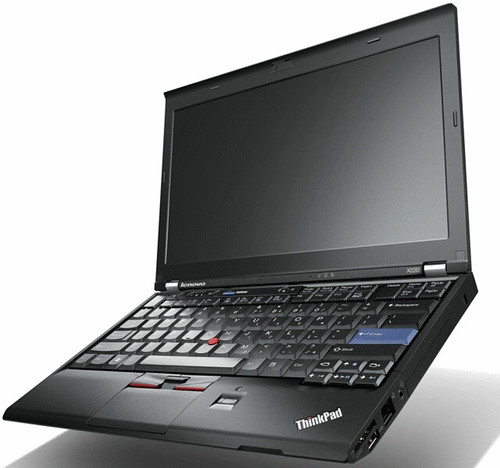
Lenovo announced ThinkPad X220 laptop and the X220 convertible Tablet PC

Lenovo ThinkPad X220

Lenovo announced today the next generation of the best-selling ultraportable laptop of 2011 – the ThinkPad X220 laptop - and the X220 convertible Tablet PC. These PCs give mobile business professionals the full performance and usability found in larger laptops, but in a super ultraportable design. The PCs run up to 75 percent faster than ultraportable competitors that use low-powered CPUs2, feature smart PC technologies for incredibly long battery life up to 24 hours3 on the ThinkPad X220 and sport a clean, revamped design with hinge-based latching and a giant touchpad in a thinner laptop design. Additionally, they feature improved durability with wider drain-holes in the spill resistant keyboard and a 50% improvement in drop test performance4.

24 hour Battery Life for Around the Clock Computing

The ThinkPad X220 offers up to 15 hours battery life with a standard 9-cell battery. Battery life jumps up to 24-hours by adding the new ThinkPad external battery. The convertible tablet starts under four pounds with its standard 4-cell battery. When combined with a 6-cell battery and the external battery pack, the tablet can run for 16 hours continuously on one charge. Users charge the PCs on the external ThinkPad Battery when connected to the PC or separately. A battery charge indicator shows when the battery reaches a full charge.

Full-Performance Under Three Pounds

These speed-optimized PCs fit the same full-powered CPUs as bigger 14 and 15-inch laptops for full performance5, while similar weight competitors offer only low powered CPUs. Lenovo Enhanced Experience 2.0 primes the PCs for rapid boot, shut down and resume from sleep by tuning the BIOS and other hardware settings. With Intel HD integrated graphics the PCs perform twice as quickly in streaming video, editing photos and loading web pages. Additionally, USB 3.0 technology on select models transfers data lightning fast, up to 10 times that of USB 2.0.

Smart PC Technologies

Equipped with second generation Intel Core i7 processors, applications run fast and make multi-tasking hassle-free. The PCs come with self-aware and adaptive technologies to ensure priority components receive power for the highest levels of performance and battery life. Intel Turbo Boost Technology 2.0 boosts processor speed during intensive tasks, and with Lenovo Turbo Boost+, the PCs can stay in Turbo Boost mode longer by keeping processor temperatures below certain thresholds. With reduced power to non-essential hardware, the laptops achieve up to 30 percent longer battery life while playing multimedia so users can watch DVDs, listen to MP3s or stream web content longer.

Loud and Clear Voice and Video Calling

The "no compromise" performance experience continues with technologies that solve everyday challenges. For example, they incorporate several technologies for excellent voice and video conferencing, such as private chat and conference call microphone modes, keyboard noise suppression technology and a dedicated LED-lit microphone mute key.

The PCs also keep corridor warriors connected longer with Lenovo's new Instant Resume function. This function maintains connections during sleep mode for up to 99 minutes, eliminating the need to login and reconnect between meetings. And tablet users don't have to worry about losing their pen with the new "never-lost-pen" technology. It notifies a person when he or she moves the tablet without the pen in the pen-holder.

Lenovo ThinkPad X220-02

ThinkPad Remodels with Clean, Sharp & Durable Design

The inside of the new PCs reveal a cleaner, sharper design over previous models. Both the ThinkPad X220 laptop and X220 Tablet feature a 12.5-inch HD screen and self-closing hinges that shut the PCs. This space-saving hinge design brings several key benefits: better antenna and speaker placement for stronger thoroughput, a 45 percent larger touchpad and a cleaner visual design. The larger, buttonless touchpad gives extra room for fingers to scroll, highlight and do multitouch gestures.

For students, mobile sales forces and other mobile professionals working outside, the multitouch tablet now adds a new rough and tough feature to its super bright, 300-nit screen with scratch-resistant Gorilla Glass. Already military specifications tested to meet extreme conditions, Gorilla Glass strengthens the screen so it can withstand scratches, scrapes and abuse from the field.

Ready for Business

The PCs are also business-ready: They're easy for IT administrators to use and manage thanks to their second generation Intel Core and Core vPro processors. Common ThinkPad docking stations and batteries also allow companies to swap hardware among employees to maximize their resources and minimize cost.

Pricing and Availability

The ThinkPad X220 laptop and X220 Tablet will be available starting in April through business partners and www.lenovo.com. Prices for models start at approximately $899 and $1,199, respectively.

Saturday, 5 November 2011

webOS developers can get HP TouchPad for $150

HP TouchPad

HP announced the Developer Device Purchase Program for the HP TouchPad for a limited time under which registered developers in the US, Canada, and Europe will be able to purchase up to two TouchPads and one unit will cost $149.99 (USD) for US and Canada; €150 in Europe (includes VAT); £130 in the UK (includes VAT).

Those interested will have to file their request before November 18th, and if they're accepted they'll receive a coupon that must be redeemed before November 27th or while supplies last.

Source:-HP webOS Developer Center

Wednesday, 1 September 2010

HP Officially announced HP Mini 210 and Mini 5103

HP Mini

   Today HP officially announced  HP Mini 210 and Mini 5103 with Dual-Core Atom power.

The HP Mini 210 HD Edition has a sleek design; it's highly portable and comfortable to use. Features include:

    HP Mini 210
  • New Intel Atom N455 processor for reliable, energy-efficient performance
  • Simplified daily PC activities with genuine Windows XP Home Edition
  • Slim and light design: .9" thick and 2.69 lb.
  • Touchpad with click buttons at the bottom
  • 10.1" high definition (720p) display with smooth, edge-to-edge surface
  • Color choices: silver crystal (pattern), black crystal (pattern), sonoma red (solid), pacific blue (solid), preppy pink (pattern), white crystal (pattern)
  • 1GB of system memory that is user upgradeable to 2GB
  • 160GB hard drive to store your photos and songs (250GB hard drive if Windows 7 is selected)
  • Transfer of data to and from other devices via three USB ports
  • Optional external multiformat CD/DVD drive for installing software (the Mini does not have an internal optical drive)
  • Price starts from $329.99*

   HP Mini 5103 HP’s latest touch-enabled mini notebook, is designed for students and mobile professionals alike. It incorporates the latest dual-core Intel Atom processor and features an all-metal case in a new espresso color.

HP Mini 5103

Features of HP Mini 5103

  • Genuine Windows 7 versions, SUSE Linux Enterprise 11, or FreeDOS
  • 10.1-inch diagonal LED-backlit display available in WSVGA (1024 x 600) or 16:9 HD (1366 x 768) resolution; optional capacitive multi-touch screen (Windows only)
  • Corel Office productivity suite of software included for word processing, spreadsheets and presentations
  • Ultra-portable light-weight design starting at 2.64 lb (1.2 kg) and 0.91 in (23.2 mm) thin at front
  • All metal case with magnesium alloy support structure and metal alloy hinges Choice of Espresso, Blue, or Red color; optional handle
  • 95% full-size, spill-resistant QWERTY keyboard with HP DuraKeys; touchpad with scroll zone; touch-sensitive controls
  • Flexible wireless connectivity options:
    • Integrated HP un2420 EV-DO/HSDPA Mobile Broadband Module provides worldwide Gobi mobile Internet technology with GPS
    • Integrated 802.11 a/b/g/n or b/g/n wireless LAN module
    • Integrated 802.11 b/g/n wireless and Bluetooth combo adapter
    • Bluetooth v2.1
  • Flexible battery solutions: 4-cell for lightest weight or 6-cell for longer battery life; HP Fast Charge
  • HP QuickSync for synchronization; HP QuickLook 3 and HP QuickWeb; HP Daystarter
  • Intel NM10 Express chipset and Intel Atom processor
  • Up to 320 GB 7200 rpm hard drive with HP 3D DriveGuard protection, or 80/128 GB Solid State Drive
  • Optional Broadcom Crystal HD Enhanced Video Accelerator enables 720p and 1080p HD video playback
  • Integrated 2 MP Webcam
  • Face Recognition for easy login by simply looking into your notebook's camera
  • Optional HP USB 2.0 Docking Station and HP External USB 2.0 CD/DVD R/RW Drive
  • Price Starts from $ 399.

Press Release

Wednesday, 29 September 2010

Gateway Unveils NV59C66U Notebook with Integrated WIMAX

Gateway NV59C66u

Gateway today unveils the Gateway NV59C66u notebook, the newest model in its Gateway NV Series line of notebooks, which features integrated WiMAX capabilities, a premium chassis design and a robust configuration.

The WiMAX card in the Gateway NV59C66u is the Intel 6250 wireless card, which provides a reliable connection to both WiMAX and Wi–Fi networks. As a result, customers using WiMAX on the Gateway NV59C66u will be able to connect while moving around their coverage area, making the notebook ideal for small business owners that move about a specific urban area, such as realtors and salespeople, as well as students and other tech-savvy individuals that want to remain connected.

The Gateway NV59C66u features a new design with an attractive tone-on tone patterned espresso chassis that is visually interesting and stylish. The metal chassis and palm rest both appear to be dramatically textured, but feel subtle and comfortable to the touch.

The Gateway NV Series feature Intel Core i3 and Core i5 as well as AMD Athlon and AMD Turion, processors, supported by up to 4GB of DDR3 memory that is upgradeable to 8GB. Ample storage space is available for with high-capacity hard drives ranging from 320GB to 500GB.

In addition to featuring an Intel Centrino Advanced-N+WiMAX 6250 WiMAX Wireless Card for a connection to WiMAX networks, the Gateway NV59C66u also has integrated 802.11b/g/n WiFi Certified connectivity for a convenient connection to hot spots and wireless networks, as do other models in the Gateway NV Series line. The integrated High Definition webcam allows web chats and video emails in incredible clarity thanks to its 1280x1024 resolution. Also, Gigabit Ethernet LAN connectivity ensures a fast wired online connection.

Visually complementing the performance technology in the Gateway NV Series' is the High Definition LED-backlit TFT Widescreen display. Delivering crisp and clear video with vibrant color and detailed images, the Gateway NV Series have models in two sizes: The Gateway NV Series with a 15.6-inch display deliver 1366x768 resolution, while the Gateway NV Series with a large 17.1-inch display provide even more clarity with 1600x900 resolution. Customers who want to share video on the go can use the HDMI port to connect the Gateway NV Series to a home theater or external LCD to deliver crisp high-quality visuals and high-fidelity audio with a single cable.

The Gateway NV59C66u and Gateway NV Series are complemented by extra features in the line that make it incredibly enjoyable and useful. Navigating websites, moving between documents and even inputting characters is incredibly enjoyable thanks to the notebooks' multi-gesture touchpad, touchpad lock, and dedicated numeric keypad.
The Gateway NV Series comes with either DVD or Blu-Ray drives, giving customers a way to view the latest movies. Also, digital media can be downloaded to the notebooks through the media card reader and USB ports. Protecting media and other files on the PC is easy, since the Gateway NV Series includes MyBackup functionality that gives customers a way to quickly and easily back-up all important files to another location such as a USB drive or another hard drive.

Gateway's popular "social networking" button is integrated into the NV Series, so customers can access their social networks, including Facebook, YouTube and Flickr, with a single touch of a button.

  The Gateway NV Series will be available at retailers nationwide over the coming weeks at prices starting at $479.99. The Gateway NV59C66u with integrated WiMAX is priced at $699.99 and is available now.


Wednesday, 23 February 2011

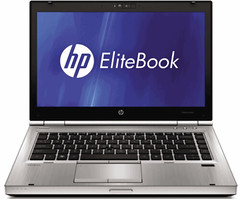
HP Unveils Business EliteBook and ProBook Laptops

hp EliteBook

HP today revamped its business notebook PC lineup with new technology aimed at boosting performance and productivity, while offering an enriched and sophisticated industrial design that improves notebook quality and reliability.

The company’s new “FORGE” design framework ensures HP business notebooks embody a timeless construction, with precision-engineered durability features that are designed for maximum reliability and with the environment in mind. Precision aluminum-alloy hinges, cast titanium-alloy display latches and the HP DisplaySafe frame are a few of the design highlights behind the approach.

New products and services include:

HP EliteBook 8460p and 8560p notebook PCs feature an aerospace-inspired HP DuraCase that meets the MIL-STD 810G military-standard testing specifications, enabling it to withstand wear and tear while still sporting an attractive, professional-looking platinum color tone finish. The EliteBook 8460p also provides industry-leading battery life of up to 32 hours.

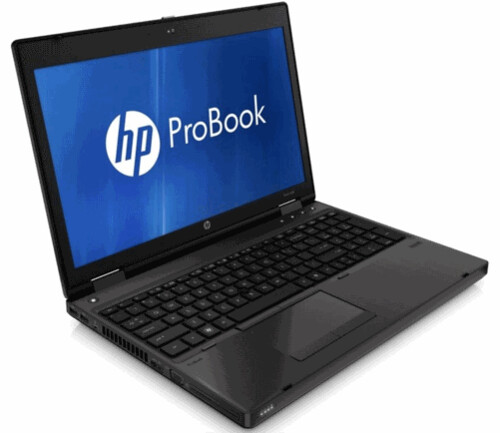
HP ProBook 6360b, 6460b and 6560b notebook PCs offer configuration flexibility in areas such as processor, graphics and battery technology. Boasting an all-new 13.3-inch diagonal display option, the ProBook b-series also features a new smudge-resistant and wear-resistant tungsten-colored design.

HP ProBook s-series 4230s, 4330s, 4430s, 4530s and 4730s notebook PCs are available in an array of sizes – from ultra-light to desktop replacement – making them an excellent, affordable choice for small and midsize businesses.

Rugged, optimized design for premium business performance

Bold, confident and modern, the HP EliteBook 8460p and HP EliteBook 8560p are the culmination of creative design and precision engineering. Starting at only 4.56 pounds and 6.10 pounds, respectively, the HP EliteBook 8460p and 8560p offer 14- and 15.6-inch diagonal high-definition (HD) LED-backlit displays that deliver incredible portability without sacrificing screen legibility.

The EliteBook p-series delivers optimum business performance with second-generation Intel Core i7 quad-core processors and Core i7, i5 and i3 dual-core processors, while offering flexible choices of UMA or high-performance AMD Radeon HD 6470M discrete graphics with responsive performance and rich media capabilities. The notebooks also feature new USB 3.0 ports and a USB 2.0 charging port, in addition to a range of wireless connectivity options, choice of multiple operating systems, and either hard disk drive or solid-state disk drive options.

The HP EliteBook p-series also offers 3-, 6- and 9-cell options for lightweight and extended battery run time, and an HP Long Life Battery option for the highest-achieving notebook battery lifespan on the market. The notebooks also are compatible with the new HP Extended Life Notebook Battery and HP Ultra-Capacity Notebook Battery. With the new HP Ultra-Capacity Notebook battery, the HP EliteBook 8460p can achieve up to 32 hours of battery life.
hp probook

The new HP EliteBook p-series easily connects to the HP 90W Docking Station or the HP 120W Advanced Docking Station for use with peripherals like a monitor and keyboard, enabling users to have a desktop experience without needing to plug and unplug accessories. In addition, the HP EliteBook p-series offers SRS Premium Sound, which delivers optimized audio settings for voice and multimedia applications.

Smartly designed, productivity-enhancing notebook series

The new HP ProBook 6360b, HP ProBook 6460b and HP ProBook 6560b are ideal choices when smart design, ultimate configurability and business-critical attributes are top priorities.

The HP ProBook b-series sports bead-blast aluminum display enclosures, a magnesium-reinforced ABS chassis and a bottom-case drain that helps protect against accidental minor spills on the keyboard. Other new features include an HP DisplaySafe frame for added panel protection, precision display latches for a more secure fit and a spill-resistant keyboard set in a full aluminum deck for a better look and feel.

Available with 13.3-inch (6360b), 14-inch (6460b) and 15.6-inch (6560b) diagonal HD LED backlit displays, the HP ProBook b-series offers a range of processing options, including second-generation Intel Core i7, i5 and i3 dual-core processors or an Intel Celeron processor. For businesses looking for simple multimedia functionality, the ProBook b-series offers an optional HD webcam and features a standard Media Card Reader, SRS Premium Sound, discrete launch buttons and a touchpad on/off button.

Stylish with affordable enhanced security for small businesses

The HP ProBook s-series balances business functionality with style and affordability. Designed with small business needs in mind, the HP ProBook 4230s (12.1-inch diagonal), ProBook 4330s (13.3-inch diagonal), ProBook 4430s (14-inch diagonal), ProBook 4530s (15.6-inch diagonal) and ProBook 4730s (17.3-inch diagonal) are available in a stylish yet durable brushed-aluminum finish in metallic gray color. The HP ProBook s-series offers second-generation Intel Core i7, i5 and i3 processors for high performance and advanced processing speed or an Intel Celeron processor.

Additionally, HP ProBook s-series notebooks are optimized for business and home multimedia usage. The ProBook s-series includes a spill-resistant keyboard set in a full aluminum deck, touchpad with gestures supported, integrated HD webcam with optional dual-array microphones and SRS Premium Sound. The series also includes a choice between Power Express Switchable Graphics and Integrated Graphics, and it offers a productivity suite including USB 3.0, standard media card reader and a fingerprint reader.

HP Professional Innovations

HP is focused on innovations that enhance productivity and simplify how people use technology.

The latest version of HP QuickWeb builds on the premise that users have a need to get online fast – without waiting for long boot times ­– whether they are browsing the web or using applications such as email and conferencing. The newest version of HP QuickWeb now includes web browser, offline email, video conferencing via Skype and multiple widgets such as weather, stocks and social media apps.

The updated HP Connection Manager is a single software application that manages integrated mobile broadband connections, as well as reports the status of Ethernet and Wi-Fi connections. It now supports 3G/4G, Wi-Fi and Ethernet for most networks across Windows 7, Vista and XP and has been redesigned to integrate with HP Client Automation. IT managers can now centrally manage and view mobile broadband usage for client machines with HP mobile broadband modules on their networks. Bluetooth wireless on a user’s mobile phone, paired with face recognition authentication, delivers robust user access to Windows and websites.

HP Power Assistant software extends battery run time while reducing energy consumption through a simple, new user interface. It is an integrated solution that measures and logs reported energy usage by the PC and up to four HP connected monitors (for a total of five screens). Users can now create custom power plans and track energy consumption to meet specific computing needs around the clock.

Pricing and availability

The HP EliteBook 8460p and 8560p start at $999 and $1,099, respectively, and are expected to be available in the United States on March 15.

The HP ProBook b-series starts at $799 and is expected to be available in the United States on March 15.

The HP ProBook s-series starts at $579 and is expected to be available in the United States on March 15.

[PRESS RELEASE]

Monday, 4 October 2010

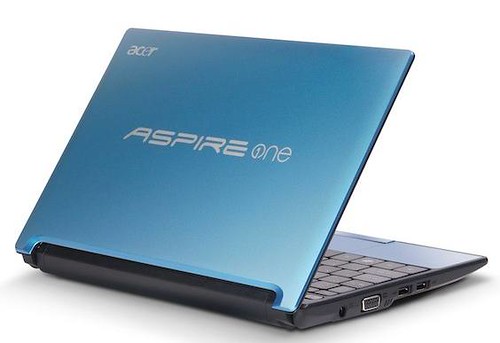
Acer Aspire One Netbook D255 Packed with Dual-Core Processor Power

Acer Aspire One D255 Netbook

Acer America today expanded its industry-leading line of Aspire One netbooks to include dual-core processing power. Leading with the new Aspire One AOD255, this mobile powerhouse delivers Intel Atom dual-core processing power in an ultra-thin design for enhanced mobile performance. Additionally, the updated Aspire One AO721 and AO521 were designed for mobile entertainment, featuring AMD Athlon II Neo processors, excellent connectivity and high-definition graphics.

These new netbook lines are packed with powerful features and performance to boost productivity and battery life for highly mobile consumers. Featuring the latest Intel dual-core technology for netbooks, the Acer Aspire One AOD255 includes the new Intel® Atom™ N550 processor, which provides consumers with more responsiveness while surfing the Internet remotely. It also brings advanced DDR3 memory support in a lightweight and compact mobile computer. Additional Aspire One AOD255 models support single-core Intel® Atom N450 processors.

"We have enhanced our best-selling Aspire One netbook line with the improved performance and better power efficiency to improve the mobile computing experience for consumers," said Pete Dailey, senior product marketing manager for netbooks. "With the new Aspire One AOD255, users are able to multitask, explore the Internet, connect with friends, and enjoy entertainment applications, without worrying about battery life or being tethered to an electrical outlet."

Dual-Core Mobile Performance and Efficiency
Designed for all day mobility and connectivity, the Aspire One AOD255 netbook features the latest Intel® technology with the Intel Atom N550 dual-core processor, integrated Intel graphics, up to 8 hours of battery life(1) and fast Wi-Fi connectivity. All this power and functionality comes in a package that is only 1-inch thin and weighs just over 2-1/2 pounds.

Supporting power savings and longer battery life, the Aspire One AOD255 has a 10.1-inch CrystalBrite™ LED-backlit display that saves 22.2 percent power compared with other netbook displays(2) and offers an optimal viewing experience. Further enhancing the product's usability, it has a keyboard that is 93 percent of a standard size keyboard for convenient for typing on the go.

To remain connected, the netbook features 802.11 b/g/n Wi-Fi CERTIFIED™ and fast Ethernet LAN connectivity. For further communications needs, the line is equipped with a built-in 1.3 Megapixel HD Webcam, delivering smooth video streaming and high quality images for online chats and video conferences. A built-in digital microphone conveys superior voice quality, keeping background noise levels low and minimizing echoes.

Rounding out its feature set, the AOD255 comes with 1GB of DDR3 memory and a large 250GB internal hard drive to store plenty of digital albums, music and documents. It also includes Windows® 7 Starter and Microsoft® Office Starter 2010, offering the latest software with the familiarity and compatibility of Windows.

The Aspire One AOD255 comes in a variety of colors to fit anyone's style - red, black, brown and aquamarine.

High-Definition Graphics and Advanced Performance
Designed for ultra-portability and high-def entertainment, the Acer Aspire One AO721 and Aspire One AO521 netbooks feature powerful AMD Athlon™ II Neo processors, high-definition ATI Radeon™ graphics, ample memory, large hard drives and LED-backlit displays.

The AO721 and AO521 utilize AMD Athlon II Neo K125 processors, designed to deliver balanced performance for multiple applications while saving power. With the powerful ATI Radeon HD 4225 Graphics with 384MB of dedicated system memory, Aspire One users are well-equipped for mobile performance whether surfing the Internet, playing games, watching videos or working. Additionally, the netbooks offer HDMI™ connectivity for enjoying high-definition entertainment on large external displays.

To keep in touch with friends, family and colleagues, the Aspire One AO721 and AO521 netbooks features 802.11 b/g/n Wi-Fi, fast Ethernet LAN connectivity, built-in webcam and a digital microphone.

The Aspire One AO721 has a high-definition 11.6-inch CrystalBrite™ LED-backlit display with true cinematic 16:9 aspect ratio, delivering an optimal viewing experience. Sleek and portable at less than one-inch thin and about three pounds in weight, the Aspire One AO721 boasts a full-sized keyboard, enabling more accurate and comfortable typing. The Aspire One AO721 is equipped with a full 2GB of DDR3 memory and up to 250GB internal hard drive, providing plenty of storage space for mobile enthusiasts. It also comes with Windows® 7 Home Premium and nearly six hours of battery life for easy productivity.

The ultra-mobile Aspire One AO521 features a 10.1-inch CrystalBrite LED-backlit display, offering a broad viewing area for web navigation and entertainment enjoyment. Just shy of one-inch thin and about 2.75 pounds, it is still packed with features. The 1GB of DDR3 memory and 160GB internal hard drive offer plenty of media storage. The Aspire One AO521 comes equipped with Windows 7 Starter and delivers up to six hours of battery life.

Additional Features Enhance Ease-of-Use
For precise control and intuitive navigation, the three new netbooks utilize a Multi-Gesture Touchpad with anti-slip microbead texture, allowing users to pinch, flick and swirl their fingers across the touchpad. It also allows users to scroll, zoom in and out, and flip through web pages, photos, spreadsheets and more.

Price and Availability
All three netbooks will be available later this month at leading U.S. retailers. The Acer® Aspire One AOD255 with dual-core Atom N550 processors has a MSRP of $329.99 and single-core Atom N450 processors prices begin at MSRP $269.99. The Acer® Aspire One AO721 has a MSRP of $429.99 and the Acer® Aspire One AO521 has a MSRP of $349.99.

[PRESS RELEASE]

Sunday, 30 July 2023

Got a New Mac? Do These 10 Things to Set It Up Perfectly

System Settings-MacOS
So you just bought a brand new Mac and can't wait to dive into the world of the Apple ecosystem. Congratulations! Whether you're a long-time Apple user or a first-time Mac user, setting up your new device can improve your experience and productivity. In this article, we'll walk you through ten important steps to ensure your new Mac is ready to reach its full potential. Let's get started!

1. MacOS Updates:

Once you've set up your Mac, check for macOS updates. Click on System Settings, then select General, then select Software Update. Install any pending updates to ensure your Mac is running the latest version of macOS, which includes bug fixes and new features.

2. Adjust System Preferences:

Customize your Mac's settings to your liking. Go to System Settings and explore options like Touchpad, Mouse, Keyboard, Desktop & Dock etc. Customize these settings to fit your workflows to personalize your Mac experience.

3. Customize your Dock:

The Dock is the quick access bar at the bottom of the screen. Customize for easy access by adding the apps you use most. To add an application to the Dock, simply drag its icon from the Applications folder or click and hold the application icon in the Dock, then select Save to Dock. 

4. Install Must Have Apps:

Go to the App Store and download essential apps like web browsers, communication tools (like Slack or Microsoft Teams), productivity apps, and media players. Some popular applications you might consider are Google Chrome, Microsoft Office, VLC Media Player, and Evernote.

5. Configure Time Machine (Backup):

It's important to back up your Mac regularly to protect your data from the unexpected. Connect an external hard drive and set up Time Machine (Apple's built-in backup solution). Go to System Settings > General>Time Machine and select an external drive as the backup destination.

6. Configure iCloud:

Take advantage of Apple's cloud services by setting up iCloud. Go to System Settings > Apple ID> iCloud. Enable iCloud Drive to sync files across devices, iCloud Photos to back up and access your photos and videos, and iCloud Keychain to keep your passwords safe. 

7. Security and privacy settings:

Make sure your Mac is protected by setting the necessary security and privacy settings. Go to System Settings > "Privacy & Security" to configure features such as FileVault (disk encryption), firewall, and gateways (application security). You can also manage app permissions to access your camera, microphone, and other sensitive data. 

8. Add email and social media accounts:

Integrate your email and social media accounts into your mail and calendar applications. This will help you stay organized and up-to-date without constantly switching between different platforms.


9. Personalize your desktop and screensaver:

Make your Mac feel more like home by personalizing the desktop wallpaper and screensaver. Simply right-click on the desktop, choose "Change Wallpaper," and select an image of your choice. For screensavers, go to System Settings > Screensaver and choose from the available options or add your own folder of images.

10. Learn useful keyboard shortcuts:

Finally, learn some useful Mac keyboard shortcuts to improve your workflow. Learn basic keyboard shortcuts like Command+C (copy), Command+V (paste), Command+Z (undo), and application-specific shortcuts that can dramatically speed up tasks. 

By following these ten steps, you can ensure that your new Mac is perfectly set up and tailored to your needs. From software updates to personalizing your desktop, every step helps create a smoother, more enjoyable Mac experience. Embrace the world of MacOS and explore the possibilities offered by the Apple ecosystem. 


Wednesday, 1 September 2010

SanDisk Officially Announces The Sansa Fuze+ MP3 Player

SanDisk Logo

   SanDisk officially announced  a new standard for sub-$100 portable media players- The Sansa Fuze+ (plus) MP3 player. The Sansa Fuze+ portable media player, successor to the popular Sansa Fuze MP3 player, offers consumers the quality and flexibility they demand at a price that's hard to beat. Sansa Fuze+(plus)The completely redesigned media player delivers a hassle-free and satisfying user experience that enables unparalleled freedom in how consumers access their favorite digital content. Music and video lovers can expand the player's storage capacity according to their needs, quickly navigate their libraries of files and enjoy high-quality audio and video playback.

"The Sansa Fuze+ is the most versatile portable media player available for under $100," said Tom Bailey, senior director, AV retail, SanDisk. "We developed an entirely new product to provide consumers with a stylish, affordable device that performs exactly as a sophisticated yet easy to use player should."

Features:-

  • The Sansa Fuze+ portable media player offers a sleek and thin styling that fits comfortably in the palm of a hand, and its new capacitive touchpad provides the sensation of using a touch-screen without obscuring the device's viewable area.  Sansa Fuze+
  • 2.4" QVGA LCD screen
  • Consumer-friendly "Film Strip" GUI
  • The Sansa Fuze+ portable media player's broad audio and video CODEC pack ensures easy compatibility with most major media formats.
    • Audio: MP3, WMA, WAV, AAC/M4A (DRM-free iTunes songs), FLAC, Ogg
    • Vorbis, Audible, Secure WMA, Podcasts
    • Video: H.264, MPEG-4, WMV, Flip Video
    • Photos: JPEG, BMP, TIFF, GIF, PNG
  • Compatible with Windows, Mac OS and Linux operating systems.
  • Preconfigured for seamless synchronization with Rhapsody, eMusic and Napster.
  • Fully compatible with SanDisk slotRadio™ cards or any microSD™ card loaded with music, photos or videos
  • microSDHC™ cards let consumers fill the player with additional content-up to 4,000 songs1 or 64 hours of video (H264 video @ 384 kbps)1 per 16GB card. This feature creates interoperability with compatible devices such as mobile phones with microSD card slots.
  • Rechargeable battery lasts up to 24 hours of audio playback or up to five hours of video playback2.
  • It includes a recordable FM radio, gapless playback and a microphone for audio capture.
  • The Sansa Fuze+ is available in red, white, black, blue and purple.

The player is available now at major retailers and at sandisk.com in 4, 8 and 16 gigabyte (GB) capacities carrying MRPs of $79, $89 and $119 respectively, although in-store pricing will be set by retailers.

Via SanDisk

Tuesday, 10 April 2012

Sony unveils VAIO E Series 14P Laptops with gesture control

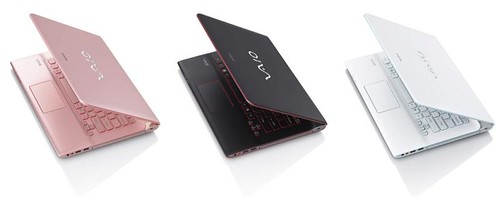
VAIO E14P

Sony today announced the VAIO E Series 14P – the 35.5cm (14") notebook packing a 14-inch, 1366 x 768 display, an Intel Core i3 2550M processor with 4GB of RAM and choice of AMD Radeon HD 7670M or Intel HD Graphics 3000. New VAIO E Series 14P notebook offers Gesture control lets you interact with your computer using intuitive hand movements but its currently supported by Windows Media Player, Internet Explorer 9, PowerPoint and PowerDVD. There is no words on pricing yet but in a meantime decide which colour white, black or pink suits you the best. Read more detailed specs after the break.

VAIO E Series 14P Specifications:

  • Model : VAIO SVE14A1S1EW
  • Processor : Intel Core i3-2350M Processor
  • OS : Genuine Windows 7 Home Premium 64bit with Service Pack 1
  • Memory : 4GB DDR3 1333MHz SDRAM
  • Drive : 500GB HDD 5400rpm
  • Screen : 35.5cm (14”) VAIO Display (1366x768) with wide (16:9) aspect ratio
  • Graphics : AMD Radeon HD 7670M (1GB VRAM) + Intel HD Graphics 3000
  • Optical drive : DVD SuperMulti Drive
  • Others : WLAN 802.11b/g/n; Bluetooth Ver. 4.0 + HS; USB 2.0 (x2), USB 3.0 (x1), USB 3.0 with USB charge (x1); HDMI out; stereo speakers with Dolby Home Theater v4; HD Web Camera powered by ‘Exmor for PC’ (1.31 megapixels); Web, VAIO and Assist buttons; backlit keyboard and touchpad with gesture support
  • Dimensions DxHxW : Approx. 245 x 22.4 x 341mm
  • Weight : Approx. 2.3kg (with standard supplied battery)

Thursday, 30 August 2012

HP unveils Envy x2, SpectreXT TouchSmart Ultrabook, ENVY TouchSmart Ultrabook 4

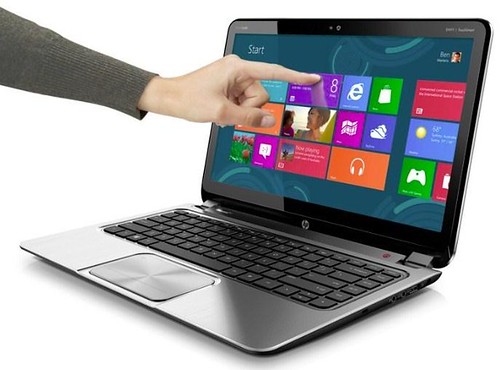
ENVY Touchsmart Ultrabook 4.0

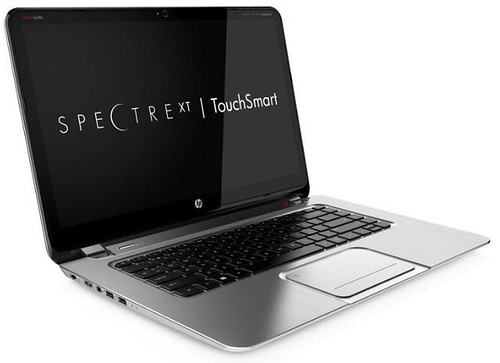
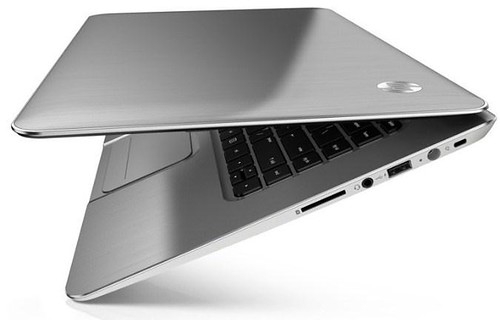
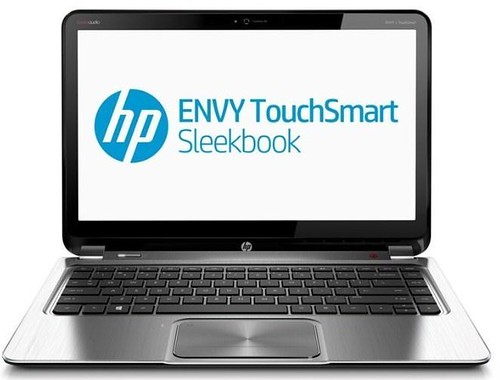
HP today announced the ultrathin hybrid PC HP Envy x2, HP SpectreXT TouchSmart Ultrabook and HP Envy TouchSmart Ultrabook 4.

HP Envy x2

The HP Envy x2 solves the "Do I bring my notebook or tablet?" dilemma. Consumers get the power of a notebook and the freedom of a tablet in one stylish, lightweight device.

Featuring a sleek aluminum finish and an innovative hinge with magnets that smoothly guide the tablet into place, the HP Envy x2 weighs 3.1 pounds. When separated, the tablet portion weighs just 1.5 pounds.

Customers can interact directly with the optimized Windows 8 touch interface on the HP Envy x2's vivid 11.6-inch diagonal HD touch display. Ultrawide viewing angles and a bright, 400-nit In-Plane Switching (IPS) panel provide a superb visual experience indoors and outdoors, while an HD webcam on the front and an 8-megapixel camera on the back capture high-quality photos and video.

The HP Envy x2 also features Beats Audio for the best-sounding, richest audio experience available on a PC. An optional stylus offers added creativity, giving customers the freedom to write, draw and navigate with added accuracy.

The HP Envy x2 also makes sharing and staying connected with friends and family a breeze. A new HP Connected Photo application seamlessly syncs photos across multiple devices and offers basic editing options and instant-sharing capabilities for social networks. HP Connected Music powered by Meridian allows consumers to experience music downloads, streaming services and internet radio all in one convenient place.

The HP Envy x2 uses solid-state memory designed for improved reliability and faster startup times. Near Field Communication (NFC) technology lets users share content, including photos, contacts and URLs, with a simple tap.

HP Spectre XT TouchSmart Ultrabook-a premium touch experience SpectreXT TouchSmart Ultrabook

With Windows 8, the HP TouchSmart experience expands beyond the desktop to deliver multitouch technology to notebooks.

Featuring a 15.6-inch diagonal multitouch Radiance Full HD display with IPS technology, the HP SpectreXT TouchSmart Ultrabook delivers strong performance and the ability to go beyond keyboard and mouse with an optimized touch experience.

Measuring 17.9 millimeters (mm) thin and weighing 4.77 pounds, this premium Ultrabook stands out from the crowd with a sophisticated all-metal design featuring edge-to-edge glass, a soft-touch base for comfort and grip, a glass touchpad and tilted speakers with Beats Audio for optimal sound.

The HP SpectreXT TouchSmart Ultrabook is HP's first notebook with Intel Thunderbolt technology for blazing-fast transfer of music, movies and data to external devices. HP USB Boost technology charges devices via USB ports while the Ultrabook is on or off. The Ultrabook delivers great performance with the latest Intel Core processors, an mSATA solid-state drive with Intel Rapid Start, Intel Identity Protection Technology, Intel Anti-Theft Technology, Intel Smart Response and Intel Smart Connect technologies, and a full array of ports, including Gigabit Ethernet, USB 3.0 and HDMI.

The notebook also features exclusive HP innovations, including HP CoolSense for a noticeably cooler PC; an HP Imagepad for precise multifinger and gesture navigation; HP ProtectSmart for added hard-drive protection; an HP TrueVision HD Webcam; and applications such as HP Connected Photo and HP Connected Music for easy access to photos, music and more.

The HP SpectreXT TouchSmart Ultrabook offers a clean software image with fully loaded versions of entertainment and security software and a concierge phone line for technical support dedicated exclusively for HP Spectre customers.

For entertainment, full versions of Adobe Photoshop Elements 10 and Adobe Premiere Elements 10 bring powerful photo- and video-editing capabilities, and sMedio 360 and HP Connected Music deliver easy media access between PCs and mobile devices.

To safeguard confidential data and thwart cyberthreats, the notebook is preloaded with one year of Absolute Data Protect, two years of Norton Internet Security, and Intel Anti- Theft for remote data protection. SpectreXT TouchSmart Ultrabook-01

The Ultrabook also includes 90 days of complimentary HP SmartFriend Setup Service, which offers expedited, one-on-one assistance to help customers get their new PCs up and running fast. HP SmartFriend Complete Service gives customers answers to how-to questions for setting up Wi-Fi, removing a virus, using new software or backing up files.

HP Envy TouchSmart Ultrabook 4-the power of touch HP ENVY TouchSmart Ultrabook 4

Featuring an eye-catching metal design, the HP Envy TouchSmart Ultrabook 4 offers a 14-inch multitouch HD display, measures 23mm thin and weighs 4.77 pounds. A backlit keyboard, up to 8 hours of battery life, a booming subwoofer with Beats Audio and an optional AMD graphics card with 2 GB of graphics memory allow customers to power through their day.

The HP Envy TouchSmart Ultrabook 4 delivers powerful performance with the latest Intel processors, solid-state drive options, and the same Intel technologies available on the HP SpectreXT TouchSmart Ultrabook. HP innovations such as HP CoolSense, HP Imagepad, HP ProtectSmart, HP TrueVision HD Webcam, HP Connected Photo, HP Connected Music and HP Connected Backup also are included.

Pricing and availability

  • The HP Envy x2 is expected to be available in the United States for the holidays. Pricing will be available at a later date.
  • The HP Spectre XT TouchSmart Ultrabook is expected to be available in the United States in December with a starting price of $1,399.99.
  • The HP Envy TouchSmart Ultrabook 4 is expected to be available in the United States for the holidays. Pricing will be available at a later date.

[Press Release]

Tuesday, 13 March 2012

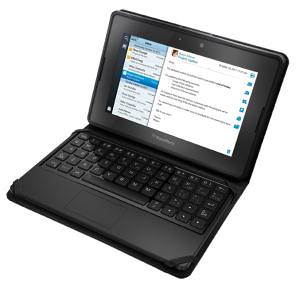
BlackBerry Mini Keyboard for the PlayBook Tablet

BlackBerry Mini Keyboard

Research In Motion (RIM) today introduced the BlackBerry Mini Keyboard, a new accessory for the BlackBerry PlayBook tablet.

The BlackBerry Mini Keyboard is ultra portable measuring less than 6mm thick and comes with a stylish convertible case. In addition to a full QWERTY keyboard, it offers an integrated touchpad that allows users to navigate and control the BlackBerry PlayBook as easily as using the touch screen on the tablet itself.

The BlackBerry Mini Keyboard connects to PlayBook via Bluetooth, and features 128-bit encryption to keep the data passed between keyboard and tablet secure and its battery lasts up to 30 days on a full charge.

The BlackBerry Mini Keyboard is now available for pre-order internationally at www.shopblackberry.com for US$119.99. In Canada, it is also available for pre-order at The Source - www.thesource.ca.