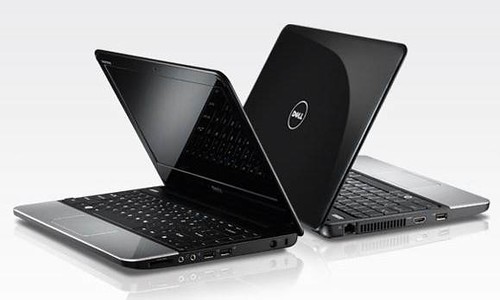
Sprint claimed another U.S. wireless first as the 4G leader unveiled the first dual-mode 3G/4G-embedded netbook and notebook offered in the country by a national wireless carrier. Dell™ Inspiron™ Mini 10 (1012) netbook with Windows 7 Starter, is designed to deliver long battery life, on the go entertainment and maximum connectivity in a compact size while the ultramobile Dell™ Inspiron™ 11z notebook with Windows 7 Home Premium provides PC performance in a stylish mobile package that can go anywhere. Since introducing 4G service in 2008, Sprint has launched 15 4G devices, with 11 devices currently available, including phones, USB modems, mobile hotspots and routers.
The compact and light weight Dell Inspiron Mini 10 (1012) netbook is perfect for students, consumers and small businesses that rely on Internet access, Web browsing and social networking to stay connected. Nearly as small and light as a netbook but with more storage and a powerful processor, Dell Inspiron 11z notebook is a perfect solution for business users and consumers who want more computing power.
Both Dell Inspiron Mini 10 (1012) netbook and Dell Inspiron 11z notebook also come pre-loaded with Windows Live Essentials 2011. Windows Live is an integrated suite of products that help you communicate and share on the PC, Web and mobile phone. Windows Live includes Hotmail, Messenger, SkyDrive, Photo Gallery, Movie Maker and a number of other great apps and services. The power of Windows 7 plus Windows Live delivers the true promise of a mobile PC, helping customers stay connected to the people that matter most to them in the most meaningful way while having access to all their digital content – whenever and wherever.
Additionally, both Dell Inspiron Mini 10 (1012) netbook and Dell Inspiron 11z notebook have integrated connectivity to the Sprint 3G and 4G networks. This flexibility allows customers to enjoy 4G performance in any Sprint 4G market or to use the reliable Sprint 3G network when outside a 4G area. Sprint 4G is already available in 55 markets and continues to expand to new cities, delivering wireless speeds up to 10 times faster than 3G.
"As a 4G leader in the United States, Sprint continues to introduce innovative products that provide unrivaled speed, access and mobility for millions of users today," said Fared Adib, vice president-Product Development, Sprint. "While other carriers continue to talk about their 4G networks, we lead by example. The addition of these two exciting 4G-embedded Dell products nicely fits within our current ecosystem of fixed and dual-mode devices that also includes phones, mobile broadband cards, mobile hotspots and routers."
Starting Oct. 31, Dell Inspiron Mini 10 (1012) netbook will be available to business customers from Sprint's Direct Business Field Sales Team. On Nov. 14, it will become available at select Sprint Stores and sold via Direct Ship from remaining Sprint stores, sprint.com, Telesales (1-800-SPRINT1), select dealers, and Business Solution Partners. Dell Inspiron Mini 10 (1012) is FREE (excluding taxes), after a $100 mail-in rebate, with a new-line activation (or eligible upgrade) on a Sprint Mobile Broadband plan and a two-year service agreement.*
Beginning Nov. 14, Dell Inspiron 11z notebook will be available at select Sprint stores, and available through sprint.com, Telesales (1-800-SPRINT1), select dealers, remaining Sprint Stores, Business Solution Partners and Sprint's Direct Business Field Sales via Direct Ship. Dell Inspiron 11z will cost just $149.99 (excluding taxes), after a $100 mail-in rebate, with a new-line activation (or eligible upgrade) on a Sprint Mobile Broadband plan and a two-year service agreement.*
"Young professionals, students and even moms will enjoy the Inspiron Mini 10 and the Inspiron 11z because they deliver fast and reliable access to e-mail, social networking and Internet surfing," said Michael Tatelman, vice president-Global Consumer Sales and Marketing, Dell. "Bundling Sprint's fast and reliable 3G/4G network support with these easy-to-carry systems ensure they will get the best in immersive on-the-go experience available."
"Intel continues to work closely with Sprint and other service providers worldwide to provide ubiquitous mobile connectivity to both consumers and businesses. Sprint is the first carrier to provide a 3G/4G (WiMAX) notebook and netbook offering to address the demand for fully mobile, connected computing solutions", said CJ Bruno, VP, GM, Intel Americas.
Big on Features, Small on Size
With Dell Inspiron Mini 10 (1012) netbook, users can take with them all of the things they do on the Internet in a convenient, affordable and portable package – eliminating the need to carry a bulky laptop. Dell Inspiron Mini 10 pairs with a Sprint 3G/4G connection plan to easily handle both the bandwidth and data volume requirements of demanding e-mail/browsing users.
Key features include:
Intel® AtomTM Processor N450 (1.66GHz)
Windows® 7 Starter – 32-bit
Windows Live™ Essentials
10.1-inch widescreen display (1,024x600)
3 lbs. with 6-cell battery (2,600mAh) supports up to nine hours depending on usage
1GB Memory
250GB hard drive
Intel® GMA 3150 integrated graphics
Wireless connectivity via Intel® Centrino® Advanced-N + WiMAX 6250 integrated WiFi/WiMAX
Dell Inspiron 11z notebook is ideally suited for small businesses and consumers who live a mobile lifestyle and want to enhance their productivity by being connected virtually anywhere they go. Its processor is one of the latest from the Intel® CoreTM Processor family, enabling it to multitask and handle most business applications with ease.
Key features include:
Intel® Core™ i3-330UM processor, 1.20GHz , 3MB cache
Windows® 7 Home premium – 64-bit
Windows Live™ Essentials
11.6-inch 1,366x768 WLED HD
3.44 lbs. with 6-cell battery (2,600mAh) supports up to 6.5 hours depending on usage
2GB memory, expandable to 4-GB
HDMI output port
250GB hard drive
Intel® HM57 integrated graphics
Wireless connectivity via Intel® Centrino® Advanced-N + WiMAX 6250 integrated WiFi/WiMAX
"Customers have shown they want a Windows experience," said Harry Patz, vice president-Communications Sector North America, Microsoft. "Working with Dell and Sprint, we're bringing the power of a Windows PC and the Web to a broad set of mobile customers. By offering Windows 7 and Windows Live on a compact device that capitalizes on the speed of Sprint's 4G network, customers will get the ultimate mobile solution and allow them to connect to their content, social hubs, devices and the Web from anywhere."
Dell Inspiron 10 (1012) netbook and Dell Inspiron 11z notebook will work with two distinct two-year pricing plans, a 3G/4G price plan and a 3G-only Entry Level price plan.
The 3G/4G plan is $59.99/month (excluding surcharges and taxes) and includes Unlimited 4G and 5GB of 3G per month (300MB domestic roaming/off-network limit for 3G; additional MB: $0.05/MB for on-network usage, $0.25/MB for off-network usage). This plan is eligible for existing dual-mode bundled pricing.
The 3G-only Entry Level price plan is $39.99/month (excluding surcharges and taxes) and includes 500MB of 3G per month (100MB domestic roaming/off-network limit for 3G; additional MB: $0.05/MB for on-network usage, $0.25/MB for off-network usage).
Leading with 4G
Sprint already offers an extensive portfolio of 4G-enabled devices and routers, including America's first 4G capable handset, HTC EVO™ 4G, the newly launched Samsung Epic™ 4G, and Overdrive™ 3G/4G Mobile Hotspot from Sierra Wireless (a mobile hotspot supporting up to five simultaneous Wi-Fi connections). These products are part of a large selection of 4G-capable modems, mobile hotspots and routers, which enable the productivity-enhancing and application-expanding 4G advantages of rapid mobile downloads of large files, high-quality streaming video, online presentations and high-speed Web browsing.
Sprint 4G download speeds support faster data rates and higher system capacity than 3G, enabling customers to move large amounts of data at broadband speeds comparable to basic DSL.2 These faster speeds enable customers to take advantage of robust applications and services, such as wireless voice-over-IP (VoIP), high-speed video telephony, music on-demand, and video messaging. This kind of high-powered computing device combined with a large screen easily enriches viewing experiences, such as streaming video on Hulu.
Sprint delivers an exceptional network experience and unmatched value, providing the first and ever-expanding wireless 4G network from a national carrier and a coast-to-coast 3G network customers can depend on. Sprint 4G provides peak download speeds of more than 10 Mbps and average download speeds of 3-6 Mbps. Sprint 3G (EV-DO Rev. A) generates expected average upload speeds of 350-500 kbps and download speeds of between 600 kbps and 1.4 Mbps. Peak 3G download data rates are 3.1 Mbps and peak upload data rates are 1.8 Mbps.
With 4G, users can download music, pictures, files or videos in seconds – not minutes. If it normally takes 15 to 45 minutes to download a full-length feature film with a 3G connection, it will likely take less than 10 minutes with Sprint 4G. If a business traveler has to send a huge file (10MB, for example) and it usually takes a couple of minutes with a 3G connection, it will likely take less than a half a minute using Sprint 4G.
Sprint 4G is now available in 55 cities across the country: California – Merced, Modesto, Stockton, Visalia; Delaware – Wilmington; Florida – Daytona Beach, Jacksonville, Orlando; Georgia – Atlanta, Milledgeville; Hawaii – Honolulu, Maui; Idaho – Boise; Illinois – Chicago; Maryland – Baltimore; Massachusetts – Boston; Michigan – Grand Rapids; Minnesota – Minneapolis-St. Paul; Missouri – Kansas City, St. Louis; New York – Rochester, Syracuse; Nevada – Las Vegas; North Carolina – Charlotte, Greensboro (includes High Point and Winston-Salem), Raleigh (includes Cary, Chapel Hill and Durham); Oregon – Eugene, Portland, Salem; Pennsylvania – Harrisburg, Lancaster, Philadelphia, Pittsburgh, Reading, York; Rhode Island – Providence; Tennessee – Nashville; Texas – Abilene, Amarillo, Austin, Corpus Christi, Dallas/Fort Worth, Houston, Killeen/Temple, Lubbock, Midland/Odessa, San Antonio, Waco, Wichita Falls; Utah – Salt Lake City; Virginia – Richmond; and Washington – Bellingham, Seattle, Tri-Cities, Yakima. Additional major cities, including New York, Los Angeles and San Francisco, are expected to launch by year end.
Sprint is delivering the power of 4G as the majority shareholder of Clearwire, the independent company that is building the WiMAX network. For more information, visit www.sprint.com/4G.
PRESS RELEASE