Showing posts sorted by relevance for query USB. Sort by date Show all posts

Friday, 1 October 2010

Wireless USB 1.1 Specification Now Available

wireless usb 1.1

The Wireless USB Promoter Group today announced the completion of the Wireless USB 1.1 specification, the technical map for product developers to bring the next generation of Wireless USB products to the market.

"Consumers want a fast, easy-to-use solution to wirelessly transfer content from PCs to devices. Wireless USB 1.1 is the solution supporting robust, high-speed wireless connectivity among devices."

Wireless USB 1.1 delivers key performance enhancements to Wireless USB technology, as well as added UWB upper band support for frequencies of 6 GHz and above, and offers backward compatibility with Wireless USB products currently in use by consumers. Wireless USB is evolving with optimized power efficiency and ease of use. Lower idle power requirements and improved battery life enhance Wireless USB power efficiency, and the new association model offers support for Near Field Communication (NFC) and proximity-based association, making Wireless USB even easier to install and use.

"The Wireless USB 1.1 specification is the next step in Wireless USB technology," said Jeff Ravencraft, USB-IF president and chairman. "Consumers want a fast, easy-to-use solution to wirelessly transfer content from PCs to devices. Wireless USB 1.1 is the solution supporting robust, high-speed wireless connectivity among devices."

To download the Wireless USB Revision 1.1 specification and adopter agreement, visit http://www.usb.org/developers/wusb/docs/.


Tuesday, 5 October 2010

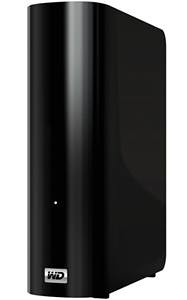
WD announces new USB 3.0 and 3TB External Hard Drive

WD My Book Essential

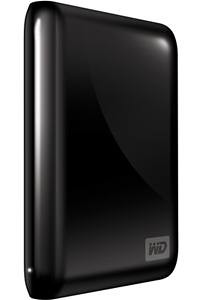
Western Digital (WD) today introduced its new My Passport Essential portable hard drive , My Passport Essential SE portable hard drive and My Book Essential external hard drive. All three drive families come in a variety of capacities and offer lightning-fast USB 3.0 connectivity Highest industry capacity is another key feature for the My Book Essential drive, which is now available in 3 TB capacity, in addition to 1 and 2 TB capacities. Equipped with WD SmartWare visual backup software for automatic, continuous backup, these drives provide users the extra space they need to store or back up all of their digital memories, such as high-resolution photos and videos, along with music and other critical files, all in one place.

The drives not only take advantage of the latest blazing-fast USB 3.0 technology, but are also fully compatible with USB 2.0 connections for those who have yet to upgrade their computers to USB 3.0. When connected to a SuperSpeed USB 3.0 port, consumers can transfer data at speeds up to 150 MB/s. At that rate, a two-hour HD video will transfer in as little as three minutes. The same two-hour video would take approximately 13 minutes to transfer on a USB 2.0 port.

WD MyPassport Essential

My Passport Essential, still WD's smallest portable drive, is available in a 500 GB capacity and comes in five fun colors - Midnight Black, Cool Silver, Real Red, Pacific Blue and Arctic White (Arctic White only available in EMEA and APAC). My Passport Essential SE portable hard drives are available in 750 GB and 1 TB capacities and come in stylish black, silver, metallic blue and metallic red colors. The pocket-sized My Passport portable hard drives are powered directly through the USB cable; no separate power supply is needed.

My Book Essential, the world's number-one selling hard drive, also impresses with its small footprint, sleek design and high-capacity storage ranging from 1 TB up to a massive 3 TB3. The drive is compatible with both USB 2.0 and USB 3.0 ports, and uses WD SmartWare visual backup software.

" With more and more devices like the iPod touch, iPhone 4 and other smartphones adding video-capable cameras, digital video is becoming ubiquitous. Most homes already have thousands of photos and music files, increasing the need for storage around the house. Having the extra capacity to store these files and move them around quickly is becoming a big issue for many consumers around the world," said Dale Pistilli, vice president of marketing for WD's branded products group. "WD's newest line of My Book and My Passport external hard drives features the latest USB 3.0 connection technology, which more than triples the speed to transfer media files, but still works with today's USB 2.0 ports. In addition, consumers can take advantage of the highest capacity available on external hard drives with the new 3 TB My Book Essential drive."

Features:

  • My Book Essential external hard drives, My Passport Essential and My Passport Essential SE portable hard drives feature:
  • Dual USB 3.0 and USB 2.0 interfaces;
  • Up to 3x faster transfer rates when compared to USB 2.0;
  • WD SmartWare software for automatic, continuous backup;
  • Password protection for privacy; and,
  • Planet-friendly packaging from recycled materials which can, in turn, also be recycled.

Capacity and Compatibility:

The My Passport Essential portable hard drive is available in 500 GB capacity. The My Passport Essential SE portable hard drive is available in 750 GB and 1 TB capacities. The My Book Essential external hard drive is available in 1 TB, 1.5 TB, 2 TB and 3 TB capacities. The drives are formatted NTFS for Windows XP, Windows Vista, or Windows 7. These drives require reformatting for Mac OS X Leopard or Snow Leopard.

My Passport Essential portable hard drives and My Book Essential external hard drives offer a 2-year limited warranty in the U.S. and are now available at select U.S. retailers and online at wdstore.com.

MSRP for My Passport Essential portable is $99.99 USD. MSRP for My Passport Essential SE drives range from $129.99 USD to $169.99 USD. MSRP for My Book Essential drives range from $129.99 USD to $249.99 USD.

Tuesday, 17 January 2012

Sony's Micro Vault MACH USB 3.0 Flash Drive accelerates file saving and sharing

MICROVAULT MACH USB 3.0

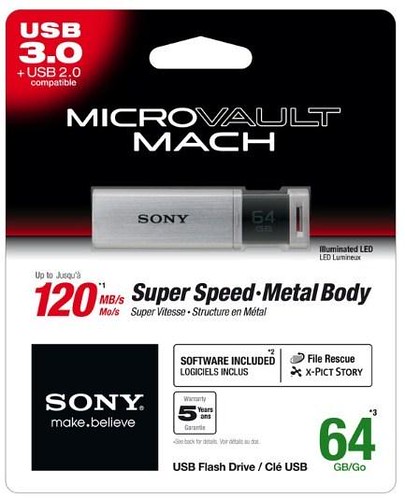
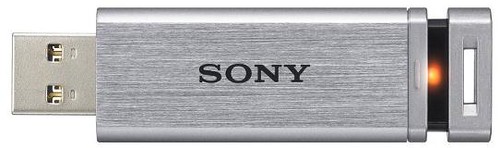
Sony brings it’s first USB 3.0 flash memory drive-Micro Vault MACH.  Micro Vault MACH is encased in sleek, solid aluminium body and sports a red indicator LED. It offers ultra-fast transfers up to 120 MB/s read / 90 MB/s write, backed by standard five-year warranty. The drives should be available later this month in 8GB, 16GB, 32GB and 64GB capacities. Read the full press release after the cut.

Sony MACH USB 3.0

Sony goes faster with Super Speed USB 3.0 Flash Drive

17 January 2012

New Micro Vault MACH accelerates file saving and sharing

First USB 3.0 flash memory drive from Sony
Available in 8GB/16GB/32GB/64GB capacities
Ultra-fast transfers up to 120 MB/s read / 90 MB/s write*
Sleek aluminium body with retractable USB connector and LED indicator

USB MACH 3.0 - open

Get ready for even faster saving, sharing and uploads of your personal media files. Brand-new Micro Vault MACH is the first family of flash memory drives from Sony with SuperSpeed USB 3.0 technology for blazing performance that won't slow you down.

Micro Vault MACH is ideal for consumers and business users who need the convenience and reliability of ultra-fast on-the-go data transfers. Available in capacities from 8GB up to 64GB, Micro Vault MACH offers data speeds up to 120 MB/s (read) and 90 MB/s (write)*. You'll enjoy faster sharing and uploads of music, photos, HD video and media-rich documents – and less time spent waiting for your files to copy.

Micro Vault MACH is backward-compatible with USB 2.0, so you can use it seamlessly with current PCs and other devices that don't support the SuperSpeed USB 3.0 standard.

Micro Vault MACH is encased in sleek, solid aluminium body that's built to withstand day-to-day knocks. The retractable USB connector's click mechanism offers extra protection while shrinking the drive's size for even greater portability. There's a handy LED indicator to give visual confirmation of data transfers when the drive is in use. For extra peace for mind, all drives come with a standard five-year warranty.

Downloadable software for Micro Vault MACH series includes File Rescue and x – Pict Story™. File rescue enables users to recover any important data that might have been deleted by mistake, making retrieving lost data such as images, movies and music files a breeze. The x – Pict Story™ software allows the creation of an automated photo presentation using the files stored on the Micro Vault.

The new Micro Vault MACH series of USB 3.0 SuperSpeed flash memory drives by Sony is available from January 2012.

* Based on Sony internal tests with USM64GQ as of November 2011. Transfer speed may vary depend on host devices, software and usage. Not guaranteed. Design and specifications are subject to change without notice


Tuesday, 2 November 2010

SuperTalent Introduced USB 3.0 Flash Drive at less than $15

supertalent_logo

Super Talent Technology, a leading manufacturer of Flash storage solutions and DRAM memory modules, announced that their new USB 3.0 Express Duo has broken the $15 price barrier.

The fastest USB 2.0 flash drives are limited to a maximum READ speed of approximately 32MB/s. Super Talent’s new USB 3.0 Express Duo can top over 67MB/s when plugged into a USB 3.0 port, yet remains fully-backward compatible to USB 2.0… and for about the same price. Starting today, Super Talent will begin offering the 8GB USB 3.0 Express DUO for $14 and the 16GB version for only $29!! 

“The USB 3.0 Express DUO is perhaps our most exciting USB 3.0 flash drive to date. We were first to break the 300MB/s barrier with our USB 3.0 RAIDDrive and now we’re breaking the $15 price barrier. There’s simply really no reason to buy a USB 2.0 flash drive anymore”., CH Lee COO of SuperTalent. 

Now Sampling to Press and taking orders for shipment in November.

SuperTalent USB 3.0 Flash Drive Prices

YouTubeVideo-Benchmark: http://www.youtube.com/watch?v=ybjfVmSRe9c


Friday, 29 April 2011

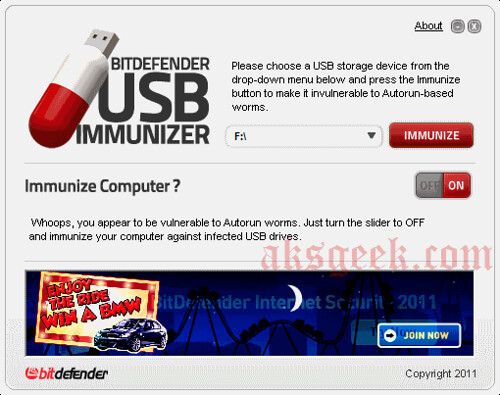
BitDefender USB Immunizer-Protect your USB and computer against Autorun Malware threat

USB Immunizer-01

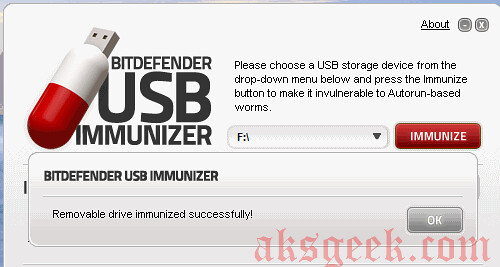
BitDefender added new tool in the list of their security application and this time its USB Immunizer. If you’re not a BitDefender fan—its OK but you surely going to like this tool, portable, simple and easy to use, less than 2MB in size BitDefender USB Immunizer allows you to shield your USB storage device or SD card against infections. Even if your storage device has been plugged into an infected computer, the piece of malware will be unable to create its autorun.inf file, thus removing any chance of it auto-launching. Want to know more?

USB Immunizer-02 Immunized

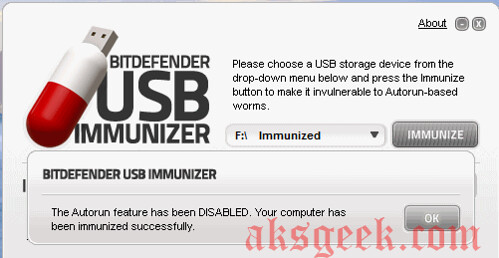
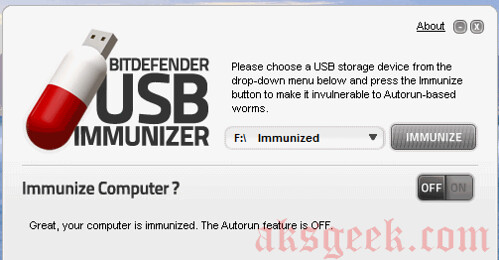
There is another option available in this app, Immunize Computer slider which allows you to toggle the autorun feature On or Off for any removable media (except for CD/DVD-ROM devices). If you accidentally plug-in an infected USB drive that has not been immunized, the computer will not auto-execute the piece of malware located on the USB storage device.

USB Immunizer-03 computer Immunized

And one more thing this is a Free tool anyone can use it but it displays their own ads, I hope this is not bothering you.

Am I missing something? Want to add more?--go ahead and share with us.

USB Immunizer-04

Download BitDefender Immunizer | Homepage


Wednesday, 22 June 2011

Samsung Unveils Premium Accessory Suite for Galaxy Tab 10.1

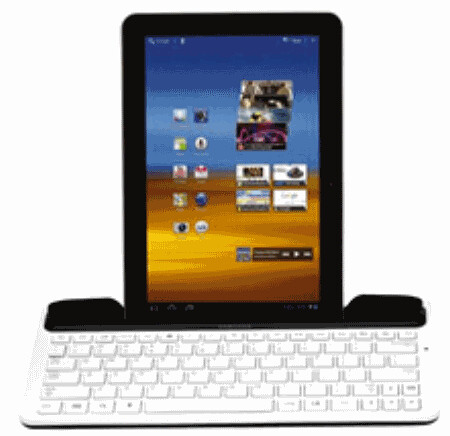
Galaxy tab keyboard dock

Samsung, today announced a line of premium accessories designed exclusively for the Android 3.1 Honeycomb-powered Samsung Galaxy Tab 10.1. The new set of accessories includes an array of docking, charging and convertibility options to provide users with an enhanced mobile experience for the latest in Android tablet computing.

GALAXY TAB 10.1 KEY ACCESSORIES AVAILABLE NOW

Docking Solutions

The Samsung Galaxy Tab 10.1 accessory portfolio includes several docking solutions for consumers to easily view their favorite movies, listen to music, or quickly empty their inbox on their Galaxy Tab. The Samsung Galaxy Tab 10.1 Multi-Media Dock provides desktop docking in landscape view, allowing users to charge their Galaxy Tab 10.1 while checking email, listening to music via the 3.5 mm stereo line-out port, or viewing their favorite photos in digital picture frame mode. With easy data sync to PC, pictures, videos, music, contacts, and calendar appointments sync smoothly from the Galaxy Tab 10.1 to a home computer. The Multi-Media Dock also includes HDMI pass through, allowing users to connect their docked Galaxy Tab 10.1 to Samsung's Galaxy Tab 10.1 HDMI Adapter (sold separately) to seamlessly transfer multimedia content to a home entertainment center.

With comfortable, soft-touch Android Hotkeys, convenient charging and audio line-out capabilities, the full-size Samsung Galaxy Tab 10.1 Keyboard Dock maximizes the Tab's features while keeping it securely stationed in the weighted, integrated charging and media dock. Meanwhile, the Android Hotkeys give you one touch access to key features like Internet, e-mail, music and video controls.

Protective Casing Options

The Samsung Galaxy Tab 10.1 line of accessories also provides users multiple protective casing options, with two available now and a third option – the Samsung Galaxy Tab 10.1 Bluetooth Keyboard Case – available later this summer. The Galaxy Tab 10.1 Book Cover Case protects all corners and sides of the Galaxy Tab 10.1 against bumps and scratches while also converting into an easel stand with non-slip feet on the edges. When propped as an easel stand, the Galaxy Tab 10.1 Book Cover Case holds the Tab higher to easily view multimedia content while standing up, or props it lower as a keyboard stand for owners to use the Galaxy Tab 10.1 touch-screen keyboard without removing the Tab from its case. Made from premium material, the Galaxy Tab 10.1 Book Cover Case is durable, stylish and always maintains its shape.

Also available now is the Galaxy Tab 10.1 Leather Pouch for the perfect mix of portability and convenience. Made from soft leather, this black protective pouch snugly holds the Galaxy Tab 10.1 and fits easily in luggage or a briefcase, offering users a stylish protective carrying solution with no added weight or bulk.

Adapters for Multimedia Solutions

Samsung's popular movie and TV content service, known as Media Hub, has been redesigned with a new user interface for even faster content downloads and will be available on the Galaxy Tab 10.1 through a future software upgrade. The new version of Media Hub also includes an HD Extender, allowing users to play back Media Hub content on their television via Samsung's new HDMI Cable Adapter. This adapter also charges the Galaxy Tab and provides 1080p Video playback.

The Galaxy Tab 10.1 supports USB On-The-Go (OTG), a hardware solution that allows for several USB enhancements that go beyond data sync and charging. In addition to the ability to upload and share multimedia content between the Galaxy Tab 10.1 and other devices, the Galaxy Tab 10.1 USB Adapter utilizes the Tab's USB OTG support and allows seamless connectivity between the Tab 10.1 and USB accessory devices such as keyboards, mice, memory sticks, and other peripherals. After simply plugging the USB Adapter into the Galaxy Tab accessory port, owners are now able to use a keyboard, mouse, or memory stick directly with the Galaxy Tab 10.1 without having to load drivers.

Additional Galaxy Tab 10.1 Accessories Available Now

The Galaxy Tab 10.1 accessories lineup also includes a collection of charging and enhancement solutions universal to the entire Galaxy Tab portfolio. Whether at home or abroad, the USB 2A Travel Charger and USB 2A Car Charger allow users to stay powered up while on the go. Each includes a USB to 30 Pin Data Cable that can also be purchased separately.

Additionally, seamlessly interact with your Tab while leaving messy finger prints behind with the Galaxy Tab Conductive Stylus. Finished in attractive chrome and black and styled similar to a premium writing instrument, the Conductive Stylus simulates a finger touch, tap or swipe to provide a full touch screen environment without fingerprints or smudging. The Conductive Stylus is designed with a shirt pocket clip for convenient storage and portability.

GALAXY TAB 10.1 KEY ACCESSORIES AVAILABLE MID-SUMMER

Available later this summer, Galaxy Tab 10.1 users can enhance their accessory portfolio with additional solutions for content sharing and protection. The Galaxy Tab 10.1 Bluetooth Keyboard gives users a full-sized wireless keyboard in a super-thin design. The Galaxy Tab 10.1 Bluetooth Keyboard comes in a sleek black leather case that allows for easy tying at an adjustable angle, while the comfortable Android Hotkeys provide shortcuts to users' favorite Tab 10.1 features.

Also later this summer, users can transfer photos and videos directly from their digital camera to their Samsung Galaxy Tab 10.1 with the Samsung SD Card Adapter and USB connection kit. Put the Galaxy Tab 10.1 in digital picture frame mode, and users can easily view slideshows of their favorite photos on the Tab's brilliant 10.1-inch HD touchscreen display with WXGA 1280 x 800 resolution, delivering vibrant colors, crisp clarity, and smooth transitions.

Source:- Samsung Store


Saturday, 19 November 2011

Kingston launches DataTraveler HyperX 3.0 fastest USB Flash Drive

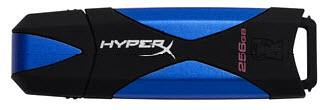
DataTraveler HyperX 3.0 flash drive

Kingston, today announced the Kingston DataTraveler HyperX 3.0. The DataTraveler HyperX 3.0 is designed for enthusiasts and gamers, and features the fastest speeds and largest capacities that Kingston has to offer in a USB Flash drive.

Its high-speed eight-channel architecture provides USB 3.0 data transfer rates of up to 225MB/s read and 135MB/s write. Users can save time associated with opening, editing and copying large files and applications between devices. The fast write speeds also allow users to work on large files or applications directly from the USB 3.0 drive without performance lag.

The DataTraveler HyperX 3.0 is available in 64GB, 128GB and 256GB capacities and it features a metal and rubberized casing with a reinforced key ring hole for daily use. It allows users to keep it with them at all times, as it can be easily attached to a key ring or lanyard.

Kingston DataTraveler HyperX 3.0 Features and Specifications:

  • Capacities: 64GB, 128GB, 256GB
  • Speed:
    • USB 3.0: up to 225MB/s read and 135MB/s write
    • USB 2.0: up to 30 MB/s read/write
  • 8-Channel Architecture
  • Backwards Compatible: with USB 2.0 and USB 1.1 ports
  • Solid/rugged design: durable metal and rubberized casing provides increased protection
  • ReadyBoost Support
  • Dimensions: 2.952" x 0.916" x 0.626" (74.99mm x 23.29mm x 15.9mm)
  • Simple: just plug into any USB port
  • Practical: durable casing with a solid lanyard loop
  • Warranty: 5 Years
Kingston DataTraveler HyperX3.0


Friday, 10 September 2010

Lenovo Power Hub Features 4 USB ports

Lenovo Power Hub

  Many PC users buy a spare power adapter and a USB hub – separately. Most have a secondary device, like a smart phone, to manage along with their PC. In this hustle-bustle world, you need devices that are portable and easy to use almost anywhere and most important thing Saving money is critical, so combining elements for convenience can’t cost you more.

  So, Lenovo did it for you by combining data synchronization and charging capabilities into one low cost, portable unit. Now you can stay plugged in at home or on the road with the flexible Lenovo Power Hub.

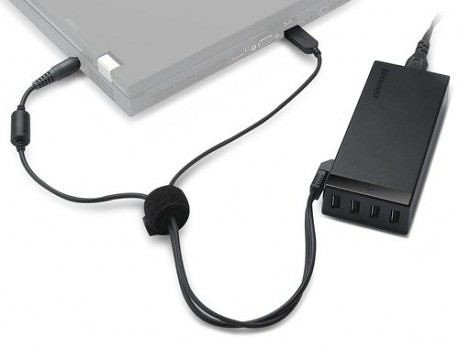
  This device combines a 65W laptop AC power adapter with a 4-port powered USB hub for your peripherals. Three ports offer standard USB data transfer and charging capability, while a fourth dedicated “power” port charges devices, like most mobile phones. Use the flexible Lenovo Power Hub to: -Charge your laptop battery, Access up to four USB peripherals in your workspace, Charge those USB peripherals even when your laptop is away. .

Features and Benefits:

  • Compatible with 90W and 65W ThinkPad laptops
  • 3 standard USB ports transfer data and charge devices
  • 1 dedicated power port charges devices, including most mobile phones
  • Attaches to laptop via two cables
  • Power cable connects to laptop power port
  • USB cable attaches to any available laptop USB port
  • Backed by Lenovo's 1 year limited warranty with renowned Service and Support available from IBM

The Power Hub is available right now for only $74.99. There is no word whether Lenovo bundle There’s no word on whether or not Lenovo is going to start bundling this with their products.

Now, this is what we call Innovation!

Lenovo Blog

Monday, 31 January 2011

Sanho Announces 2nd Iteration Of HyperDrive iPad-compatible Hard Drive

HyperDrive iPad Compatible

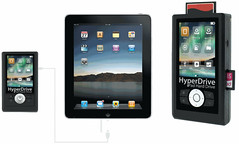
Sanho announced the second iteration of their popular HyperDrive Hard Drive for iPad, the only hard drive in the market that can connect directly to the iPad via the Apple Camera Connection Kit. This new version allows users to directly use their iPads to browse and transfer up to 1TB of video and photo content without the need for computers, additional apps or a jailbroken ipad.

Finished in a slim enclosure, the HyperDrive looks exactly like any portable USB hard drive except that it has 2 mini USB ports, one for connecting to the computer to function as a normal USB hard drive and the other to connect to the iPad via the Apple Camera Connection Kit.

Using the Apple Camera Connection Kit, the iPad is able to connect to SD cards and self-powered USB devices. However there is a size limitation of 32GB, making it impossible for larger USB hard drives to connect to the iPad. HyperDrive iPad Hard Drive overcomes this limit with its unique patent pending ability to turn individual file folders into virtual 32GB drives on the fly that is readable by the iPad. While the HyperDrive is bus powered when connected to the computer, it has an internal 1600mAh battery to power its connection to the iPad.

Users can first transfer their entire movie and photo library from their computer to the HyperDrive via USB. Once that is done, users will have up to 1TB of media accessible to the iPad anytime.

To transfer media from the HyperDrive to the iPad, users just need to connect the HyperDrive to the iPad via a USB cable and the Apple Camera Connection Kit. The HyperDrive hard drive folder contents will appear on the iPad screen and users can navigate the folders to search for videos and photos to download to the iPad.

Features

  • Connects to the iPad to transfer photos, movies and other media
  • Connect HyperDrive as a USB hard drive to the computer
  • Support multiple partitioned hard drive formats

The new HyperDrive Hard Drive for iPad ships in March 2011 and is available for pre-order now at the following manufacturer's suggested retail price (0GB: $99, 320GB:$199, 500GB:$249, 640GB:$299, 750GB:$349, 1TB: $399). It is available at http://www.hyperdrive.com/ipad


Friday, 30 September 2011

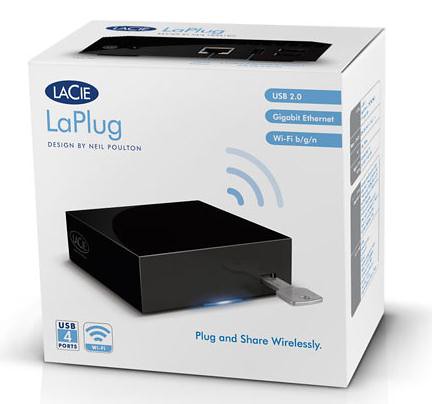
LaCie introduced LaPlug - turns any USB HDD into a Network Storage Device

LaCie LaPlug

Today LaCie announced the LaPlug, a simple solution to share any USB hard drive or key over a local network. The LaPlug turns any USB hard drive into a network storage device, sharing files wirelessly throughout the home. Simply connect the LaPlug to the network then connect the drive to the LaPlug.You can also connect a USB printer to the LaPlug and make it wirelessly available to all computers on the network.

ACCESSIBILITY AT HOME AND ON THE ROAD

Not only does the LaPlug make USB hard drives accessible throughout the home, it even supports remote access. Instead of emailing large files between friends, just give them access to the LaPlug – all they need is an Internet connection. The user can even set up a custom web address, so access to the LaPlug is as easy as typing a URL.

MULTIMEDIA STREAMING

It is easy to access USB drives connected to the LaPlug from any networked equipment that's UPnP/DLNA-certified, such as the PlayStation 3 or Xbox 360, as well as the LaCie LaCinema Classic HD. If a user has movies on a USB key they can just connect it to the LaPlug then play the movie using the multimedia device on the network. Instantly watch movies from the comfort of your living room even if the LaPlug is located in another part of the house. The LaPlug also plays music files from a USB drive or streams music to computers on the network running iTunes.

CENTRALIZE BACKUP FOR CONVENIENCE AND SECURITY

The LaPlug offers a convenient way to automatically back up all computers in a household onto one central location. Use the included backup software or Time Machine. Either way, simply configure automatic backups once then rest assured knowing all data is secure. Since the LaPlug supports Wi-Fi, once the computer is configured the user does not need to connect it to the LaPlug in order to initiate backups. It works as soon as the computer is connected to the local network.

AVAILABILITY

The LaCie LaPlug will be available through the LaCie Online Store, LaCie PROgram+ Partners and LaCie PROgram+ Resellers starting at the suggested retail price of $74.99 (VAT included).

Source:- LaCie


Thursday, 9 September 2010

LaCie Introduces the World’s Smallest Mobile and Desktop USB 3.0 Hard Drives

Press Release

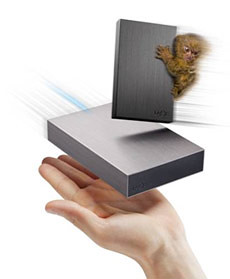
LaCie World's Smallest USB 3.0 HDD  LaCie debuts sleek USB 3.0 hard drives for your desktop or pocket – the LaCie Minimus and LaCie Rikiki USB 3.0. Proving size does matter, LaCie delivers the industry's fastest transfer speeds at 5Gb/s in its ultra–small Rikiki form factor – perfect for users that refuse to sacrifice performance for mobility; and the LaCie Minimus – for users that enjoy their terabytes as much as desk space.

  Complementing their remarkably small sizes, the Rikiki and Minimus hard drives are encased in sturdy brushed aluminum for an elegant aesthetic appeal. The aluminum offers resilience from blunders, improved heat dissipation, and is fully recyclable.
Designed to be simple from the inside out, the Rikiki and Minimus come with LaCie's Software Suite to ensure seamless setup and backup support for Mac or PC. Additionally, each product comes with 10GB of Wuala online storage so you can securely store and share files online.

  "The Minimus and Rikiki USB 3.0 offer our customers easy and affordable options to access the super speeds of USB 3.0," said Philippe Rault, LaCie Consumer Product Manager. "Since these products offer backward compatibility with USB 2.0, they will work on any PC or Mac with no worry."

Availability

  The LaCie Rikiki USB 3.0 is available in a 500GB capacity at $99.99. The LaCie Minimus is available in a 1TB capacity at $129.99. Both products are available through the LaCie Online Store, LaCie Corner, and LaCie Reseller+.

For more info: visit www.lacie.com.

Tuesday, 2 August 2011

Kingston launches USB 3.0 Media Reader

Kingston USB 3.0 Media Reader

Kingston launched the USB 3.0 Media Reader which supports multiple card formats including the newer high-capacity SDXC. With its quick and easy plug-and-play design, it delivers up to 5.0Gb/s data transfer speed for high-resolution images, large data files and more making it ideal for serious enthusiasts who need a fast and reliable data transfer device. It is also backwards compatible with USB 2.0.

Kingston USB 3.0 Media Reader Features and Specifications:

  • Portable: convenient small size
    • Versatile: works with the following Flash card formats:
    • CompactFlash
      • CF Type I (UDMA 0-6)
      • CF Type II (UDMA 0-6)
    • Secure Digital
      • SD
      • SDHC
      • SDHC UHS-I
      • SDXC
      • SDXC UHS-I
    • microSD
      • microSD
      • microSDHC
      • microSDXC
    • Memory Stick/M2
      • Memory Stick
      • Memory Stick PRO
      • Memory Stick Duo
      • Memory Stick PRO Duo
      • Memory Stick M2
  • Requirements: system with USB 3.0 port
  • Backwards Compatible: with USB 2.0
  • Dimensions: 3.66" x 2.07" x 0.63" (93.17mm x 52.68mm x 16.00mm)
  • Speed Rating: USB 3.0, up to 5.0Gb/s data transfer speed
  • Operating Temperature: 32º to 140ºF / 0º to 60ºC
  • Storage Temperature: -4º to 185ºF / -20º to 85ºC
  • Operating System Compatibility: Windows 7, Windows Vista (SP1, SP2), Windows XP (SP3)
  • Guaranteed: two-year warranty
  • Cost: $45 (US)

Thursday, 13 January 2011

Freecom Launches World's Thinnest Mobile Hard Drive Exclusively for Macs

freecom

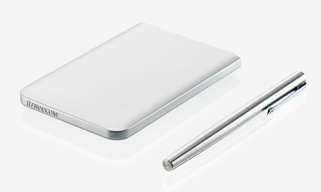
Freecom, a Mitsubishi Kagaku Media company, unveiled the Mobile Drive Mg - an elegant mobile hard drive designed specifically for the Mac market. Encased in an ultra-lightweight and strong magnesium enclosure, the Mobile Drive Mg is an ideal match for the Apple MacBook - perfect for those style-conscious Mac users and at just 10mm is also the thinnest mobile hard drive available in the world, allowing users to reliably expand their storage capacity with a complementary product that is elegant, portable and easy to use.

The drive also features the latest USB 3.0 interface standard, which offers rapid data transfer speeds of approximately 130 MB/s. Ideal for both home and professional users who want to transfer large files quickly and carry their data on the move, the Mobile Drive Mg is significantly faster than traditional USB 2.0 solutions, enabling users to back up and upload information in a matter of seconds. The drive is backwards-compatible and will work with all USB 2.0 enabled computers and notebooks, as well as forthcoming USB 3.0 models.

The Mobile Drive Mg will only be available through Apple Premium Resellers in a range of three different models, all of which are future ready and are an exact colour match with Apple's popular MacBook. The first - the world's thinnest mobile hard drive - has a height of just 10mm, while Freecom's other models are both standard-sized mobile hard drives; the difference between them being that one comes with the added benefit of FireWire 800 technology.

In addition to being incredibly strong and durable, the magnesium casing can easily be recycled - making it both practical and environmentally-friendly. The drives are also Mac formatted, making them ready for immediate use with a Macbook and 100 percent Time Machine compatible. All Mobile Drive Mg products come with a two year warranty and unlimited helpdesk support.

The Mobile Drive Mg will be available from mid-January in the following capacities, with higher capacities to follow at a later date:

- 320GB (10mm in height with a slim line 7mm hard drive inside, USB 3.0).RRP EUR 79,95/GBP 69.95

- 750GB (with USB 3.0, 12mm in height). RRP EUR 119,95/GBP 109.95

- 750GB (with USB 3.0 & FireWire, 12mm in height). RRP EUR 129,95/GBP 119.95

 Freecom

Wednesday, 4 January 2012

HP unveils 27-inch Omni27 All-in-One PC, HPE Phoenix h9, L2311c docking monitor, LV1911 and LV2011 budget displays

HP Omni27 All-in-One PC

HP today unveiled new consumer PCs and commercial displays launched in advance of the 2012 International Consumer Electronics Show (CES), the new lineup includes:

  • HP Omni27 PC – the company's first 27-inch all-in-one PC, and the first non-touch HP PC to feature HP's exclusive Magic Canvas software for a truly engaging experience.
  • HP Pavilion HPE h9 Phoenix PC – the most powerful HP Pavilion PC to date, it is engineered to run power-hungry applications, such as video editing and games, with ease.
  • HP Compaq L2311c Notebook Docking Monitor – built to pair with a notebook PC via its USB port, creating an efficient, comfortable workspace for mobile professionals.
  • Affordable HP LV1911 and LV2011 LED Backlit LCD Monitors – delivering intelligent design and reliable business performance at a great value.

HP Omni27 All-in-One PC

The HP Omni27 All-in-One PC is crafted for consumers who demand meticulous design, enhanced performance and an expanded viewing experience. Its elegant flat-panel display features edge-to-edge glass and tilts up to 25 degrees, allowing users to adjust the 27-inch-diagonal high- definition (HD) screen to their comfort level.

The HP Omni27 features HP Magic Canvas software, enabling users to expand the desktop horizontally to accommodate photos, videos and applications. Microsoft Windows desktop shortcuts, task bar and start menu can all be accessed through the HP Magic Canvas, so users can work without ever leaving the interface. HP LinkUp lets users access and edit content from a notebook PC on the HP Omni27 PC's large display with virtually no file transfer hassles.

The HP Omni27 offers multicore processors, advanced HD graphics and up to 2TB of storage. Additionally, features such as Beats AudioTM, HDMI-in, and an optional Blu-Ray disc drive or TV tuner make it the ultimate multimedia machine. Users also can connect the optional HP Pulse Subwoofer to complement the rich sound of Beats Audio and add depth of sound to movies and games.

HP Pavilion HPE h9 Phoenix

HPE Phoenix

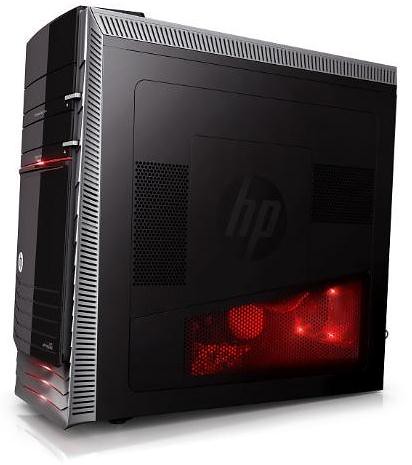
The HP Pavilion HPE h9 Phoenix is the most powerful HP Pavilion PC to date and offers a cutting-edge design and expandability for users focused on content creation and immersive gaming.

Distinct hardware details, including an armor-plated design that extends across the top and front of the bezel, attention-grabbing lighting and a slanted window on the side of the chassis to see its inner technology, make the HPE Phoenix a standout among desktop PCs. It also offers a valet tray equipped with USB ports for easy access and charging of smartphones, digital cameras and MP3 players. Exclusive features such as HP Magic Canvas, HP LinkUp and Beats Audio offer users the latest in convenience and sound. Users also can enjoy playing "RIFT," the dynamic role-playing game from Trion Worlds Inc., included at no additional cost with the HPE Phoenix.

The HPE Phoenix includes four dual in-line memory modules (DIMM) to accommodate up to 16GB of DDR3 memory and three internal hard drive bays, while its high-end discrete graphics cards, up to 250W, can support multiple displays and deliver captivating video performance and picture quality. An optional liquid cooling system draws heat away from high-performance processors, helping to protect sensitive components from heat overload and extending the life of the PC.

HP Compaq L2311c 23-inch Notebook Docking Monitor

HP Compaq L2311c notebook docking monitor

HP also announced the HP Compaq L2311c 23-inch Notebook Docking Monitor, designed to provide mobile professionals with a desktop experience via one easy connection from a USB cable to any notebook PC with a USB 2.0 or 3.0 port.

Ideal for notebook users in shared or permanent work spaces, the Compaq L2311c sports a full HD, LED backlit LCD display panel and features HP Smart AC Technology that powers and charges HP notebook PCs while also detecting and regulating the capacity of the electrical current.

The HP Compaq L2311c efficiently creates an expanded plug-and-play workspace for increased productivity with one USB connection that provides full HD video, Internet connectivity and access to peripherals directly from the monitor's integrated Ethernet, SuperSpeed USB 3.0 and USB 2.0 ports.

The monitor also features a built-in 720p HD webcam and is equipped with HP MyRoom business edition software and Cyberlink YouCam, a productive webcam tool that eases communication with coworkers and clients in any location.

HP LV1911 and LV2011 LED Backlit LCD Monitors

Also new from HP are the HP LV1911 and LV2011 LED Backlit LCD Monitors, which provide business performance at budget-friendly prices. The LED backlighting employed in all three new displays reduces the number and overall size of panel components for an attractive, slim form factor, while also minimizing power consumption when compared to previous CCFL panel monitors. The HP LV1911 and LV2011 respectively measure 18.5 and 20 inches diagonally and offer VGA inputs, 3,000,000:1 dynamic contrast ratios and 5 millisecond response times.

Pricing and availability

  • The HP Omni27 All-in-One PCs are expected to be available on Jan. 8 in the United States at a starting price of $1,199.99.
  • The HP Pavilion HPE Phoenix h9 PCs are expected to be available on Jan. 8 in the United States at a starting price of $1,149.99.
  • The HP Compaq L2311c 23-inch Notebook Docking Monitor is expected to be available in February in the United States at a starting price of $319.
  • The HP LV1911 and LV2011 LED Backlit LCD Monitors are expected to be available in March and February in the United States at starting prices of $125 and $135, respectively.

Sunday, 9 January 2011

Geohot releases PS3 Jailbreak for firmware 3.55

Geohot has released PS3 jailbreak for firmware 3.55.  With geohot's PS3 jailbreak, you /can't/ play backup games or /pirated/ games or whatever you choose to call them. You can install packages with the provided installer. More packages will be coming from the PS3 jailbreak community in the coming weeks and months. So be patient!

HOW TO GUIDE

To Jailbreak PS3 on 3.55 only

1. Plug a USB stick into your computer
2. Create a folder in the root of the USB stick called PS3
3. Create a folder inside the PS3 folder called UPDATE
4. Download
http://geohot.com/jailbreak.zip
5. Unzip Jailbreak.zip to PS3UPDAT.PUP
6. Move PS3UPDAT.PUP to the directory UPDATE that you just created on the USB stick
7. Plug the USB stick into your PS3
8. Navigate to Settings Tab
9. Choose System Update
10. Choose Update via Storage Media
11. It will say it found Version 3.55-jb
12. Choose OK
13. Accept Conditions and Install Update
14. After less than a minute, your PS3 will update, beep 4 times then shut down.
15. Power up your PS3 (You will have to do it on the console and not by the controller)
16. Your PS3 is now jailbroken!

To Install Packages

1. Plug your USB stick into your computer
2. Drop
http://geohot.com/test.pkg into the root of the USB stick
3. Plug your USB stick into your PS3
4. Navigate to the Game Tab
5. Choose Install Package Files
6. Select the test.pkg
7. After it installs you will find the test package from geohot installed below the Install Package Files folder
8. Wait for more packages to be created by the PS3 community


Source- Stealth Bravo, Geohot