Showing posts with label Security. Show all posts

Wednesday, 12 September 2012

Verizon launches Mobile Security App for Android

Verizon Mobile Security App

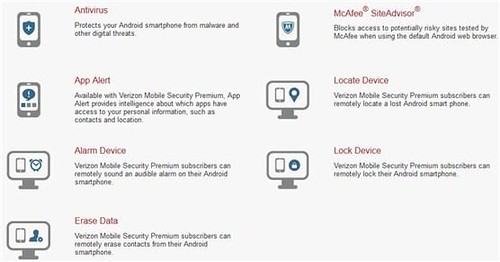
Verizon announced Verizon Mobile Security, an application that helps customers secure and protect Android smartphones against digital and physical threats. The Mobile Security app is powered by Asurion and McAfee is available in two (Free and Premium) version on Android smartphones running Android 2.1 or higher.

Verizon Mobile Security Basic – Provides antivirus protection, powered by McAfee, to detect viruses and malware, and McAfee SiteAdvisor to identify and warn customers of suspicious websites. There is no charge to download Verizon Mobile Security Basic, but a Verizon Wireless data plan is required and data usage will apply.

Verizon Mobile Security Premium – Includes the security features of Verizon Mobile Security Basic, as well as McAfee App Alert, which delivers information about which apps have the ability to access, store or transmit data to or from the device. Available for $1.99/month per line, Verizon Mobile Security Premium also provides recovery features from Asurion that allow customers to remotely locate, alarm, lock or wipe data from a lost or misplaced device using their My Verizon accounts.

Verizon customers who are subscribed to the Total Equipment Protection insurance plan can add Verizon Mobile Security Premium for $1 per month. Total Equipment Coverage combines the benefits of Asurion's Wireless Protection Plan for lost, stolen, and damaged devices, and Verizon Wireless' Extended Warranty for mechanical or electrical defects after the manufacturer's warranty expires.

Source:- Verizon
Sunday, 15 July 2012

Microsoft Malware Prevention Troubleshooter now Available for Download
malware prevention
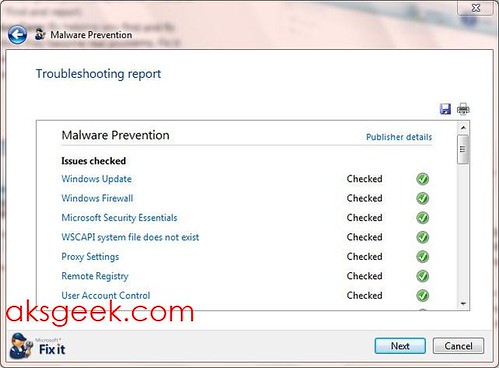
Microsoft has released a Malware Prevention troubleshooter tool, a free tool which automatically checks whether your Windows machine has up-to-date security setting and security software or not? and provide you with automatic or manual solutions.

The Microsoft Malware Prevention troubleshooter does the following:

  1. Turns on your Windows Firewall. Enabling your Windows Firewall will protect your computer by blocking communication to your PC that may be malicious software.
  2. Antivirus software: Checks your Antivirus protection status. You will be prompted to update your Antivirus program if it is not up to date or enable Real-time protection. If you don't have an anti-virus program installed it will offer you to use Microsoft Security Essentials or learn more about other security software partners.
  3. Turns on Automatic Update. Windows Update helps keep your PC current, secure and enhance performance by automatically downloading and installing the latest security and feature updates from Microsoft. This helps ensure that both Important and Recommended updates are downloaded.
  4. Pop-blocker: Enabling Pop-up Blocker will make browsing the web safer by helping prevent malicious or unsafe pop-ups from automatically appearing.
  5. Remote Registry: The Windows Remote Registry service enables remote users to modify registry settings on this computer. If this service is stopped the registry can be modified only by users on this computer as opposed to over the network.
  6. Internet Explorer: The package will inform you if you have the latest version of Internet Explorer installed. It will also modify your current privacy settings to ensure you have a safe browsing experience. The package will delete your internet cache and browsing history, which will help protect against malicious threats attempting to access your computer while you’re online.
  7. Enables User Account Control (UAC). User Account Control (UAC) will prevent malicious software from modifying your computer settings without your consent.
  8. Proxy Settings: If malicious software has modified your Internet Proxy settings, therefore making it difficult to get online, the package will reset your settings so you can browse the internet normally.

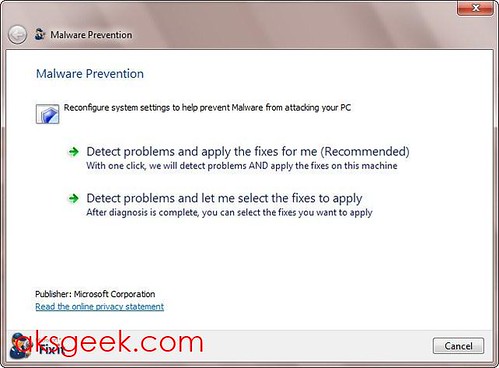
Once you have downloaded the tool, run it (with administrator privileges). You will be presented with two options "Detect problems and apply fixes for me " and "Detect problem and let me select the fixes to apply". I would suggest you to choose the second option, because it will let you know about the problems and the changes that the program would have made automatically otherwise. Just select the issues you want to fix and let the Fix It, fix it for you.

malware prevention01

It’s a good, free little tool for those who are not tech-savvy and inexperienced and will help them guard their Windows machines against viruses and other malicious software.

Download Microsoft Malware Prevention troubleshooter

Wednesday, 6 June 2012

Nuance Dragon ID secures phones, tablets and PCs with your Voice

dragonID

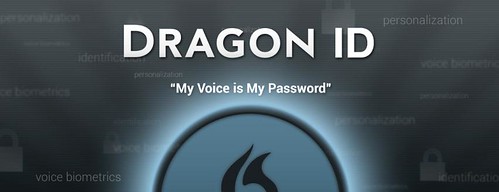
Nuance announced Dragon ID, Nuance's voice biometrics technology which lets you quickly and easily unlock mobile devices, tablets and PCs with your voice.

With Dragon ID, you can simply create a spoken password or passphrase, offering a secure and convenient way to "wake-up" and access devices. For instance, just saying "Hello Dragon" can securely turn on a device and instantly launch a personalized home screen with favorite apps and content – even on shared devices like tablets or PCs.

Dragon ID is available for consumer device OEMs, initially supporting English, French, German, Italian, Spanish, Chinese, Japanese and Korean for Android and other platforms, with additional language availability in 2012.

Monday, 30 April 2012

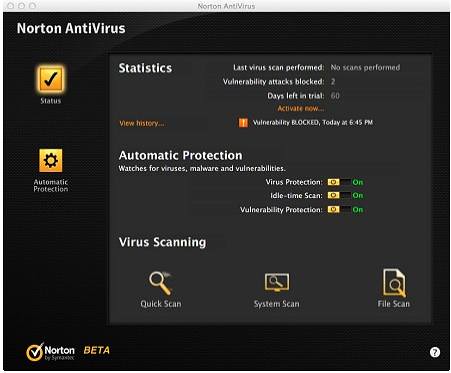
Norton Antivirus 2012 Free for 6 Month

Norton Antivirus 2012 free for 6months
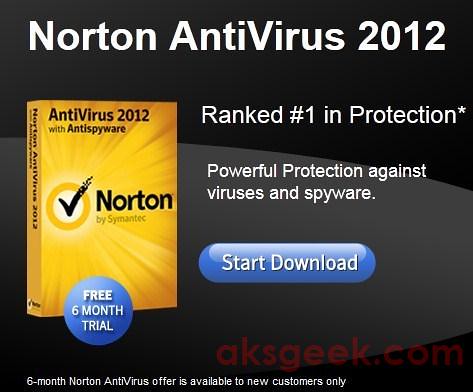
We’ve already shared with you free 90 days trial of Norton Internet Security 2011 and Norton 360 version 5.0 – currently active but changed to 60 days free trial of both (NIS 2012 and Norton 360 v5.0) and 90 days trial of NIS 2012. Now, adding to that list Norton Antivirus 2012 (NAV 2012) which is free for 6 months. Head past the break to know how to get 6 months NAV2012 for Free.

How to get Norton Antivirus 2012 Free for 6 months?
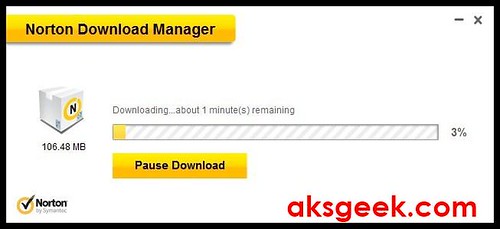
1. Visit this link and click on start download. Norton Download manager
2. Run the setup file (534KB) you have downloaded from above link. Norton download manager will first download the 106.48MB of NAV2012 and then automatically starts the installation procedure.
3. Once you are done with the installation. You need to create a new Norton account but make sure you use new email address which is NOT registered with Norton because this free offer is for new users only.
All done! now you can enjoy 6 months of free Norton Protection. And if you want, you can get free password manager – Norton Identity Safe.


Tuesday, 24 April 2012

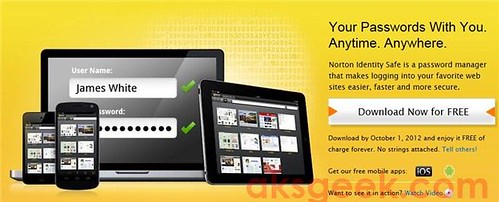
Norton Identity Safe - Free Password Manager stores your credentials in the cloud

Norton Identify Safe

Norton by Symantec released Norton Identity Safe, a free password manager that eliminates the hassle of remembering passwords while keeping you safe across PCs, Macs, iOS and Android devices.

If you've got few email accounts then keeping track of all your account is difficult. This service remember all credentials and inputs them automatically when you next visit. It can auto-fill your addresses, credit cards, frequent flyer numbers and even warn you about malicious websites.

Norton Identity Safe features include:

  • Multi-platform synchronization – Synchronizes information across platforms and devices, eliminating the hassle of remembering multiple user names, passwords, contact information, credit card numbers. Norton Identity Safe allows users to access their credentials anywhere they go.
  • Safe Search & Norton Safe Web – Help consumers protect their identities and avoid potentially risky sites by letting them know whether a site is safe to visit directly from their search results.
  • Share – Allows users to safely share online content by sending URLs through email and social networking plugins, directly from Norton Identity Safe.

Symantec is offering Norton Identity Safe is free until October 1, 2012.

Download Norton Identity Safe

Windows/Mac | iOS/Android

Saturday, 14 April 2012

Apple releases Flashback Malware Removal tool for OS X Lion Users not running Java

Flashback Malware removal tool
Apple has released another Flashback Removal tool for those running OS X Lion 10.7 without java installed.

This Flashback malware removal tool that will remove the most common variants of the Flashback malware.
If the Flashback malware is found, a dialog will be presented notifying the user that malware was removed. In some cases, the Flashback malware removal tool may need to restart your computer in order to completely remove the Flashback malware.
This update is recommended for all OS X Lion users without Java installed.

Download Flashback Malware Removal Tool (OS X Lion)356KB

Saturday, 25 February 2012

Avast 7 now Available for Download

Avast 7 cloud services

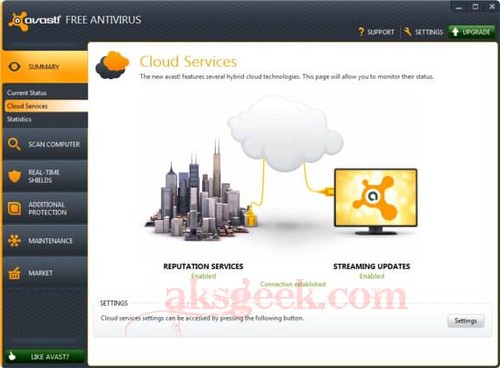
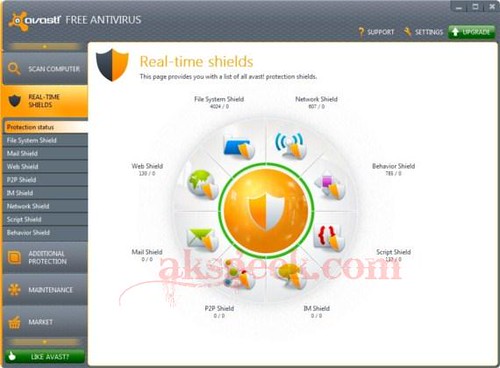
Avast! 7 stable/final version is now available for download build 7.0.1407, features cloud-based reputation scanning, streaming updates and remote assistance.

Avast 7 real shields

Avast! 7 Features:-

  • Reputation scanning via FileRep (cloud-based)
  • Streaming updates
  • Sandbox and Autosandbox improvements
  • Remote assistance
  • Browser protection improvements (including antiphishing)
  • New installer
  • Export/Import settings
  • UI facelift
  • Screensaver facelift
  • Runs on Win8 Developer Preview
  • Many other security and stability related fixes

Download Avast 7 Free | Pro | Internet Security

Thursday, 2 February 2012

Download Free Kaspersky WindowsUnlocker utility to disinfect ransomware

Kaspersky WindowUnlocker _ menu

Almost every computer user know about virus, trojan, spyware, malware etc and surely using free or paid security products to protect their machine. But do you know, what is ransom malware? It is a malware created to block access to a computer or restrict access to some functions and request a ransom (by showing instructions on screen) to restore computer functionality and starts automatically when Windows booted up even in safe mode. If your machine is infected with ransom malware, you can use a free utility called Kaspersky WindowsUnlocker to disinfect ransom malware.

The Kaspersky WindowsUnlocker utility is designed to disinfect registries of all operating systems installed on the computer (including operating systems installed on different partitions or in different folders on one partition) and disinfect user registry trees but it does not perform any actions with files (in order to disinfect files you can use Kaspersky Rescue Disk).

How to remove ransom malware using Kaspersky WindowsUnlocker?

  1. Download the Kaspersky WindowUnlocker ISO image (~200MB).
  2. Burn ISO image to a CD/DVD or USB Drive via Kaspersky USB Rescue Disk Maker and boot computer from it.
  3. A message will appear on the screen: Press any key to enter the menu – press any key and select language.
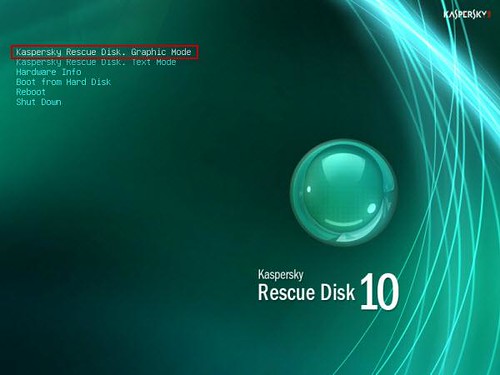
  4. Kaspersky Rescue disk is available in graphic and text modes select any one of them (graphic mode recommended) and accept the agreement. Kaspersky WindowUnlocker _ rescue disk graphic mode
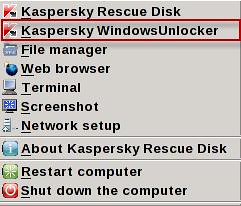
  5. Now, click the start button and select the Kaspersky WindowsUnlocker. Kaspersky WindowUnlocker _ menu
  6. The utility automatically starts and disinfects the registry. Results of performed actions will be displayed in the root window (white color window). If the root log file contains info about successfully performed actions, for example, Registry hive "path" opened successfully and "path" - suspicious value "value" deleted, then the utility has successfully ended its work on your computer.

Sunday, 29 January 2012

Prevent your children from accessing inappropriate Apps in the Android Market

Android market allow content

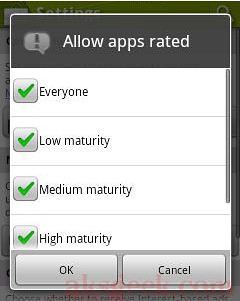
Unlike iOS, Android platform doesn’t come with parental controls which means unsuitable/inappropriate content will be visible to your children every time they access android market. But you can use first line of defense i.e content filtering for the Android Market apps to prevent kids from seeing and downloading inappropriate apps by choosing one of the filtering option which includes everyone, low, medium and high maturity.

Read more on how do you prevent your children from accessing inappropriate apps in the Android Market? and also on filtering option after the break.

Before setting content filtering, you should know what do these rating mean?:-

Everyone

Applications in this category should not collect user’s location data or contain objectionable material. Applications should not share user content or include social features.

Low maturity

Applications in this category may include instances of mild cartoon or fantasy violence or other potentially offensive content. Applications may collect user location data for the purpose of providing location specific information or otherwise improving the user experience, but should not share the data with other users. Applications may include some social features but should not focus on allowing users to find and communicate with each other.

Medium maturity

Applications in this category may include sexual references; intense fantasy or realistic violence; profanity or crude humor; references to drug, alcohol and tobacco use; social features and simulated gambling. Applications may collect user location data for the purpose of sharing or publishing with the user’s consent.

High maturity

Applications in this category may focus on or include frequent instances of sexual and suggestive content; graphic violence; social features; simulated gambling; and strong alcohol, tobacco and drug references. Applications may collect user location data for the purpose of sharing or publishing with the user’s consent.

How to set content filtering in different phones and tablets?

On phones running Android Market versions lower than 3.1.5:

  1. Open Android Market.
  2. Press Menu and touch Settings.
  3. Touch ‘Select filtering level’ and choose your desired setting.
  4. To lock the settings, touch the lock icon and enter a PIN code.
android market content filtering-PIN

On Honeycomb (3.0) tablets running Android Market versions lower than 3.1.5:

  1. Open Android Market.
  2. Press Menu on the upper right corner.
  3. Touch ‘App Content Filter’ and choose your desired setting.
  4. To lock the settings, touch the lock icon and enter a PIN code.

On phones and tablets running Android Market version 3.1.5 and above:

  1. Open Android Market.
  2. Press Menu and touch Settings.
  3. Touch ‘Content filtering’ and choose your desired setting.
  4. To lock the settings, touch 'Set or Change PIN'
  5. Enter a PIN code, and touch OK
  6. Re-enter your PIN to confirm

You can also use any third party apps available in android market for free to get more control.


Friday, 23 December 2011

idoo File Encryption Pro 5.1 License Key Giveaway

idoo File Encryption Pro 5.1_about

If you’re looking for a full-fledged encryption tool that can protect your private and sensitive data stored in your computer from prying eyes then you can try idoo File Encryption. This powerful tool allows you easily protect, lock and hide files, folders using 256-bit AES encryption and today at AKSGEEK we’re giving away idoo File Encryption Pro license key for free. Read more about this tool and giveaway after the break.

Features of idoo File Encryption

  • Hide Data : hide your private files folders drives, to make them completely invisible to users programs.
  • Lock Data : The locked files/folders/drives , can not open, read, modify, move, delete, copy, rename.
  • Protected : files/folders without password. Files and sub-folders in a locked folder are also protected.
  • Encrypt Data : It can encrypt files and folders of any type.
  • Portable Encryption : packs and encrypts a folder into an executable (.exe file) with AES encryption.
  • Safe Delete : No one can recover deleted data from your disk if you secure delete it.
  • Password Protected : there's no other way to run or uninstall it if you don’t have the password.
  • Easy to Use : A very easy to use program with user-friendly interface
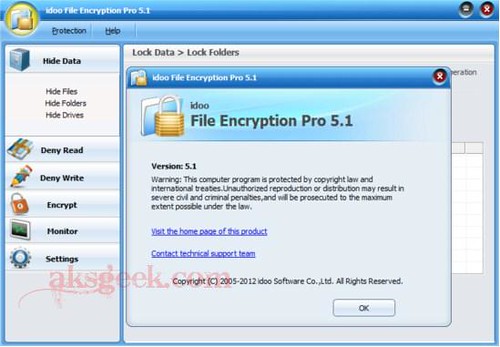
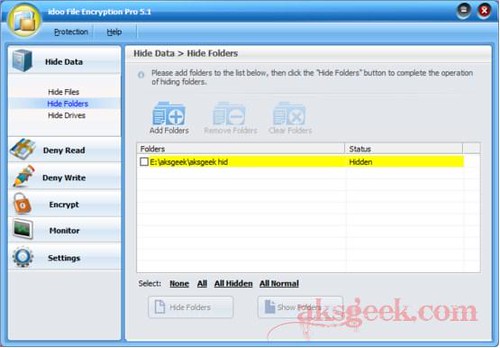
idoo File Encryption Pro 5.1_hide folders

idoo File Encryption tool is very simple and easy to use even its installation is as smooth as it can. You don’t have to look at any start up guide, just download it and install it--get down to business.

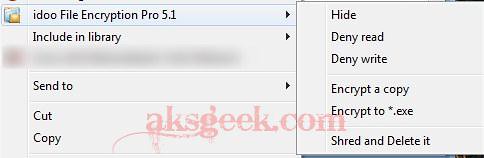
This tool gives you many option to choose – Hide Data (hide files, folder and drive), Deny Read (lock file, folder and drive), Deny Write (protect file, folder and drive), Encrypt (encrypt a folder) etc or simply you can right click on any file, folder or drive and choose your option. That’s it.

idoo File Encryption Pro 5.1_right click menu

When you use this tool, you’ll definitely love it as I’m loving it.

Idoo File Encryption Pro 5.1 License key Giveaway

idoo File Encryption Pro 5.1 is not a freeware and actually costs $59.9 but idoo software offering 10 license keys of this powerful tool for AKSGEEK readers.

How to participate in this Giveaway?

  • Simply share this giveaway on any of the social networking websites like Facebook, Twitter, Digg, etc and place the URL in the comment below (make sure you use valid email address)

or

  • You can simply like us on Facebook and comment below using you Facebook name and valid email ID. Existing facebook members can also participate.

This giveaway is open till December 31st, 2011.

Winners will be randomly selected and will receive their free license key on January 1, 2012.

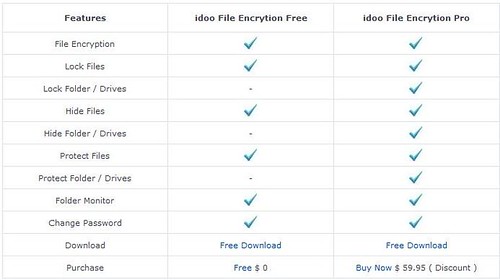
Until then, you can download and try the trial version of Idoo File Encryption Pro 5.1. It also has a free version but you cannot hide, protect and lock folders and drives.

idoo File Encryption Pro and Free comparison

Download idoo File Encryption 5.1

Pro (trial) | Freeware

#Update(1) Giveaway Closed!

#Update(2)- Winners Announced

Tuesday, 30 August 2011

Emsisoft Anti-Malware 6 Beta released

Emsisoft Ant-Malware 6 Beta

Emsisoft released the beta version of Anti-Malware 6 which has entirely new multithreaded scanning engine . According to company – during on-demand scans it is 450% (on average) faster than Anti-Malware 5.1.

What is new in Anti-Malware 6 ?

Scanner:

  • Redesigned the dual scan engine framework for optimization of multi core systems.
  • 450% speed improvement on average - with the same things being scanned.
  • Advanced caching for self optimizing scans - it gets faster with every scan.
  • New direct disk access scan mode to improve rootkit detection.
  • Changed the scan setting defaults: Rootkit scan (new) active, Cookie scan inactive..
  • Improved handling of potential false positives.
  • Desired scan actions can now be set before the scan.
  • Detection names engine postfixes changed to !E1 and !E2.
  • Changed the animation seen during active scans.
  • Simplified the user interface.
  • Added a load scan engine animation to security setup wizard.
  • Added an option to run missed scheduled scans on next program startup.

Realtime protection:

  • Optimized program loading to greatly reduce boot time.
  • Added advanced caching to significantly improve the performance of File Guard.
  • Added an internal rating system to reduce false positives in 'real world' use.
  • Added an option to reset the File Guard file extensions list to its original values.
  • Simplified the method for viewing internal and custom host blocker rules.
  • Re-organized the guard tray icon menu to provide quick access to common features.
  • Licensing:
    Changed licensing to a key-based system which replaces user accounts.
  • Changed licensing to provide a unique licence key for each computer.
  • Simplified the online licensing and relicensing dialogs.
  • Improved the notification that a license is about to expire.
  • Added a renewal rewards program - 5% cumulative reduction each renewal.
  • Added a referral rewards program to earn full version credits by referring new users.
  • Earn a 1 month credit for referring each new 1 month trial user. (no purchase).
  • Earn a 6 month credit for referring each new customer (for first purchase only, any plan).

General:

  • Simplified the setup process significantly.
  • Changed storage of settings to use 'ini' files rather than the Registry.
  • Added the ability to export and import settings by category.
  • Added security prompts when permanently deleting files, rules or logs.
  • Added improvements for more stability of online updates.
  • Added improvements to avoid potential crashes and hangs.
  • Added newsletter subscription link in news area.
  • Removed the trojan horse illustration.

Known issues:

  • The direct disk access scan feature is not available for striped RAIDs due to non-standard, 'vendor specific' systems.

Installation:

  • If you have Emsisoft Anti-Malware already installed simply enable "Use Beta updates" under "Configuration"/"Update", perform an online update and follow the instructions.
  • If you don't have Emsisoft Anti-Malware already installed, you can simply download and install it from here.

Emsisoft Anti-Malware 6.0 now asks for a license key instead of a user account. You can find this license key in the Emsisoft Customer Center (choose "Manage Licenses" on the left).

Download Emsisoft Anti-Malware 6 Beta (118 MB)

Saturday, 6 August 2011

Download Norton Internet Security 5 and Antivirus 12 Beta for Mac OS X Lion 10.7

Norton Internet Security 5 for Mac

Symantec has released the public beta version of Norton Internet Security 5  and Norton Antivirus 12 for Mac OS X Lion 10.7. Both are available for download for Free.

Norton Internet Security 5 for Mac OS X Lion 10.7

Browse, shop, and bank online with powerful protection against getting attacked or ripped off. Norton Internet Security for Mac blocks dangerous websites, and detects and eliminates online threats so you can safely enjoy your favorite Internet activities.

The new beta of Norton Internet Security for Mac includes:

  • Norton Safe Web
  • New and Improved User Interface
  • Faster Installation and Improved Performance

Download Norton Internet Security 5 Beta 

Norton Antivirus 12 for Mac OS X Lion 10.7

Norton Antivirus 12 for Mac

More and more online threats are targeting Mac and Mac users. Fortunately, Norton AntiVirus for Mac gives you the power to keep your Mac—and your files—safe from the newest threats.

  • The new beta of Norton AntiVirus for Mac includes:
  • Daily protection updates to keep you safe from new Mac threats
  • New and Improved User Interface
  • Faster Installation and Improved Performance

Download Norton Antivirus 12 Beta


Tuesday, 26 July 2011

Netswipe turns your webcam into credit card reader

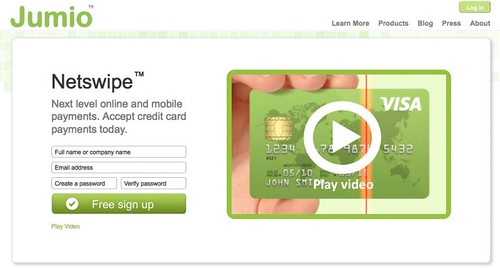
Jumio Netswipe

Jumio, today unveiled a new technology that  called Netswipe, it utilizes any webcam as a credit card reader to offer consumers a quick and easy way to make purchases online. Netswipe is the first and only solution that enables online card-present-transactions: Checking out just like at the point of sale (POS).

To complete a transaction, consumers briefly hold their credit card in front of their webcam. Through secure video streaming, the credit card details are being recognized and verified. No snapshot image is being taken, no data is stored on the computer that is used for the payment.

With the launch, Jumio has introduced three products for merchants that simplify the online payment process: Netswipe Start, Netswipe Scanning and Netswipe Processing. Additional products including a mobile solution will be released later this year.


Wednesday, 20 July 2011

Google warns users about Malware on their Computers

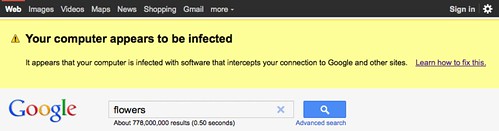
MalwareWarning

Google has identified malware while performing routine system maintenance which is redirecting traffic to their server.

"Recently, we found some unusual search traffic while performing routine maintenance on one of our data centers. After collaborating with security engineers at several companies that were sending this modified traffic, we determined that the computers exhibiting this behavior were infected with a particular strain of malicious software"

"This particular malware causes infected computers to send traffic to Google through a small number of intermediary servers called “proxies.” We hope that by taking steps to notify users whose traffic is coming through these proxies, we can help them update their antivirus software and remove the infections. "

As a result of this discovery, Google is using web search result as a malware warning system to notify users whose traffic is coming through these proxies.

Source:- Google Blog

Tuesday, 19 July 2011

Get avast! Internet Security 6 License key for FREE

avast! internet security

avast! lover’s, its time to rejoice! Now you can get avast! Internet Security 6.0 license key valid till April 18, 2012 for FREE! avast! internet security 6 provides complete antivirus, anti-spyware, antispam, and firewall protection, complemented now by new avast! SafeZone technology. It creates an isolated virtual desktop, invisible to any possible attacker, where you can do your online shopping and banking securely.

How to get avast! Internet Security 6 License key for FREE (9 months) ?

1. Visit this link

 http://www.my-avast.de/AVAST-Aktion-com-so-gehts

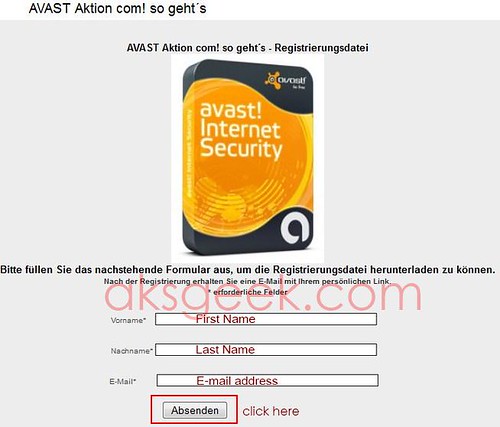
Avast Internet Security-form

2. Enter your first name (vorname), last name (nachname), email address and click on "Absenden" button.

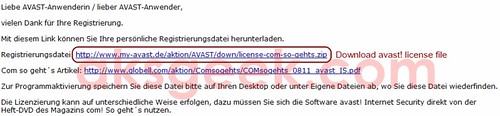
3. Now check your inbox, you’ll receive a mail from Globell Marketing containing link of avast! internet security 6 license file. Download the file and extract it.

Avast Internet Security-license

or Download license file from below link 

http://www.my-avast.de/aktion/AVAST/down/license-com-so-gehts.zip

This key is valid till April 18, 2012

4. Download and install avast! Internet Security 6.

5. During the setup use this license file and enjoy avast! internet security 6 for Free.

[Via]


Tuesday, 28 June 2011

Get Zemana AntiLogger License key for Free

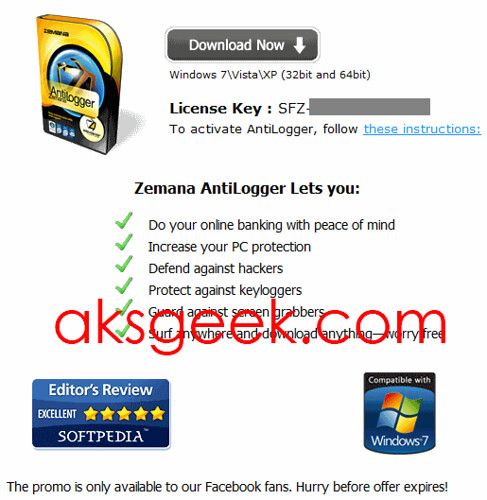
Softpedia is giving away ("Like away") Zemana AntiLogger License key which normally cost $34 for Free.

Zemana Antilogger license key

Zemana AntiLogger prevents all known forms of malwares which intend to carry out information theft. As AntiLogger uses a proactive and a unique way to detect potentially harmful applications which have not already been recognized or identified by any anti-virus programs consequently, it protects your 'Information Security' from a range of threats.

Key Features:-

  • Secure your Internet banking and financial transactions
  • Protect information in emails and Instant Messages
  • Protect keystrokes from spyware
  • Protect all screen images
  • Windows Vista, XP and 7 compatible

How to Get Zemana AntiLogger License key for Free?

1. Visit Softpedia facebook page and like it, you’ll see your license key.

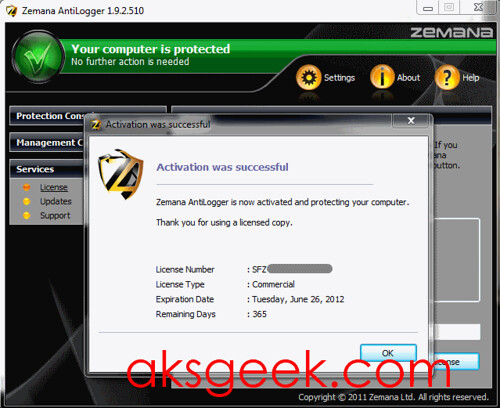
Zemana Antilogger license key

2. Download Zemana Antilogger and install it.

3. Use the above generated license key (in step 1) to activate your Zemana AntiLogger for 1 year.


Enjoy!

Wednesday, 1 June 2011

Download Free Microsoft Standalone System Sweeper Beta

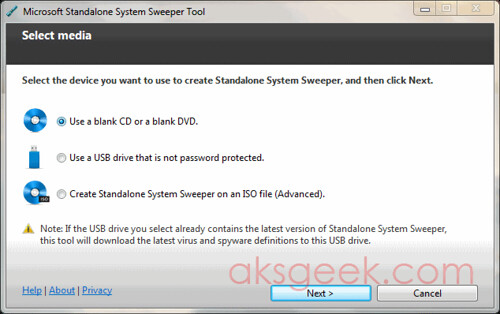
Microsoft Standalone System Sweeper

Microsoft released a free security tool called Microsoft Standalone System Sweeper. It helps you start an infected PC and perform an offline scan to help identify and remove rootkits and other advanced malware. In addition, Microsoft Standalone System Sweeper Beta can be used if you cannot install or start an antivirus solution on your PC, or if the installed solution can’t detect or remove malware on your PC.

Microsoft Standalone System Sweeper Beta is not a replacement for a full antivirus solution providing ongoing protection; it is meant to be used in situations where you cannot start your PC due to a virus or other malware infection.

The following requirements apply only to the computer infected by a virus or malware:

  • The computer infected with a virus or malware must have the same Windows operating system architecture as Microsoft Standalone System Sweeper Beta, either 32-bit or 64-bit.
  • In addition, BitLocker must be disabled to use Microsoft Standalone System Sweeper Beta.

The following requirements apply only to the computer on which you are creating the bootable media:

  • Internet connection: Required for installation and download of the latest virus and spyware definitions for Standalone System Sweeper.
  • Internet Browser: Windows Internet Explorer 6.0 or higher or Mozilla Firefox 2.0 or higher.

Download Microsoft Standalone System Sweeper Beta v1.0.856.0

32 bit version v 1.0.856.0 | 64 Bit version v 1.0.856.0

You can also checkout Microsoft Security Scanner

Saturday, 28 May 2011

Free 3 Months Kaspersky Internet Security 2011 License Key for everyone

kis 2011

Kaspersky Russia started a limited time promo on facebook giving away 3 months or 90 days license key for Kaspersky Internet Security 2011 (KIS 2011) for Free. May be, you’re very desperate to know how to get KIS 2011 license key for free, then here we go..

Get 3 Month KIS 2011 License Key for Free

1. Visit Kaspersky Russia Facebook page and like it.

Kaspersky fb page

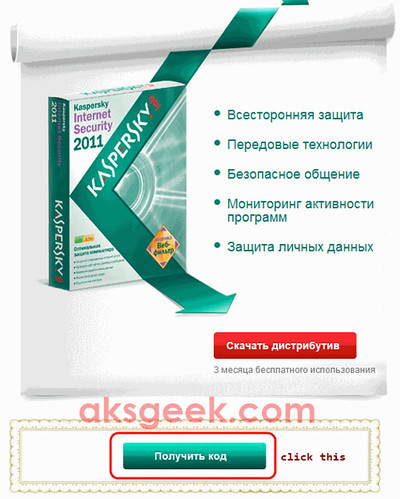
2. Click on the green button.

Kaspersky fb page1


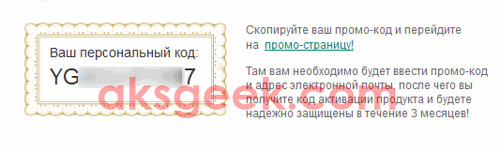
3.  Now allow access to Kaspersky Russia application and you’ll see a promo-code.

Kaspersky fb page-promocode

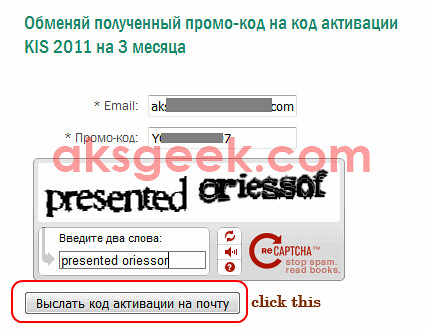
4. Visit Promo activation page. Now enter your valid email id, promo-code and submit the form.

Kaspersky enter promocode

5. You’ll see this message (shown below).

kaspersky message

6. Now, check your email from Kaspersky which contain 3 month free license key. Use it to activate your KIS 2011.

KIS 2011 License key

Enjoy!


Saturday, 7 May 2011

Download Comodo Internet Security Pro 2011 with 1 Year license for Free

Comodo Internet Security pro 2011

Comodo is now offering FREE download of their Internet Security PRO version for one year. Comodo Internet Security Pro 2011 offers real-time protection against Viruses, Trojans, Adware, Spyware and other Malware threats. Other Antivirus products depend on signature updates alone but Auto Sandbox Technology means you’re protected from even unknown threats. It adds an additional layer of prevention called Defense+. This is what is known as a HIPS or Host Intrusion Prevention System.

Key Features:-

  • Firewall
  • Defense+ Technology
  • Auto Sandbox Technology
  • Spyware Scanning
  • Cloud based Antivirus

The latest version of Comodo Internet Security Pro normally priced at $49.99 per 1-year license but as part of Comodo giveaway promotion, you can now  download the full version of Comodo Internet Security Pro (12 months) free of charge.

Download Comodo Internet Security Pro 2011


Saturday, 30 April 2011

Get Emsisoft Mamutu Free for 1 year

Mamutu

Till Sunday you’ve a chance to get Emsisoft Mamutu free for 1 year which is a product from EmsiSoft maker of a-Squared anti-malware. Mamutu monitors in real time all active programs for dangerous behavior and blocks malicious activities. It recognizes new and unknown Trojans, Backdoors, Keyloggers, Worms, Viruses, Spyware, Adware and Rootkits (Zero-Day attacks), without the need of daily signature updates. It is small but very powerful.

How to Get Mamutu Free for 1 Year

1. Visit this page and scroll down and click on "grab your copy" or you can click here.

Mamutu 02 Mamutu 03

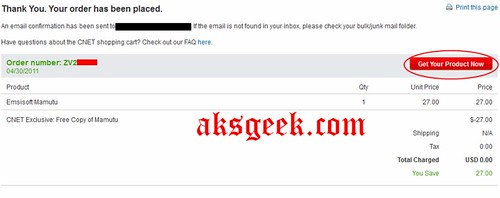
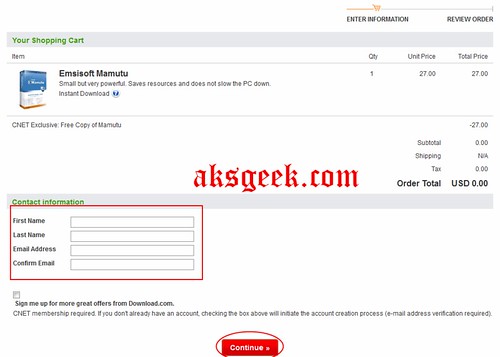
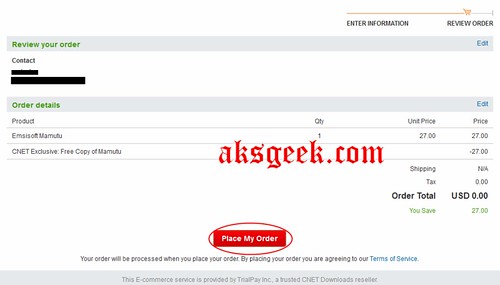
2. Enter your first name, last name  and email id then click on continue button. After that click place my order button

Mamutu 04

3. On new page you’ll see Get your product. Click it.

Mamutu 05

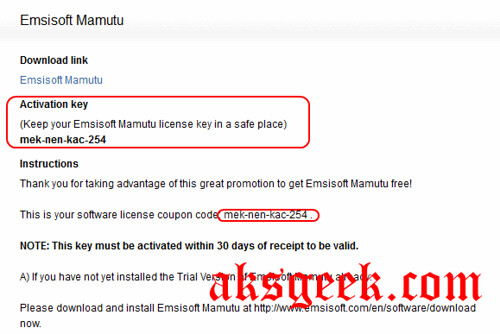
4. Now you’ll see Emsisoft Mamutu download link and activation key.

5. Download and install Mamutu.

Mamutu-login-01

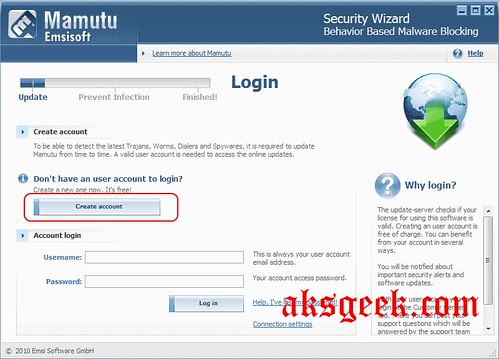
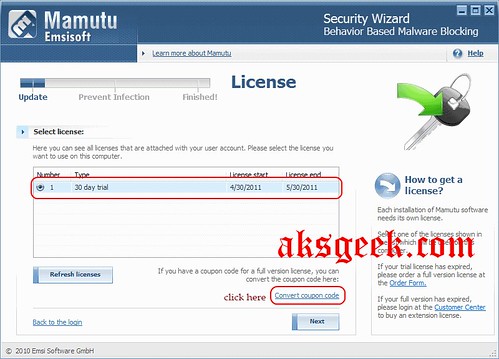
6. Enter your Mamutu account credentials, if you don’t have Mamutu account then Create a new Mamutu user account, then go to your inbox (you entered for creating Mamutu Account) and click the link to activate Mamutu user account.

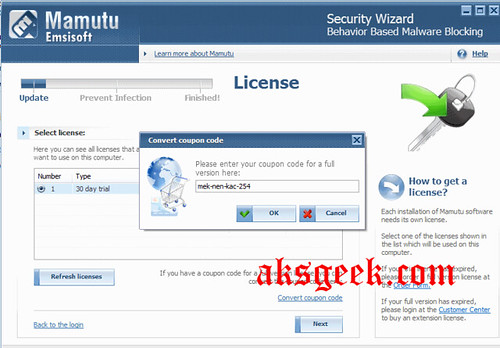
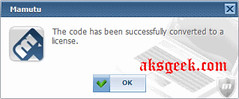
Mamutu-login-02 Mamutu-login-03 coupon code Mamutu-login-03 coupon code converted

7. Now login into your account on main screen and click on convert coupon code and enter this key "mek-nen-kac-254"

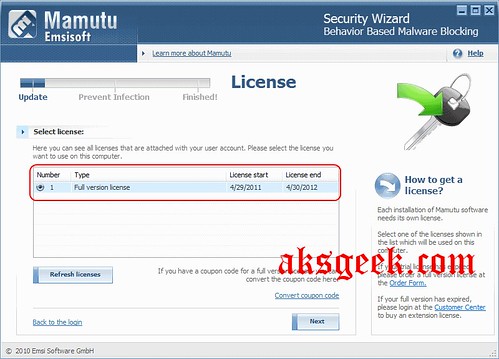
Mamutu-activated

Done! Your Mamutu now activated for 1 year.

I don’t think 1-4 steps is necessary. You can proceed from step no. 5 and I hope it will work. It would be great if anyone confirm this.

Hurry Up! this offer is available till Sunday, May 1,  11:59 PM PDT

Enjoy!