Showing posts sorted by relevance for query firefox. Sort by date Show all posts

Friday, 20 July 2012

Mozilla Firefox OS Revealed in Images

Firefox os

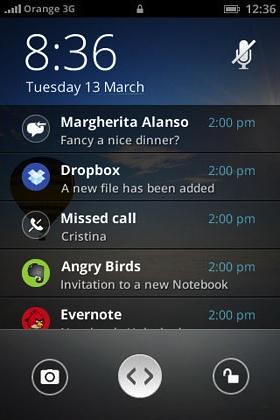
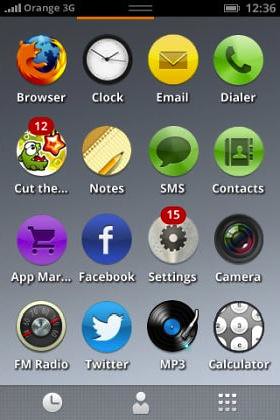
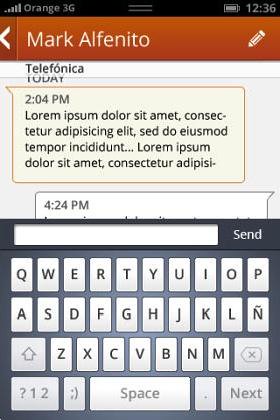
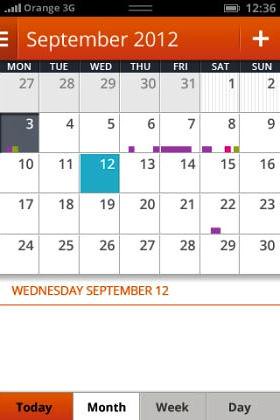
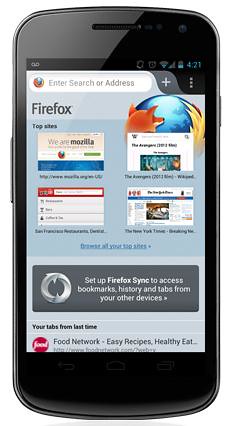
Mozilla's new Firefox OS (earlier known as Boot 2 Gecko) devices aren't set to ship until the beginning of 2013, but new screenshots of Firefox OS surfaced online shows that project coming along nicely. More Firefox OS images after the cut.

Firefox os notifications firefox os icons

The Firefox OS is intended for low end smartphones, if you look at the screenshots, you will find similarities from other mobile OS like Android, iOS or Windows Phone yet it run apps in HTML 5. The most important thing is that Firefox OS includes everything you would expect from smartphone OS like support for calls, texts, web browsing, calendar, contacts camera and run apps.

Firefox OS Messages Firefox OS photos

Firefox OS camera  firefox os calendar

Source:- TechWeekEurope

Monday, 30 May 2011

Firefox 6 Now Available for Download on Aurora Channel

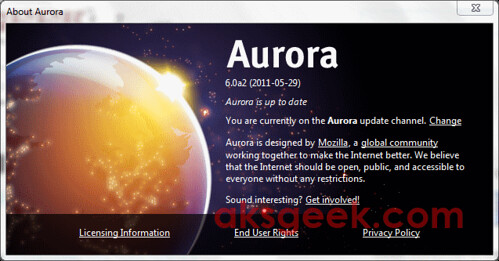
Firefox Aurora

The next version of Firefox—Firefox 6 or Firefox Aurora now available for download and testing. The new features in Firefox Aurora give users and Web developers more control over their browsing and development environments while improving overall performance.

Firefox Aurora/Firefox 6 Features:-

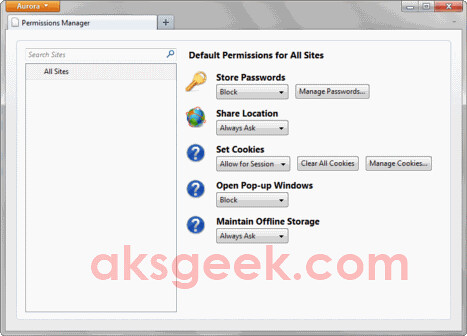
Data Management Window:-this feature provides control over the the access that specific websites have to your browsing data, including cookies, passwords and location information. To start testing this feature type “about:permissions” in the URL Bar.

aboutpermissions

Add-ons Manager with Plugin Check quickly verifies the compatibility of installed plugins directly from the Add-Ons Manager.

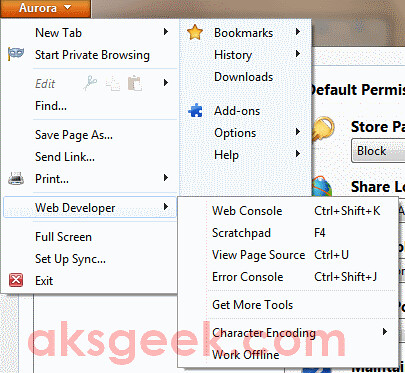
Web Developers love to check out the Scratchpad which lets you quickly build and test JavaScript snippets in the browser and Web Console adds the ability to move the console to other parts of the window or break out into a separate window.

Web Developer

Firefox Aurora has additional support for HTML5, DOM level 3, server-sent events, networking technologies and other tools that make it easier for developers build advanced Web apps.

Download Firefox Aurora/ Firefox 6


Tuesday, 27 September 2011

Mozilla Firefox 7.0 Released, now Available for Download

Firefox 7.0

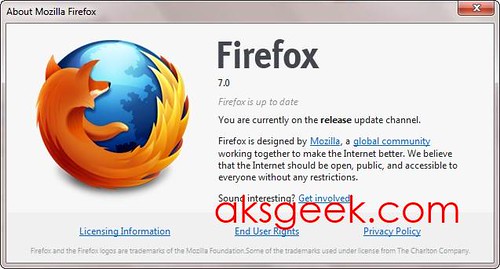
Mozilla today released the Firefox 7.0 for Windows, Mac and Linux and at the same time, the Android mobile version of Firefox was announced, which now lets users copy and paste from websites to destinations outside the browser, such as e-mails and SMS messages.

The latest Firefox 7.0 drastically improves the usage of memory (RAM) which enhanced the Web browsing experience. Users will notice Firefox is faster at opening new tabs, clicking on menu items and buttons on websites and is said to consume 20-30% less memory than former builds of Firefox browser.

Firefox adds opt in Telemetry tool that allows users to provide anonymous browser performance data in a private and secure way that they control.

Download Firefox 7.0 | Release Notes


Sunday, 19 June 2011

Firefox 5 is now Available for Download; Offical release date June 21st

Firefox 5.0

Mozilla Firefox 5 is now available for download via Mozilla’s  ftp servers. Unlike Firefox 4 which went through 12 Beta and 5 RC Build, Firefox 5 taken only 12 weeks after the last re-up. The official release of Firefox 5 is expected to be June 21st. If you want to wait.. you can. If don’t you can download it from the link below.

Download Firefox 5  Windows | Mac | Linux

Wednesday, 1 February 2012

Mozilla Firefox 10 now available for Download

Firefox 10

Stable version of Mozilla Firefox 10 is now available for Windows, Mac and Linux users. Mozilla added new features to the latest browser update which includes - the forward button is now hidden until you navigate back, most add-ons are now compatible with new versions of Firefox by default, Anti-Aliasing for WebGL is now implemented and firefox 10 now supports CSS3 3D-Transforms. For developers, Mozilla added IndexedDB APIs to more closely match the specification and new CSS Style Inspector. You can download the Firefox 10 from the link below.

Download Firefox 10

Windows | Mac | Linux | ftp


Friday, 23 September 2011

Retrieve Private Browsing History in Firefox

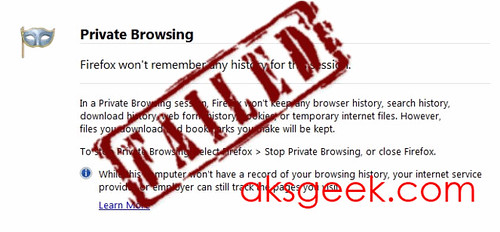
Firefox Private Browsing failed

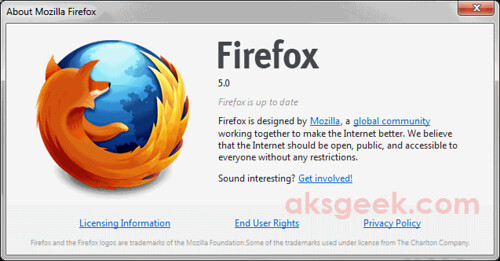
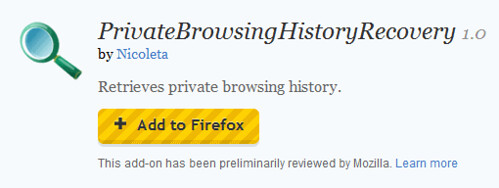
Firefox Private Browsing (ctrl+shift+p) allows you to browse the internet without saving any information about which sites and pages you’ve visited. But if you really think your browsing history is safe in private mode then it’s time to think again. Your private browsing history can be easily retrieved with a free Firefox add-on called PrivateBrowsingHistoryRecovery.

The developer behind this extension, Nicoleta says that, "The extension was implemented as a part of my dissertation project with the aim to illustrate the limitations found on private browsing mode."

How it works?


privatebrowsinghistoryrecovery

Install PrivateBrowsingHistoryRecovery and restart your browser.

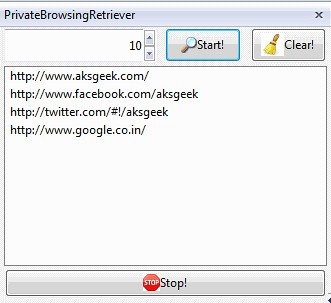
Now, you can load the sidebar using CTRL+SHIFT+U as the shortcut keyboard key, or otherwise by selecting on Firefox View-> Sidebar-> PrivateBrowsingRetriever.

privatebrowsinghistoryrecovery_01

Once the sidebar loaded completely, you can see every site you visit in your private browsing session will be recorded, proving your private browsing in Firefox is not private.

Tuesday, 29 March 2011

Firefox 4 Now Available for Android

Firefox 4 for Android

Today, Mozilla release Firefox 4 for Android. Firefox delivers an intuitive interface, unparalleled customization and support for modern Web technologies. To make mobile browsing effortless and fun, Firefox provides seamless and secure access to personal data across desktop and mobile devices, including browsing history, bookmarks, open tabs, form data and passwords.

Firefox for mobile is offered in more than 10 languages.

Android Market | Download For Maemo

Via Mozilla Blog


Monday, 2 July 2012

Mozilla's Firefox OS gains Global Support

Firefox OS

The Firefox OS for mobile devices built on Mozilla's "Boot to Gecko project" has gained support from number of carriers, including Deutsche Telekom, Etisalat, Smart, Sprint, Telecom Italia, Telefonica and Telenor.

Device manufacturers TCL Communication Technology (under the Alcatel One Touch brand) and ZTE today announced their intentions to manufacture the first devices to feature the new Firefox OS, using Snapdragon processors from Qualcomm Incorporated, the leader in smartphone platforms. The first Firefox OS powered devices are expected to launch commercially in Brazil in early 2013 through Telefonica's commercial brand, Vivo.

Thursday, 31 March 2011

Disable Location Aware Browsing in IE9, Firefox, Chrome and Opera

browsers

Currently all the browsers support location aware browsing or geo-location browsing which tells the website where you’re located. This features is useful in most of the cases to provide you the information which is relevant to you. But if you don’t want this or little conscious about your privacy then you can disable this on Internet Explorer 9 (IE9), Firefox 4 or previous version, Chrome and Opera 11.

How to Disable Geo-Location/Location Aware Browsing in

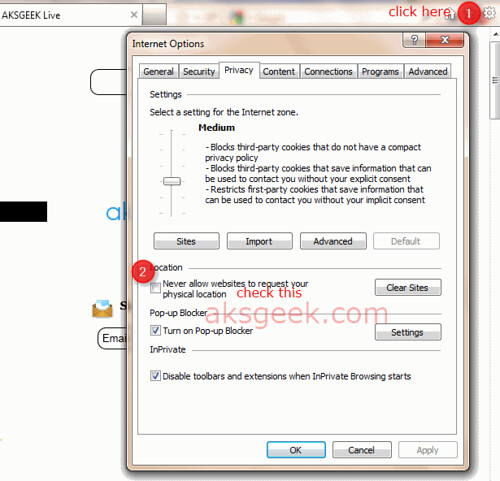
1. Internet Explorer 9 ?

IE9 Internet Options
  • Open IE9 –> go to Internet Options –> Privacy Tab.
  • Check the box “Never Allow Website to request your physical location” and click Ok

OR 

Go to Control Panel –> Network and Sharing –> Internet Options –> Privacy tab and check the box next to "Never allow web sites to request your physical location" and click OK .

2. Firefox 4 or previous version?

Firefox geoenabled
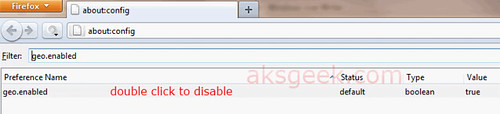
  • In Firefox address bar type about:config and hit enter.
  • Confirm the security warning and type geo.enabled in the filter field.
  • Double click on the geo.enabled to disable Location-Aware Browsing.

3.  Google Chrome 11?

Google Chrome-options
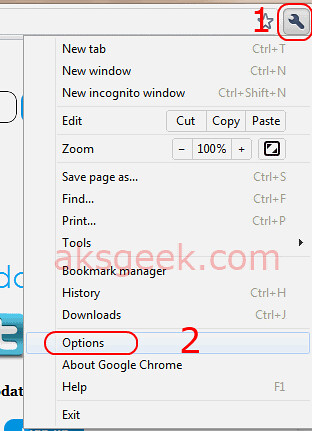
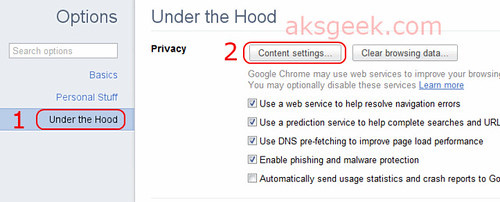
  • Click the Wrench icon and select Options. Google Chrome-under the hood
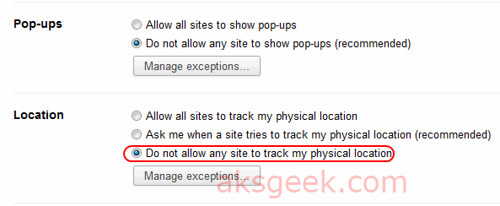
  • Now select the 'Under the hood tab' and click the button 'Content Settings' Google Chrome-Locations
  • In this window scroll down and see location –>  Now select 'Do not allow any site to locate my physical location' and  Close

(screenshots of chrome 11 beta)

4. Opera 11? 

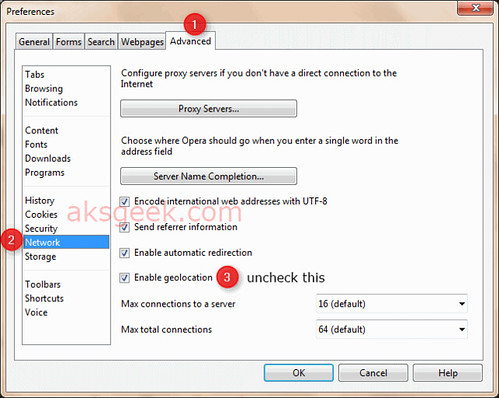
Opera Advance tab
  • Go to Menu –> Settings-> preferences or you can click ctrl+F12
  • Now go to Advanced tab –> Network and uncheck ''Enable geolocation".

That’s it!

Enjoy!


Tuesday, 20 December 2011

Download Mozilla Firefox 9

Mozilla Firefox 9

Mozilla Firefox 9 is now available for download. The latest browser update added type inference, support for querying Do Not Track status via JavaScript, two finger swipe navigation for Mac OS X Lion and support for improved HTML5, MathML and CSS.

Download Mozilla Firefox 9

Windows | Mac| Linux | Release notes | ftp


Tuesday, 26 June 2012

Friday, 14 April 2017

How to Connect to EC2 Instance using PuTTY and Terminal

1_connect to instanceIn our last post, we learned how to create EC2 instance in AWS. After successfully launching our EC2 Linux instance, today we will connect to our instance so we can install and run WordPress. There are two methods via which we can connect to our Amazon EC2 Linux instance:
  1. A standalone SSH Client
  2. A Java SSH client directly from my browser (Java required)
2_standaloneinstance
Later seems easy to connect as most of the computer have java installed, let's get started and see how to connect our EC2 instance directly from browser.
First check whether you have java installed or your browser supports java or not?
chrome not supportted
All of you have encountered with error/problem while connecting to your instance in Chrome browser as the Chrome browser version 42 and above disabled the standard way their browser supports plugin.
firefox_java not supported
Now it’s Firefox turn: While trying on Mozilla Firefox 64-bit, I got a message saying it is 64-bit and will not run java. Another failed attempt.
win10_edge_java not supported
Our Last hope?: Using Microsoft Edge browser didn’t help either as it doesn’t have support plugin. My bad!
Old is Gold!? While checking for java on internet explorer (IE11), a pop-up window appeared mentioning “the page you are viewing uses java”. Finally a positive response, now it’s time to connect our instance  by
  1. Sign-in to AWS console –> EC2 dashboard-> running instance-> select running instance –> click on Connect button
  2. Select “A Java SSH client directly from my browser (Java required)”
  3. Your username will be mentioned by default as “ec2-user”. Now enter the location of private key path (which you have downloaded in step 7 of creating ec2 instance) C:\folder\location\private_key.pem and select save key location
  4. Now click on “Launch SSH client” button .
IE not connecting


Wait! Nothing happened, the same pop-up appeared and didn’t connect. Looks like IE 11 on 64bit Windows 10 won’t work.

firefox-32bit limited support for plugin

This time around installing and running on  32-bit Firefox, I have had encountered with a different message (gladly) but – Limited support for the plugin, therefore will not run java.  There are other browser options like opera, safari which I didn’t try and leaving up to you to try it using above steps and leave a comment below whether they worked for you or not.

It’s time to go with the first option of connecting instance via standalone SSH client:

Connect to Amazon EC2 Linux Instance using PuTTY

For Windows user
  1. Download PuTTY, PuTTYgen

    PuTTYgen

  2. Open PuTTYgen –> click “Load” button –>  Windows explorer will open browse to the .pem file location (private key that you have downloaded while creating EC2 instance) and select “All Files (*.*)” otherwise you won’t be able to see your .pem –> click “open”

    PuTTYgen_2

  3. Select “save private key”. PuTTYgen warning window appear to ask you to save this key without a passphrase key? If you want to then you may choose otherwise it’s not necessary. In short press “yes” and save the .ppk file.

    PuTTY Alert


    PuTTY_hostname

  4. Now start PuTTY and enter hostname username@public_dns_name. e.g. ec2-user@52.xx.xxx.xxx48 or ec2-user@ec2-xx-xxx-xxx-xxx.us-west-1.compute.amazonaws.com
    (The username may vary depending on which AMI you have installed. You may find this information in example when you click Connect button in console) –> Connection type SSH and port 22

    PuTTY_auth


  5. In Category pane, expand connection, then expand SSH, click on Auth –> Browse your .ppk and click Open.

    PuTTY Alert-auth

  6. If you connect for the first time, PuTTY display security alert –> choose “Yes”.

    puTTY_login_success
  7. Connected!


For Mac OSX/Linux User:


EC2 Connect via Terminal
  1. Open Terminal

  2. Locate your private key (.pem) key. (In my case, private key is in download folder)

    cd ~/Downloads

  3. Your key must not be publicly viewable for SSH to work. Use this command:

    chmod 400 your_privatekey.pem

    or

    chmod 400 /location/private_key.pem

  4. Now connect to your instance using below command:

    ssh -i "your_privatekey_name.pem" ec2-user@ec2-52-xx-xxx-xxx.us-west-1.compute.amazonaws.com You will see message like this:
    The authenticity of host xxx:xxx:xx:xx:xx can't be established.
    RSA key fingerprint is xx:xx:xx:xx:x:xx:xx:xx:xx:xx:xx:xx:xx:xx
    Are you sure you want to continue connecting (yes/no)?


  5. Type Yes and enter

  6. Now you are successfully connected your EC2 Linux instance using Terminal.
On next, we will see how to install WordPress in AWS.

Wednesday, 21 December 2011

Google and Mozilla Sign new agreement for Firefox Search

Mozilla firefox logo

Mozilla today announced that they had signed significant and mutually beneficial revenue agreement with Google that will last for at least three additional years.

“Under this multi-year agreement, Google Search will continue to be the default search provider for hundreds of millions of Firefox users around the world,” said Gary Kovacs, CEO, Mozilla.

“Mozilla has been a valuable partner to Google over the years and we look forward to continuing this great partnership in the years to come,” said Alan Eustace, Senior Vice President of Search, Google.

This deal is crucial to Mozilla, who starting to look bit shaky as Google’s Chrome overtook Firefox, rumor had it that the organization's revenue sharing deal with the search giant had expired and may not be renewed. Well all those rumors will RIP for at least 3 years.

Source:- Mozilla


Sunday, 17 June 2012

Free Video Downloader - Wondershare vDownloader

wondershare vdownloader

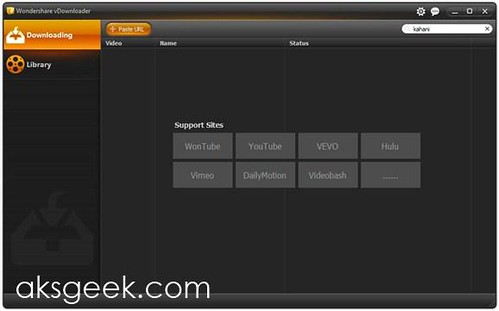
There are lots of free/paid video downloader softwares all over the internet and even free online services but what makes us share Wondershare vDownloader with you is - easy to use, simple interface, and it's a Freeware.
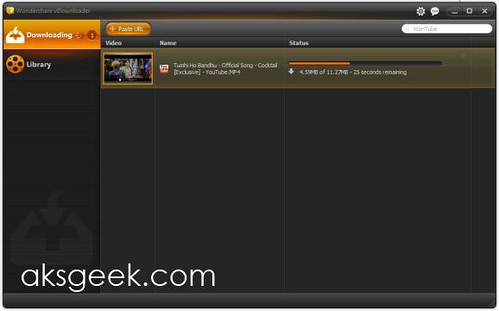
downloading vdownloader

Wondershare vDownloader is a very handy application allows you to download videos from websites such as Hulu, DailyMotion, YouTube, Vevo and more. There are two ways of working with this software. Firstly, there are browser plugins available for Internet Explorer, Firefox and Chrome, which gives you a dedicated download button. The second option is to simply copy the URL of a video you want to download, vDownloader monitor the clipboard when it's running, so as soon as you copied the link, it will start downloading in seconds. wondershare vdownloader_library
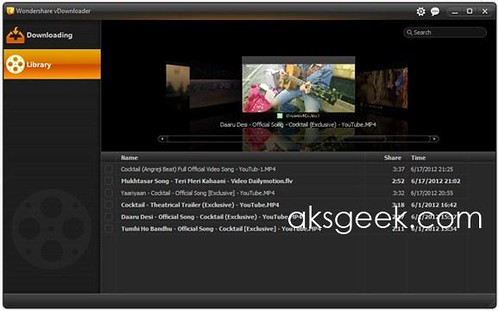
The interface contains two tabs - Downloading, which shows the list of video you're downloading (allows maximum 20 downloads simultaneously, default is 5) and Library contains all your downloaded files and can be played in its integrated player. You can even search videos on WonTube through Wondershare vDownloader interface, which search videos around the web. But we will love to see the other search options in the list like YouTube, DailyMotion and others. wondershare vdownloader-preferences
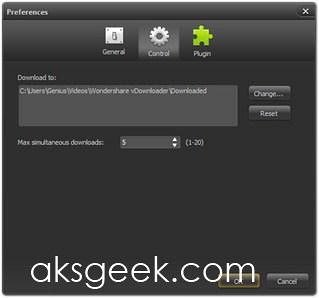
What we like about Wondershare vDownloader?

  • Easy to use
  • Simple interface
  • No ads and other unwanted software
  • Integrated player to play downloaded files vdownloader
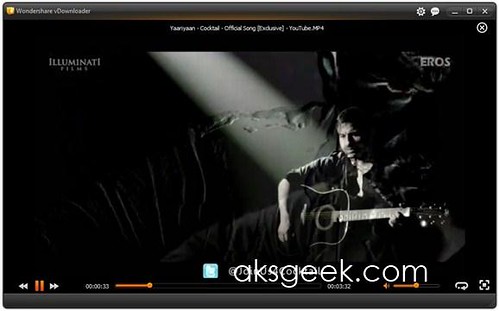
  • Quickly starts downloading
  • Extension support for IE, Firefox and Chrome
  • Supports a good list of sites

What’s missing and expected?

  • Doesn’t allow us to choose a file name up front.
  • Include only WonTube and missing other video sharing sites in search options like YouTube, DailyMotion and more.
  • Search results doesn’t display in interface itself.
  • Normally save files in MP4 or FLV format, doesn’t allow us to choose different format or convert file in other format.
  • No help file (once again not that important but it's nice to have manual for those who are very cautious)

Wondershare vDownloader is free, simple, easy to use software, which completes your basic need of downloading videos online and it's a must have for any user who's looking Free Video Downloader.

Download Wondershare vDownloader (14 MB)

Wednesday, 23 March 2011

Chrome 11 Beta Released with Text to Speech Capabilities

Chrome 11 Beta

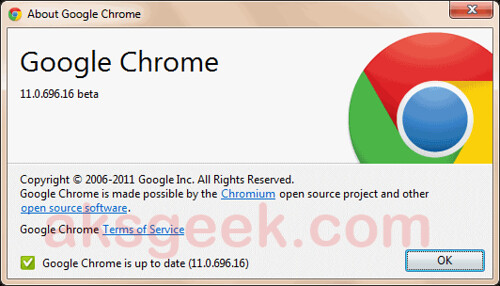
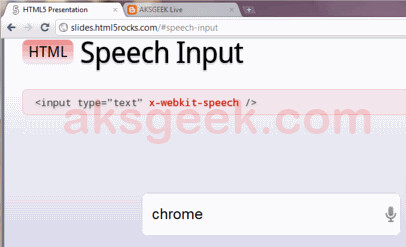
Its not just Firefox or Opera which get updated, Google pushed Chrome 11 into beta added with new features like speech-to-text capabilities, support for GPU-accelerated 3D CSS, which will let developers apply all sorts of 3D effects to websites.

Chrome 11 Beta-speech input

If you’re running Chrome 11, you can try it out here. It works very well. You speak, and the browser is able to transcribe what you say. No Flash, no plug-in and yet Awesome!

Download Chrome 11 Beta

Via Chrome Blog